
Yes—AI appointment scheduling works with recurring appointments when the connected scheduling system supports repeating bookings and the assistant has permission to create and manage them. Booking one appointment does not prove that the same setup can reserve a series, change one occurrence, or cancel future visits correctly. Before you commit, test the entire series and its exceptions, not just the first booking.
- Does AI appointment scheduling work with recurring appointments? Yes, when the connected system supports recurring bookings and series changes.
- Test future availability, single-visit changes, cancellations, and reminders before accepting recurring bookings.
- AL IntelliFlow fits service businesses seeking lead capture, follow-up, and appointment booking; verify recurring scheduling support separately.
Does AI appointment scheduling work with recurring appointments?
Yes, but recurring scheduling requires more than repeating a customer's request. Your assistant must translate that request into the right calendar action, preserve the relationship between appointments, and explain exceptions accurately.
Start with how AI appointment scheduling works with your calendar. Calendar access and permission to edit recurring bookings are separate questions.
Use this comparison when evaluating a scheduling setup in 2026. These are workflow choices to verify, not capabilities every assistant includes.
| Scheduling approach | Best for | Advantage | Limitation to check |
|---|---|---|---|
| Recurring series | Customers keeping a predictable schedule | Maintains a repeating appointment pattern | Single-occurrence and future-series edits need separate handling |
| Separate advance bookings | Customers needing different dates or times | Each visit can have its own details | Changes require identifying the affected bookings individually |
| Repeat booking invitation | Customers who prefer choosing each next visit | Leaves the next appointment under customer control | Does not reserve future appointments |
For a predictable schedule, prefer a recurring series only after testing its exception handling. Choose separate bookings when visits genuinely differ. Use repeat booking invitations when customers do not want a standing commitment.
Why this matters
A customer asking for the same appointment every week is asking you to reserve future capacity, not merely remember a preference. If your assistant confirms a series but creates only the first visit, the customer and your team leave the conversation with different expectations.
Recurring appointments also turn small mistakes into repeated problems. An incorrect location, staff assignment, or duration can carry into future bookings unless someone checks the series before confirming it.
Your 2026 evaluation should therefore focus on what happens after the first successful booking. The decisive test is whether the system changes the intended appointments without changing the rest.
Recurring series: best for a stable appointment pattern
A recurring series fits a customer who wants the same service on a predictable schedule. Think of a weekly tutoring session or a regular business coaching appointment; these are examples of scheduling needs, not claims about a particular platform.
Before creating a series, establish the service, duration, start date, repeat pattern, time zone, and stopping rule. Also establish whether the customer needs the same staff member or location each time.
The advantage is consistency. The limitation is that a repeating pattern does not eliminate exceptions: holidays, staff absences, and customer changes still need explicit handling.
Ask your provider to demonstrate both an ordinary occurrence and an exception. A demonstration that only creates the series leaves the harder operational questions unanswered.
Separate advance bookings: best for changing appointment details
Separate advance bookings fit customers whose visits differ in timing, duration, or assigned staff. Each appointment stands on its own instead of relying on a shared repeating rule.
This approach gives you control over individual visits. Its drawback appears when the customer asks to move or cancel everything: the system must identify the relevant bookings rather than assume they form a series.
Make the distinction clear in the confirmation. Several appointments booked ahead are not necessarily a recurring series, even if they happen to fall on the same weekday.
If your assistant cannot manage a series reliably, use a documented staff-reviewed booking process rather than presenting separate bookings as equivalent functionality.
Repeat booking invitations: best for flexible customers
A repeat booking invitation asks the customer to choose another appointment instead of reserving a standing slot. It fits customers who want ongoing service without committing to a fixed schedule.
The benefit is flexibility. The trade-off is equally clear: a follow-up message is not a reservation, and the customer's preferred time remains unconfirmed until a booking succeeds.
Do not describe this workflow as recurring appointment scheduling. Describe it as follow-up that encourages another booking, and tell the customer whether any future appointment actually exists.
For a 2026 software decision, this distinction prevents a common evaluation mistake: treating automated outreach as proof of recurring calendar management.
Why recurring appointment support varies
Recurring scheduling depends on the whole booking workflow, not just the assistant's ability to understand a sentence. Verify these factors before choosing how much responsibility to delegate:
- Calendar support: Confirm that the underlying scheduling system can create the recurring pattern your business needs.
- Editing permissions: Verify permission to create, change, and cancel bookings, including the intended scope of a series edit.
- Availability rules: Check how the workflow handles staff schedules, blocked time, appointment duration, and conflicts on future dates.
- Customer instructions: Require clarification when a request does not specify whether a change applies once or repeatedly.
- Confirmation and follow-up: Check that customer messages describe the bookings actually saved, including exceptions and cancellations.
A feature checklist is not enough. Ask the provider to show the resulting calendar entries and customer messages for the same request.
How should you test recurring scheduling before launch?
Use a controlled test calendar and fictional customer details. The following examples are test instructions, not product specifications or claims about measured performance.
1. Capture the request
Start with a clear example: a 30-minute appointment on the same weekday for 3 consecutive weeks. State the time zone and the desired staff member, if staff selection matters to your business.
Then introduce an incomplete request, such as asking for the usual time every week. The assistant should clarify missing details rather than invent a schedule, duration, or stopping point.
2. Check availability
Block the requested time on a future date before submitting the request. Inspect whether the assistant detects the conflict and explains which appointment cannot be booked.
Decide your business rule in advance: offer an alternative, skip the conflicting visit with permission, or send the request to staff. Do not let the assistant silently choose a different arrangement.
3. Confirm the series
Inspect every expected calendar entry. Check the date, time, duration, staff assignment, location, and customer details against the original request.
Read the customer confirmation too. It should distinguish a fully confirmed series from a partially completed request, and it should not imply that an unresolved appointment is reserved.
4. Change one visit
Ask to move 1 appointment while keeping the remaining visits unchanged. Compare the calendar before and after the change, including the original time slot.
Next, request a change to future visits. A successful result must match the customer's intended scope; moving the entire series when the customer requested one exception is a failed test.
5. Stop future bookings
Cancel the remaining appointments and inspect the result. Check that past appointments remain intact and that future customer communications match the cancellation.
Repeat the request once to check how the workflow handles an already completed action. The assistant should report the current state accurately rather than claim that another set of bookings was removed.
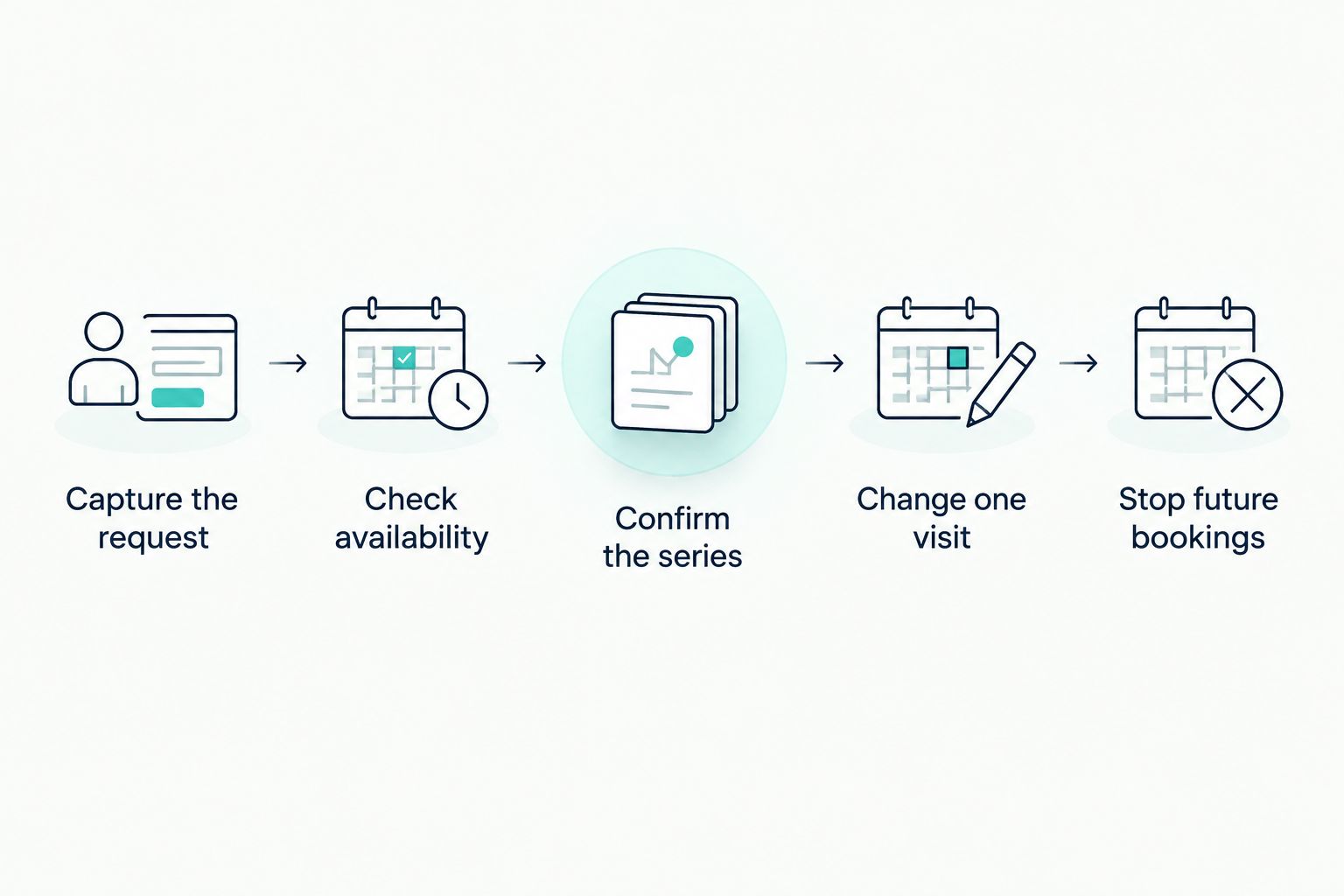
Keep a short record of each request, the expected outcome, the actual calendar change, and the customer confirmation. Use the same test sequence when comparing providers in 2026 so that a polished demonstration does not substitute for working booking behavior.
Can the assistant move just one recurring appointment?
One appointment must be editable without changing the remaining series if you want to offer single-visit exceptions. Whether your setup supports that action depends on the calendar connection and the assistant's permitted actions.
Require a clarification whenever the customer says something ambiguous, such as moving appointments to Friday. The assistant needs to establish whether the request means the next visit, all future visits, or the entire series before making changes.
What happens when a future appointment conflicts?
A future conflict needs an explicit resolution before that appointment is confirmed. Test whether your setup checks the requested dates and reports exceptions rather than treating the first available date as proof that the whole series works.
If the business requires the same staff member each time, another employee's availability does not satisfy that request. Offer a clear alternative or ask a person to resolve it.
Will reminders follow a rescheduled recurring appointment?
Reminders must reflect the saved appointment, including any rescheduled occurrence. Verify the reminder workflow separately; successful calendar editing does not establish that scheduled messages have also changed.
Your test should check both sides: the customer receives the correct new details, and the old appointment does not continue generating misleading messages. Ask the provider to demonstrate that result rather than accepting a general statement about reminders.
Where AL IntelliFlow fits—and what to verify
AL IntelliFlow is best for service businesses seeking lead capture, follow-up, and appointment booking support. Those are confirmed uses; recurring-series editing, specific calendar integrations, and reminder behavior need separate verification for your intended setup.
AL IntelliFlow presents its business growth assistant through three roles: Strategist, Connector, and Operator. Use those roles to structure your evaluation around planning, customer engagement, and routine operational workflows—not as evidence that a particular recurring-booking action is supported.
The practical benefit of AL IntelliFlow appointment booking and lead management is addressing the work around inquiries and follow-up. The boundary matters: those capabilities alone do not establish recurring-series management or a phone-answering AI receptionist, which requires separate integrations or configuration.
During a 2026 evaluation, bring your actual booking rules and run the test sequence above. Make recurring scheduling a purchase requirement only if your business needs it, and ask for a demonstration of that exact requirement.
FAQ
Does AI appointment scheduling work with recurring appointments?
Yes, when the connected scheduling system supports recurring bookings and the assistant can perform the required actions. Verify series creation, individual changes, future changes, and cancellations before using it with customers.
Can an AI scheduler book the same appointment every week?
An AI scheduler can book a weekly series when its connected system supports that pattern and grants the necessary permissions. Confirm the duration, time zone, staff assignment, and stopping rule before saving it.
Can I reschedule one appointment without changing the whole series?
You can reschedule one occurrence only if the scheduling setup supports single-occurrence edits. Test that the remaining appointments stay unchanged and that the customer receives the correct confirmation.
Are recurring appointments the same as automatic follow-up?
No. Recurring appointments reserve future visits, while automatic follow-up sends messages or prompts another action; a follow-up invitation does not itself confirm a booking.
Can an AI scheduler cancel all future appointments?
An AI scheduler can cancel future appointments only when its connected system and permissions support that action. Confirm which visits will be removed and verify that past records remain intact.
Does appointment scheduling mean an AI assistant can answer phone calls?
No. Appointment scheduling does not establish phone-answering capability; an AI receptionist requires its own supported configuration or integrations.
What should I test before allowing customers to book recurring appointments?
Test the initial series, a future conflict, a single-visit change, a future-series change, and cancellation. Inspect both calendar records and customer messages for each action.
One last thing
A correct refusal is better than an incorrect confirmation. Give your test assistant a request it cannot complete under your booking rules, then check whether it explains the problem and hands the decision to the right person.
Keep final approval with your team until the workflow consistently handles your test cases. A system that knows when to stop is more useful than one that confidently promises appointments your calendar does not contain.
Related guides
- Can an AI receptionist reschedule appointments on its own?
- Can AI appointment scheduling handle cancellations automatically?
- How does an AI receptionist actually work?
Explore AL IntelliFlow and start its free 14-day trial. Bring your recurring-booking requirements and verify the workflow your business needs before relying on it.