
An AI receptionist can respond automatically when a connected website lead triggers its workflow, but there is no universal response time in seconds for every setup in 2026. A submission acknowledgment is not the same as a delivered reply, a useful answer, or a confirmed appointment; measure each separately before trusting a speed claim.
- How quickly can an AI receptionist respond to a website lead? Measure submission-to-delivery time, not just processing speed.
- Website lead capture, automated follow-up, and appointment booking are separate stages; test the complete path.
- AL IntelliFlow supports service-business lead management; receptionist capabilities require separate confirmation of integrations and configuration.
Why this matters
Your customer experiences the wait from submitting an inquiry to receiving something useful. Your software dashboard might measure only the time spent processing a request after it arrives. Those are different clocks.
For a service business, a fast reply should acknowledge the actual request and explain the next step. A generic receipt does not tell someone whether you serve their area or how to arrange a visit.
Use the website lead to instant text reply workflow to map that journey. For your 2026 evaluation, prioritize a complete, repeatable handoff over an isolated demonstration of fast message generation.
How quickly can an AI receptionist respond to a new website lead?
The useful answer is the elapsed time from a successful website submission to a customer-visible response. That time depends on how the website passes the lead, how the workflow starts, and how the response reaches the customer.
Start by separating the events below. Each proves something different, and none should silently substitute for another in a performance report.
| Event | What it proves | What it does not prove |
|---|---|---|
| Submission accepted | The website received the inquiry | The lead reached the follow-up system |
| Workflow started | The follow-up process received a trigger | A message reached the customer |
| Message generated | A response was prepared | The channel accepted or delivered it |
| Response delivered | The destination received the response, where delivery reporting supports that status | The person read or understood it |
| Useful answer received | The response addressed the inquiry or established a clear next step | An appointment was confirmed |
Ask a provider which event starts its timer and which event stops it. A claim about message generation cannot establish customer-visible response speed.
If a channel does not expose delivery status, report the status you can verify. Labeling a sent message as delivered makes the result look better without proving the customer received anything.
Which response channel fits your website lead?
A website chat conversation and a submitted contact form take different paths. Compare them by the customer's next action, not by treating every automated message as an equivalent response.
The following are general workflow options, not a list of confirmed features in any particular platform. Confirm support before choosing a channel.
| Option | Best for | Practical advantage | Limitation to test |
|---|---|---|---|
| Website chat | Visitors who remain on the page | Keeps the exchange in the current browsing session | The visitor can leave before the conversation finishes |
| Form-to-text follow-up | Inquiries with a usable mobile number and appropriate messaging permission | Moves the exchange beyond the website session | Incorrect details or delivery failures interrupt contact |
| Form-to-email follow-up | Requests needing a written explanation | Gives the customer a message to refer back to | Delivery does not establish that the customer has read it |
| Form-to-phone follow-up | Requests better handled through conversation | Allows back-and-forth discussion when the person answers | Call initiation does not establish a successful conversation |
Choose the channel your customer can actually use. A quickly generated text is not helpful when the person supplied only an email address.
Also distinguish an automated phone call from a lead-management workflow. Capturing a form, sending follow-up, and booking an appointment do not by themselves establish that a platform answers incoming calls or conducts voice conversations.
Why AI receptionist response time varies
The path between a website inquiry and a customer reply contains several potential waiting points. Investigate these factors rather than assuming the conversational system accounts for the entire delay.
- Lead transfer: A direct event notification starts a workflow differently from a connection that checks periodically for new records. Verify which method your setup uses.
- Workflow rules: An immediate acknowledgment and a reply requiring staff approval have different release conditions. Identify intentional waiting steps.
- Answer preparation: Retrieving service information or checking scheduling details adds work before a substantive answer is ready. Decide what belongs in the first response.
- Channel delivery: Preparing a message and getting it through a messaging or email service are separate events. Keep their timestamps separate.
- Exceptions and handoffs: Missing contact details, repeated submissions, and requests outside the approved scope need defined handling. Test these paths instead of measuring only the simplest inquiry.
For a 2026 purchasing decision, ask the provider to demonstrate the workflow you intend to use. A website chat demonstration does not establish the timing of a form-to-text process.
How do you measure the complete response path?
Use the same starting event across every test: the moment the website successfully accepts the submission. Record the customer-visible outcome separately from internal processing events so you can locate a delay instead of guessing where it occurred.
Capture
Submit an inquiry through your actual website, not only through a provider's demonstration screen. Record when the form accepts it and check that the required details arrive intact.
Look for missing service selections, truncated notes, and contact fields mapped to the wrong destination. Fast transfer is not a successful result when the information needed to reply is lost.
Trigger
Record when the receiving workflow begins. Compare that event with the website submission timestamp to isolate the transfer stage.
Use consistent clocks and time zones. Otherwise, a timestamp mismatch can look like a delay or make a workflow appear to respond before the inquiry arrived.
Deliver
Record when the response is sent and, where supported, when delivery is reported. Inspect the destination account or device rather than relying solely on the automation dashboard.
A sent status is useful evidence, but it answers a narrower question than delivery. Keep the original event labels in your test notes.
Resolve
Read the response as the customer would. Check whether it recognizes the request, asks a necessary question, or provides a valid next step.
For booking workflows, continue until you can verify the appointment outcome. A proposed time and a recorded appointment are different results.
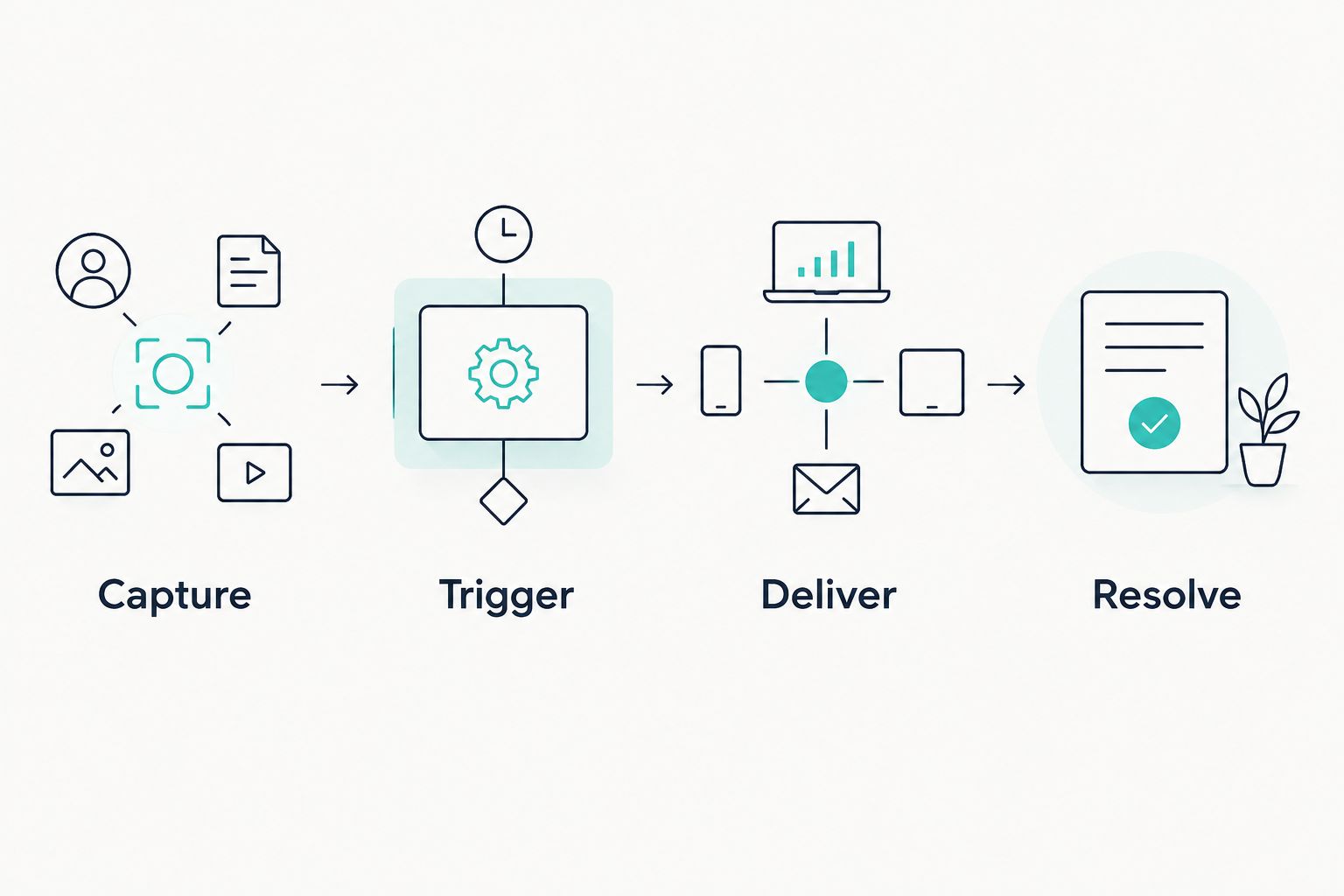
Repeat this process across the paths you plan to publish. For your 2026 baseline, retain the slow results and failed deliveries alongside successful tests; excluding them hides the cases your team needs to fix.
What should the first response actually say?
Send a useful acknowledgment without pretending that unfinished work is complete. The first reply should establish that the inquiry was received, reflect the requested service, and explain what happens next.
Imagine a homeowner asking about a landscaping visit. A useful response identifies the request and asks for the service location if it is needed to determine coverage. It should not claim that a visit is booked before scheduling is confirmed.
Keep the initial exchange focused:
- Acknowledge the service or question the person submitted.
- Ask for the missing detail needed to continue.
- Explain whether the next step is scheduling, a written response, or staff follow-up.
- State when a person must take over rather than inventing an answer.
Avoid making the customer repeat information already captured by the form. Check the field mapping before adding more questions to the conversation.
The reply also needs an honest boundary. If the system cannot verify an answer, a clear handoff is more useful than a confident but unsupported promise about service scope or appointment availability.
How do you test a setup before relying on it?
Test the workflow as an ordinary customer would encounter it. A clean demonstration proves less than a successful submission through your published form with your actual routing rules.
Start with a complete inquiry
Submit valid contact details and a clear service request. Verify that the response arrives through the intended channel and uses the information supplied.
Continue the exchange. The workflow needs to handle the next customer action, not simply produce an opening message.
Test missing information
Leave out a nonrequired detail needed for qualification, such as the service location. Check that the response asks for that detail instead of assuming an answer.
Also inspect what happens when a contact detail is unusable. Your team needs a visible exception rather than an inquiry that disappears into a failed workflow.
Test repeated submissions
Submit the same inquiry again. Inspect whether the process creates confusing parallel conversations or duplicate booking attempts.
Decide how your business wants repetitions handled, then verify that behavior. Do not assume a platform's default matches your operating process.
Test staff handoff
Ask something outside the approved information. Confirm that the customer receives an honest explanation and that the responsible person receives the inquiry with its context.
The handoff should identify ownership. A notification without a responsible recipient leaves the next action unresolved.
Test outside business hours
Submit an inquiry when staff are unavailable. Check the response against your actual operating rules, especially any wording about callbacks or scheduling.
For your 2026 launch checklist, document the expected behavior for each scenario and compare it with what occurred. Fix misleading replies before optimizing the timing of an otherwise broken process.
Where does AL IntelliFlow fit?
AL IntelliFlow is best for service businesses seeking lead capture, qualification, automated follow-up, and appointment booking. Its business growth platform is organized around three roles: Strategist, Connector, and Operator, spanning planning, customer engagement, and operational workflows.
AL IntelliFlow's lead management focus fits the problem of inquiries slipping between capture, follow-up, and scheduling. The evaluation boundary is equally important: those capabilities do not establish a particular response time or built-in voice receptionist functionality.
When assessing AL IntelliFlow lead management for your website, confirm the connection, communication channel, trigger behavior, and staff handoff your workflow requires. Treat receptionist capabilities as a separate configuration and integration question, not an automatic consequence of having follow-up software.
Does an instant acknowledgment count as a response?
An instant acknowledgment counts as receipt confirmation, not necessarily as an answer. Report it separately from a reply that addresses the service request or moves the customer toward a valid next step.
This distinction keeps a fast confirmation message from disguising a slow follow-up process.
Can an AI receptionist respond after business hours?
After-hours response depends on the configured workflow, its connected services, and its operating rules. Test that behavior directly rather than treating automation as proof of continuous coverage.
Separate an acknowledgment from a promise that staff will act immediately. The customer should understand what happens while your business is closed.
Does a faster response guarantee an appointment?
A faster response does not guarantee an appointment. Contact accuracy, service fit, customer intent, and a functioning scheduling process still matter.
Measure delivery, useful conversation, and booking as separate outcomes. That tells you whether the next fix belongs in the connection, the conversation, or the scheduling handoff.
FAQ
How quickly can an AI receptionist respond to a website lead?
There is no universal response time for every website lead workflow. Measure from successful submission to a customer-visible response, including transfer and delivery rather than only message generation.
Is a website chat reply faster than a text follow-up?
A website chat reply and a text follow-up use different delivery paths, so compare them in your actual setup. Keep the starting event consistent and distinguish sending from delivery.
What should I ask a provider about response speed?
Ask which event starts the timer, which event stops it, and whether the result includes delivery. Request a demonstration using your intended website form and response channel.
Can lead follow-up software also answer business phone calls?
Lead follow-up features do not by themselves establish phone-answering capability. Confirm voice functionality, required integrations, and configuration separately.
How do I know whether the first reply is useful?
A useful first reply acknowledges the actual request and gives a clear next step. It should ask for necessary missing information without claiming that an unconfirmed appointment is booked.
What should happen if an automated reply fails?
A failed reply should create a visible exception with a responsible staff owner. Verify the failure path during testing instead of assuming that the initial send attempt completed contact.
Does AL IntelliFlow have a free trial?
AL IntelliFlow offers a free 14-day trial. Use the evaluation to confirm how its lead capture, follow-up, and appointment booking fit your business workflow.
One last thing
The most useful speed test includes a reply from the customer. Submit an inquiry, receive the opening response, and then ask a relevant follow-up question. Continue until the workflow reaches a real next step or a clearly owned staff handoff.
That test reveals whether you have automated a conversation or only automated a receipt. Keep both results in view when deciding whether the setup is ready for your customers.
Related guides
- Can an AI receptionist qualify leads before they reach a human?
- How does AI appointment scheduling work with my calendar?
- Does an AI receptionist replace a human front desk employee?
Explore AL IntelliFlow and start its free 14-day trial to evaluate lead capture, follow-up, and appointment booking against your own business workflow.