
AI appointment scheduling works with your calendar by checking connected availability, applying your booking rules, offering suitable times, and creating an appointment after the customer confirms. The calendar connection determines which schedules it can read and update; conversational booking does not automatically include phone answering or every calendar provider. Your calendar supplies availability, while your booking rules decide which open times customers can actually book.
- How does AI appointment scheduling work with my calendar? It checks availability, applies booking rules, and records confirmed appointments.
- Calendar sync and conversational booking are separate capabilities; verify both before connecting your schedule.
- AL IntelliFlow appointment booking fits service businesses that also need lead capture, qualification, and follow-up.
- Test conflicts, rescheduling, cancellations, and time zones before opening automated booking to customers.
How does AI appointment scheduling work with my calendar?
AI appointment scheduling combines a conversation with a calendar connection. The conversation identifies what the customer needs; the connection checks whether an acceptable appointment slot exists. Your rules sit between those actions and prevent an empty calendar from becoming an unrestricted booking page.
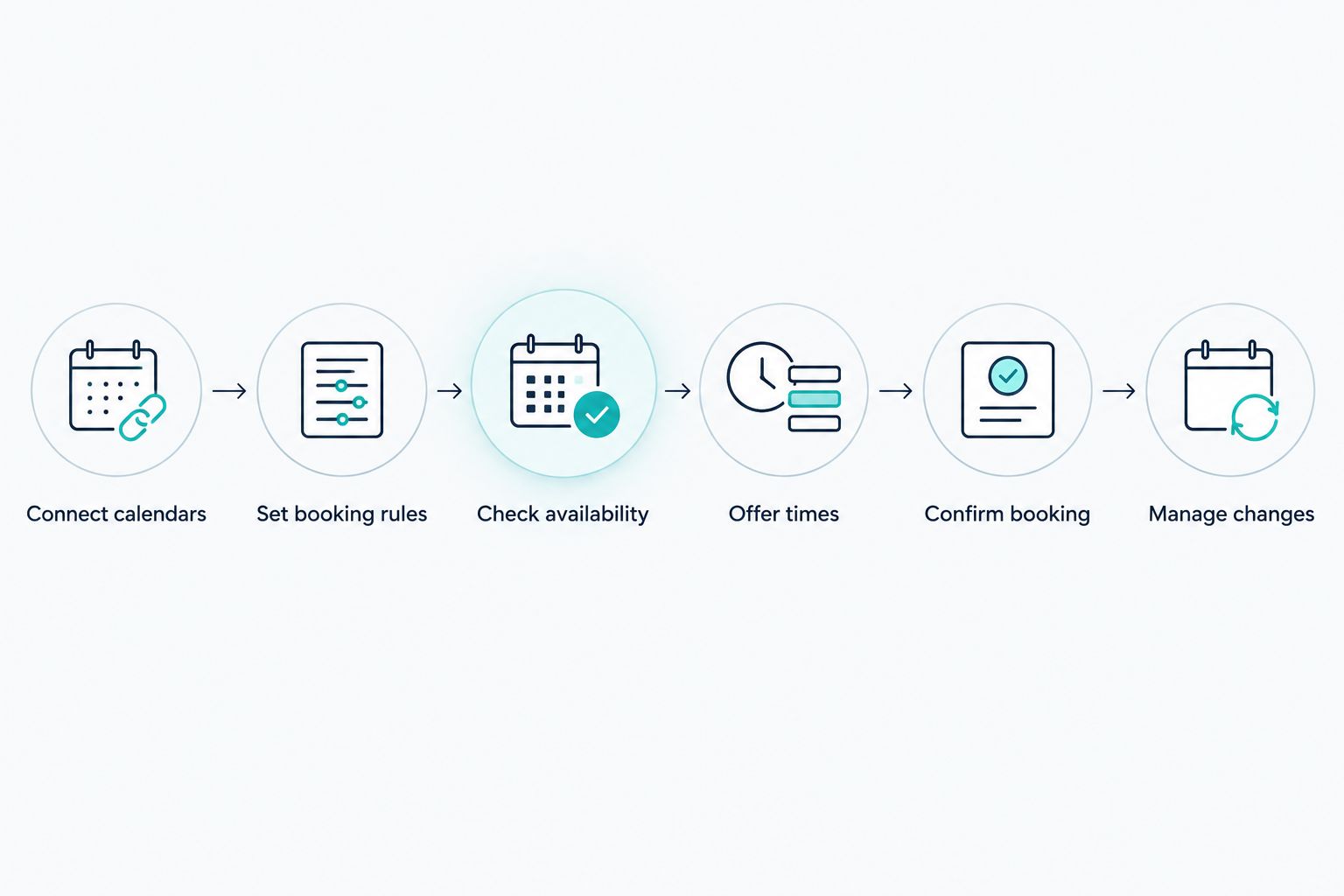
For your 2026 setup, separate the process into the following steps. These describe how calendar-connected scheduling works, not a promise that every platform supports every action.
- Connect calendars. Authorize the scheduling system to access the appropriate calendar account. Confirm which permissions it requests and which calendars it will use.
- Set booking rules. Define working hours, appointment types, meeting lengths, preparation time, and restrictions on advance booking.
- Check availability. The scheduler looks for open periods that satisfy those rules and exclude conflicting events on the calendars it checks.
- Offer times. The customer receives suitable options through the supported booking interface or conversation channel.
- Confirm booking. After the customer chooses, the system must successfully create the calendar event before treating the appointment as booked.
- Manage changes. Supported cancellation and rescheduling workflows update the appointment and its associated communications.
Booking also belongs in your wider inquiry process. The lead follow-up tools guide covers the adjacent task of keeping an inquiry moving toward a decision.
A calendar event and a customer confirmation should describe the same appointment. If one changes without the other, your team and customer can arrive with different expectations.
Why this matters
An unanswered inquiry and an unbookable calendar are different problems. Automated follow-up addresses the conversation gap; calendar scheduling addresses the handoff from interest to a confirmed time. You need both parts to agree about what happens next.
For example, a customer can ask for a service visit while your team is working elsewhere. A scheduling workflow should establish the appointment type, check the appropriate schedule, and offer a valid opening—not simply select the next blank space.
In 2026, evaluate the complete booking process, not just the quality of the conversation. A friendly reply does not prove that a calendar event was created, assigned correctly, or changed when the customer rescheduled.
Calendar sync versus AI scheduling: what is the difference?
Calendar sync exchanges scheduling information between systems. AI scheduling interprets a customer's request and helps move that request toward a suitable appointment. Neither function proves the other is present.
The practical distinction is between how customers choose a time and how that choice reaches your calendar. These approaches have different strengths and limitations.
| Approach | Best for | Practical advantage | Limitation to check |
|---|---|---|---|
| Manual scheduling | Unusual requests needing judgment | A person can clarify exceptions before booking | Staff must handle the conversation and calendar entry |
| Booking link | Customers ready to choose a time | Customers select from the displayed options | The customer must understand which appointment to select |
| Conversational AI scheduling | Requests needing clarification before booking | The conversation can collect details and guide the next step | Calendar access, booking rules, and exception handling need verification |
A booking link can be appropriate without a conversational assistant. Conversely, a conversational assistant that only collects preferred times is handling a scheduling request, not completing a confirmed booking.
Ask for a demonstration that starts with a customer inquiry and ends with the resulting calendar event. Then change the appointment. That reveals more than a demonstration ending with an offered time.
Which calendars does the scheduler read and update?
A calendar connection needs a clear purpose for each schedule. One calendar can receive appointments while other calendars supply conflicts that block availability. Reading those conflicts and writing new events are separate permissions and behaviors.
Before connecting your 2026 calendar setup, identify:
- The booking calendar: where confirmed appointments belong.
- Conflict calendars: schedules that contain commitments the scheduler must respect.
- Assigned staff: the person responsible for attending or delivering the service.
- Calendar permissions: what the scheduling system can read, create, change, or delete.
- Connection ownership: the account holder responsible for maintaining access.
Do not assume a shared calendar behaves like an individually owned calendar. Check the permissions and supported account arrangement directly with the provider.
Also distinguish viewing an event from interpreting it as unavailable time. Calendar systems can mark events as free or busy; your scheduling system's treatment of those settings affects the options customers see. A visible personal commitment is not useful protection if the booking workflow ignores it.
Why AI appointment scheduling behavior varies
Calendar-connected scheduling depends on the system and your configuration. An open period is only a candidate until it satisfies the appointment's requirements.
The main drivers are:
- Calendar access: which schedules the system can inspect and which it can update.
- Booking rules: the hours, appointment lengths, preparation gaps, and restrictions you configure.
- Appointment type: an introductory call and an on-site service visit require different planning.
- Staff assignment: availability must belong to someone qualified and responsible for the appointment.
- Time-zone handling: customer-facing times and staff calendar times must represent the same moment.
- Change handling: cancellations, rescheduling, and manual edits need an agreed update process.
These are evaluation criteria, not confirmed features of every scheduling product. Translate each criterion into a practical question: what does the system do, where is the setting, and how do you verify the result?
Choose the workflow that matches your business rules, rather than changing your business rules to fit a demonstration.
Can AI scheduling prevent double bookings?
AI scheduling can check connected calendars for conflicts, but preventing double bookings depends on the complete booking workflow. The system needs the relevant calendars, correct availability settings, and a final conflict check when it creates the appointment.
A previously offered time is not necessarily still open. Another customer or a staff member can book it before the first customer confirms. Ask how the scheduler handles that situation instead of assuming an earlier availability check reserves the slot.
For your 2026 acceptance test, introduce a conflicting event after a time has been offered. Verify that the workflow rejects the unavailable time or presents an appropriate alternative. Also test a commitment on a secondary calendar, not just the calendar that receives appointments.
Your operating rule should be simple: a failed booking attempt must not produce a success message. A customer needs either a confirmed appointment or a clear next step.
Will rescheduling and cancellations update my calendar?
Rescheduling and cancellations update your calendar only when the scheduling system supports those actions through the relevant connection. Creating an appointment does not establish that later changes work in both directions.
Check the customer-initiated path and the staff-initiated path separately. A customer changing a time through the booking workflow and a staff member editing an event directly are different actions.
A useful rescheduling test verifies that the original slot is handled correctly, the replacement appointment exists, and the customer receives the correct details. A cancellation test verifies that the appointment no longer blocks bookable time when your rules require it to be released.
Ask whether direct calendar edits trigger updated messages. Until that behavior is verified, give staff a single agreed method for changing appointments. Otherwise, an old reminder can survive after the calendar event has moved.
Do I need an AI receptionist to book appointments?
You do not need an AI receptionist for every appointment-booking workflow. Customers can book through a supported form, booking interface, or messaging conversation without an automated phone-answering service.
An AI receptionist adds a separate channel: handling calls. That channel requires its own capabilities, configuration, and connection to the booking process. Lead capture and appointment booking software should not be presented as proof of phone-answering support.
AL IntelliFlow appointment booking is best for service businesses that also need lead capture, qualification, and follow-up. Its confirmed scope includes those activities and routine operational workflows, organized around 3 roles: Strategist, Connector, and Operator.
The fit is the broader path from inquiry to appointment, rather than calendar booking in isolation. The limitation to resolve before adoption is your exact calendar connection, supported booking actions, and any separate receptionist configuration. Confirm those requirements rather than inferring them from the platform description.
How to test your calendar setup before customers use it
Test the workflow with ordinary requests and exceptions. A successful demonstration should leave a correct calendar record and a clear customer message, not merely generate a plausible response.
Use this checklist for a 2026 launch:
- Ordinary booking: request an eligible appointment and inspect the resulting event.
- Blocked time: add a conflicting commitment and confirm it is not offered.
- Outside hours: request a time outside the booking window and check the response.
- Time zones: make the request from a different time zone and compare the displayed times.
- Changed appointment: reschedule, then cancel, and inspect the calendar after each action.
- Disconnected access: remove access in a controlled test and verify the workflow does not falsely confirm a booking.
Record the expected outcome before running each test. That prevents a polished conversation from distracting you from an incorrect appointment.
Also identify who handles exceptions. When a request requires judgment, the system needs an understandable handoff instead of repeated questions or an unsupported promise. Your team should know where those requests arrive and who owns the next action.
FAQ
How does AI appointment scheduling work with my calendar?
AI appointment scheduling checks connected availability, applies booking rules, offers suitable times, and records a confirmed appointment. The supported calendar connection determines which schedules it can read and update.
Can AI appointment scheduling work with my existing calendar?
AI appointment scheduling can work with your existing calendar when the provider supports that calendar and your account arrangement. Verify the exact connection, permissions, and supported actions before authorizing access.
Can an AI scheduler see my personal appointments?
An AI scheduler's access to personal appointments depends on the calendars you connect and the permissions you grant. Confirm whether it needs only availability information or access to additional event details.
Will AI scheduling stop customers from booking over existing meetings?
AI scheduling must check the relevant connected calendars and enforce conflict rules to exclude existing meetings. Test commitments on every calendar that should block your availability.
What happens if two customers choose the same appointment time?
The booking workflow needs to resolve competing requests before confirming the appointment. Ask the provider to demonstrate its final availability check and the message shown when a chosen slot is no longer available.
Can customers reschedule without calling my business?
Customers can reschedule without calling when the scheduling system provides a supported self-service or conversational rescheduling workflow. Verify that the calendar event and customer communications both reflect the change.
Does appointment scheduling mean the software answers phone calls?
Appointment scheduling does not automatically include phone answering. AI receptionist capabilities require separate verification, configuration, or integrations beyond the scheduling workflow.
One last thing
Test a broken connection, not just a successful booking. That is where you discover whether customers receive an honest failure message or a confirmation for an appointment that never reached your calendar.
Before launch, assign someone to check failed bookings and disconnected accounts. Automation still needs a responsible owner when the normal workflow cannot finish.
Related guides
- Google Calendar connection guide
- How an AI receptionist works
- Missed call to booked appointment workflow
Explore AL IntelliFlow and start its free 14-day trial. Use the 14-day trial to evaluate your lead-to-appointment workflow and confirm the calendar setup your business needs.