
An AI receptionist works by receiving an inquiry, interpreting what the customer needs, and responding or taking an allowed action, such as collecting contact details, requesting an appointment, or handing the conversation to a person. For phone calls, this usually involves converting speech into text and generating a spoken reply; booking, live transfers, and follow-up depend on the system’s configuration and connected tools, not just its ability to talk.
- How does an AI receptionist work? It interprets inquiries, follows business instructions, and uses configured tools to respond or act.
- Voice reception requires phone handling and speech processing; lead follow-up software alone does not establish those capabilities.
- A booking is confirmed only after the scheduling system accepts it, not when the assistant suggests a time.
- AL IntelliFlow fits service businesses seeking lead capture, qualification, follow-up, and appointment booking; voice receptionist capabilities require separate verification.
How does an AI receptionist actually work?
An AI receptionist combines a conversation system with business instructions and, where configured, tools that perform actions. The conversation explains the next step; the connected system carries it out. That distinction matters when evaluating an AI receptionist in 2026.
For example, answering a question about business hours requires approved information. Booking an appointment requires access to a scheduling system and permission to create the booking. Transferring a call requires working telephone routing, not simply a sentence promising a transfer.
For a broader look at the category, see the guide to AI receptionist software.
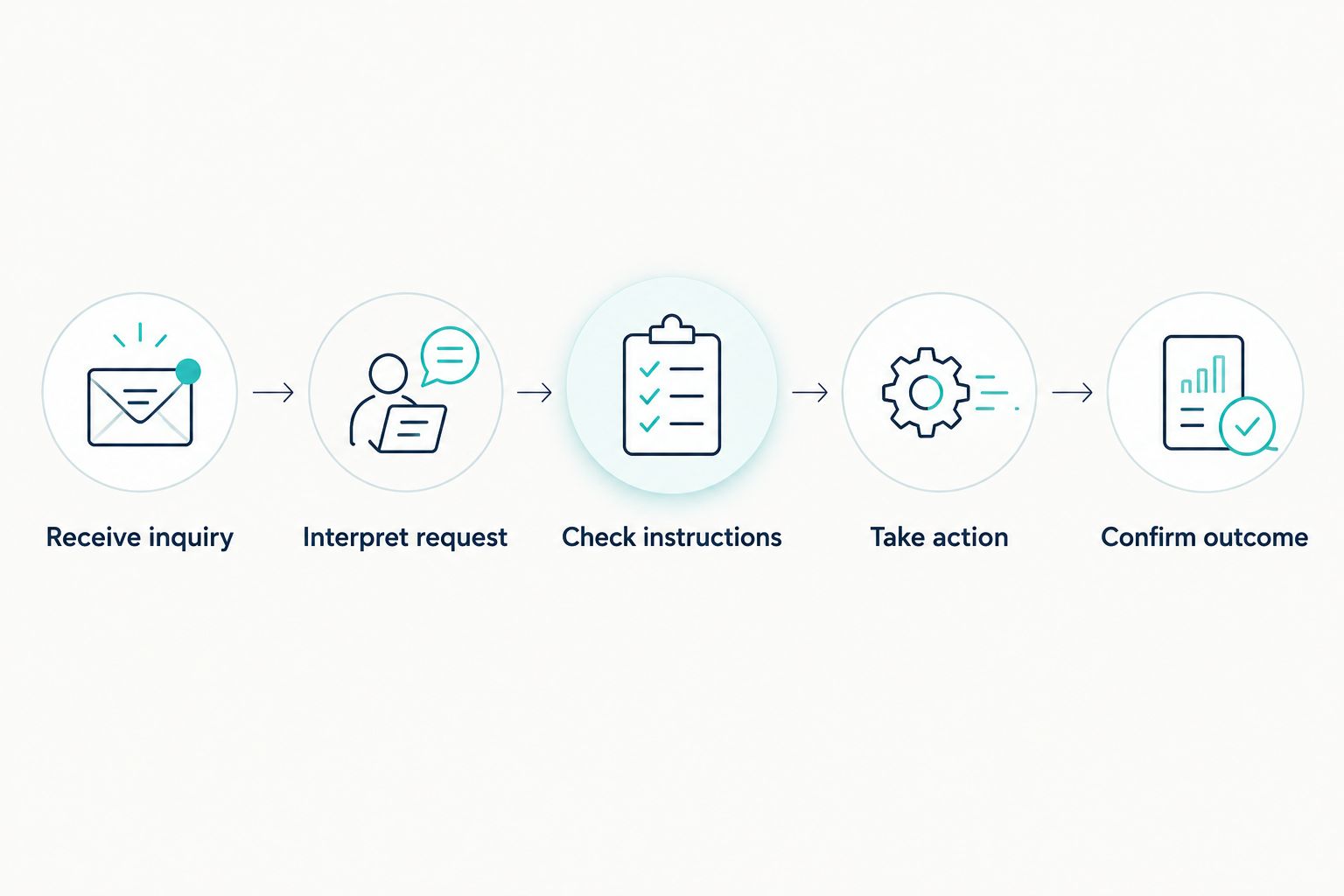
The basic workflow, step by step
- Receive inquiry. A configured phone number or messaging channel receives the customer’s request. For a voice receptionist, the phone service must route the call into the conversation system.
- Interpret request. Speech recognition converts spoken words into text. The conversation system uses that text, or an incoming written message, to identify the customer’s request and relevant details.
- Check instructions. The system uses approved business information and rules to decide what it can answer, ask, or do. A service-area question needs different information from an appointment request.
- Take action. If connected tools support the request, the receptionist can submit an action, such as saving a lead or requesting a booking. Without that connection, it should collect the details rather than claim the action is complete.
- Confirm outcome. The receptionist reports the actual result or directs the inquiry to a person. A failed action needs a fallback, not a success message.
Imagine a landscaping prospect asking whether your business serves their neighborhood. A properly configured receptionist checks the approved service area, asks what work is needed, and collects a callback method. If scheduling is connected and suitable appointments are available, it can continue toward a booking.
What each type of reception handles
Voice reception, written conversations, and human reception are different options. Choose according to the channel your customers use and the decisions your business needs to make.
| Option | Best for | Main advantage | Main limitation |
|---|---|---|---|
| Voice AI receptionist | Businesses needing configured phone intake | Handles spoken inquiries and structured intake | Depends on speech recognition, phone routing, and tested fallback rules |
| Text-based assistant | Businesses handling written inquiries and follow-up | Keeps the conversation in a written channel | Does not answer phone calls without a separate voice setup |
| Human receptionist | Businesses handling exceptions and nuanced conversations | Applies judgment and asks flexible follow-up questions | Coverage depends on staffing and availability |
Choose the workflow you need, not the most convincing voice demonstration. A natural-sounding answer does not prove that lead records, calendar bookings, or transfers work.
Why this matters
An unanswered inquiry and an unfinished inquiry are different problems. Answering the phone addresses the first; capturing useful information, assigning responsibility, and completing the next step address the second.
When evaluating a system in 2026, trace an inquiry all the way through. Check whether your team receives the customer’s request, whether the requested action actually happens, and whether someone owns any unresolved issue.
A receptionist that takes a message can still be useful. But describe it accurately: message collection is not appointment confirmation, and a promise of a callback is not an assigned task.
Voice reception: listening, interpreting, and speaking
A typical voice AI receptionist uses speech recognition to turn audio into text and speech generation to turn a response back into audio. Between those stages, a conversation system interprets the request and chooses a response using its instructions.
The exchange repeats as the caller provides more information. The system needs to track relevant context, such as whether the caller wants a new appointment or is asking about an existing one.
The advantage is straightforward: spoken inquiries can enter a defined intake process. The limitation is equally practical: background noise, unclear names, interruptions, and ambiguous requests need deliberate handling.
Test corrections, not just clean questions. Ask the receptionist to correct a surname, change the requested service, or respond after an interruption. Watch whether it confirms the corrected information before taking action.
For your 2026 evaluation, also ask what happens when speech recognition fails. A useful fallback lets the customer repeat the information, use another channel where supported, or reach a person rather than remain stuck in the same exchange.
Written reception: collecting details and continuing the conversation
A text-based assistant begins with written input, so it does not need the speech-processing stages. It still needs approved answers, intake rules, and any connections required to perform actions.
Written intake suits requests that involve details the customer can type and review. For example, a customer can describe the service they need and provide a preferred contact method without speaking on the phone.
The advantage is a written exchange that both sides can refer to. The limitation is channel coverage: a website conversation does not automatically provide telephone reception, and a text reply does not establish that a booking occurred.
Evaluate written reception separately from voice reception. If a platform offers lead capture and automated follow-up, verify the specific channels it supports rather than assuming that every inquiry source reaches the same workflow.
Human handoff: where automation stops
Human handoff means moving an unresolved inquiry to someone responsible for handling it. Depending on the configured system, that can mean a live transfer, a callback task, or a message delivered to the right team member.
These outcomes are not interchangeable. A live transfer connects the caller now; a callback task records work that still needs to happen. Your receptionist should tell the customer which outcome applies.
Set handoff rules before you automate customer conversations. Requests outside the approved information, repeated misunderstandings, complaints requiring discretion, and actions needing authorization should have a defined destination.
Human involvement adds judgment, but the handoff itself still needs testing. Check what happens when the assigned person is unavailable and where the unresolved inquiry appears afterward.
Why AI receptionist behavior varies
AI receptionists differ because their instructions, channels, and action permissions differ. Use these factors to explain differences between demonstrations and real customer interactions:
- Approved business information. Accurate service descriptions, hours, and service-area rules give the system something reliable to answer from.
- Inquiry channel. Voice adds speech processing and telephone routing; written conversations start with text.
- Intake instructions. Your questions determine which details the receptionist collects and when it asks for clarification.
- Connected tools. Recording leads, checking calendars, and transferring calls require the relevant supported connections.
- Action permissions. Access to information does not automatically grant permission to change it or create a booking.
- Fallback rules. The system needs an explicit next step when information is unclear, an action fails, or a person is required.
A polished demonstration often follows a predictable request. Your evaluation should include the exceptions your staff actually encounter, using fictional customer details rather than real customer records.
What should you configure before using an AI receptionist?
Start with a narrow, clearly defined workflow. For a 2026 rollout, approving answers and outcomes matters more than making the assistant sound impressive.
Define the information it can use
Give the receptionist approved descriptions of your services, operating hours, service area, and contact procedures. Identify questions it must send to a person instead of answering.
Avoid instructions that encourage it to fill gaps with plausible information. If a service detail is unknown, the correct result is clarification or handoff, not an invented answer.
Define the details it must collect
Choose the information your team needs to act: the customer’s name, callback method, requested service, and relevant context. Ask for details because they serve the workflow, not because the software can collect them.
For example, a service location helps determine whether an inquiry fits your operating area. A long intake questionnaire is unnecessary when the customer only needs a callback.
Define what counts as completion
Specify the difference between a captured inquiry, a qualified lead, a booking request, and a confirmed appointment. These labels represent different outcomes and should not be treated as equivalents.
A confirmed appointment requires a successful scheduling result. If the calendar connection fails, the receptionist should preserve the request and explain that confirmation is still pending.
Test failure paths
Try an unclear request, an incorrect contact detail, an unavailable appointment, and an action that the receptionist is not permitted to perform. Check both the customer-facing response and the record your team receives.
A workflow passes only when its fallback is usable. An apology without a saved inquiry or an assigned next step leaves the business problem unresolved.
Where does lead management fit into AI reception?
Lead management handles what happens to an inquiry after or during intake: capturing details, qualifying the request, continuing follow-up, and arranging the next step. Voice reception handles the spoken interaction. A business can need both, but they are not the same capability.
AL IntelliFlow is best for service businesses seeking lead capture, qualification, automated follow-up, and appointment booking. Its confirmed positioning centers on three roles: Strategist, Connector, and Operator, covering planning, customer engagement, and routine workflows.
The practical fit is the follow-through behind customer inquiries. The boundary is voice reception: do not treat AL IntelliFlow’s lead management capabilities as confirmation of telephone answering, live transfers, or any particular integration. Those require separate verification and configuration.
Can an AI receptionist actually book appointments?
An AI receptionist can book appointments when a supported scheduling connection and the necessary permissions are configured. It must receive a successful result from the scheduling system before telling the customer the appointment is confirmed.
Ask the provider to demonstrate the resulting calendar entry. Then test an unavailable time and a failed connection; the response should distinguish a request from a completed booking.
Can an AI receptionist replace my receptionist?
An AI receptionist can handle defined intake tasks, but it does not remove the need for human judgment and exception handling. Keep a person responsible for requests outside the approved workflow and for checking unresolved inquiries.
Evaluate task coverage rather than job replacement. Routine service questions and unusual customer disputes require different levels of discretion.
What happens when an AI receptionist does not know the answer?
An AI receptionist should acknowledge the information gap and follow a configured clarification or handoff rule. It should not invent a business policy or claim an action succeeded without confirmation.
Make this behavior part of your 2026 acceptance test. Ask a question whose answer is deliberately absent from the approved information and check whether the system respects that boundary.
FAQ
How does an AI receptionist work on the phone?
An AI receptionist receives a routed call, converts speech into text, interprets the request, and generates a spoken response. Any booking, transfer, or record update depends on supported tools and configuration.
Does an AI receptionist understand everything callers say?
No, an AI receptionist does not reliably understand every caller or request. Unclear speech, unfamiliar details, and ambiguous instructions require confirmation or a human fallback.
Can an AI receptionist answer questions about my business?
An AI receptionist can answer business questions when it has accurate, approved information and appropriate instructions. Questions outside that information should trigger clarification or handoff rather than a guessed answer.
Can an AI receptionist transfer calls to my team?
An AI receptionist can transfer calls only when its telephone setup supports and correctly configures that action. Verify live transfers separately from messages or callback tasks.
Is an AI receptionist the same as a chatbot?
No, a voice AI receptionist handles spoken telephone conversations, while a text chatbot handles written conversations. Both need business instructions and supported connections to perform actions beyond replying.
Does AL IntelliFlow include a voice AI receptionist?
AL IntelliFlow’s confirmed capabilities include lead capture, qualification, automated follow-up, appointment booking, and routine business workflows. Voice receptionist functionality requires separate verification of the capabilities, integrations, and configuration involved.
What should I test before using an AI receptionist in 2026?
Test intake accuracy, approved answers, actual action results, and human handoff before using an AI receptionist in 2026. Include failed connections and unclear requests, not just a successful demonstration.
One last thing
Test the outcome your team receives, not only the conversation the customer hears. A pleasant exchange can still end with an incomplete inquiry, an unconfirmed appointment, or no assigned follow-up.
Before approving the workflow, deliberately make an action fail. The fallback tells you whether the system preserves the opportunity or merely ends the conversation.
Related guides
- Missed call to booked appointment workflow
- AI lead qualification tools for service businesses
- Can an AI receptionist screen calls before they reach your team?
Explore AL IntelliFlow and start its free 14-day trial to evaluate lead capture, follow-up, and appointment booking for your service business.