Yes—an AI receptionist can transfer calls to a live person when its phone system supports transfers and the routing rules are configured. The handoff can be a direct transfer or a warm transfer that introduces the caller before connecting them. Answering calls does not automatically mean a system supports live transfers, and an unanswered transfer needs a defined fallback.
- Can an AI receptionist transfer calls to a live person? Yes, when its phone system supports configured call routing.
- Warm transfers introduce the caller; blind transfers connect without that introduction.
- Require a fallback for busy lines, unanswered calls, and after-hours requests.
- AL IntelliFlow supports lead management; verify receptionist integrations and live-transfer capabilities separately.
Can an AI receptionist transfer calls to a live person?
Yes, but verify the exact transfer method—not just whether the system can forward a call. A receptionist needs a supported destination, a rule for choosing that destination, and instructions for what happens when nobody answers.
For your 2026 evaluation, separate these three outcomes:
| Handoff option | What happens | Best for | Main limitation |
|---|---|---|---|
| Blind transfer | The system sends the caller to the destination without a spoken introduction | Straightforward requests where the destination is clear | The recipient does not receive a verbal briefing from the receptionist |
| Warm transfer | The receptionist contacts the recipient and introduces the caller before completing the handoff | Conversations where context matters | Requires support for an attended handoff and an available recipient |
| Callback capture | The system collects contact details and the reason for calling instead of connecting immediately | Requests outside staffed hours or when staff cannot answer | It is not a live transfer; someone must complete the follow-up |
The terminology in a sales presentation is not enough. Ask the provider to demonstrate the caller's experience and the recipient's experience using your intended destination.
For the broader call-handling process, see how an AI receptionist actually works. Then assess transfers as a separate capability rather than assuming they come with automated answering.
Why this matters
A caller asking for a person has reached the boundary of automated handling. Your job is to make that boundary clear and usable, not to keep the caller talking to software indefinitely.
Consider a home-service business receiving a question about an existing job. Automated intake can collect the caller's name and reason for calling, but an employee still needs to resolve a scheduling dispute or explain a change in scope.
A completed transfer means the caller reaches the intended person—not merely that another phone rings. That distinction belongs in your 2026 acceptance checklist. Otherwise, a demonstration can look successful while the real caller ends up in voicemail without a clear next step.
Blind transfers: direct connection without an introduction
A blind transfer sends the caller to another number or extension without the receptionist first briefing the recipient. It is a straightforward handoff when you already know where the call belongs.
The benefit is simplicity. A caller requesting the front desk can be sent to the front desk without an additional conversation between the receptionist and an employee.
The drawback is context. The recipient generally starts the conversation without a spoken introduction from the receptionist, so the caller needs to explain the request again unless a separate, supported mechanism supplies that information.
Choose blind transfers for clear routing decisions, not for situations that depend on a detailed handoff. Also verify what happens when the destination is busy or unanswered. Do not assume the receptionist can retrieve the caller after sending the call away.
Warm transfers: an introduction before the handoff
A warm transfer involves contacting the recipient before completing the connection. The receptionist introduces the caller or explains the request, then connects the conversation according to the system's supported behavior.
This approach suits calls where an employee needs context before taking over. For example, a customer asking about an unresolved appointment change benefits from a handoff that identifies the issue rather than restarting intake.
The trade-off is coordination. The recipient must answer, and the system must support the introduction and connection process. Ask whether the employee can accept or decline the call and what happens to the caller during that decision.
For your 2026 shortlist, request a live demonstration of the introduction. A system that simply forwards the call while sending a separate notification is not demonstrating the same spoken handoff. Both approaches can be useful, but they create different experiences.
Callback capture: a fallback, not a live transfer
Callback capture preserves the request when a live person is unavailable. The system collects the caller's contact details and reason for calling, then passes the request into a supported follow-up process.
This is useful after hours or while your team is occupied. Its limitation is straightforward: the caller has not reached a person, and the business still owes a response.
Tell callers what is happening. Do not describe message-taking as a successful transfer, and do not promise a callback deadline your team has not agreed to meet.
A useful callback record includes:
- The caller's name and preferred contact method.
- The reason for the call.
- The intended person or department.
- Relevant details already supplied during intake.
- An assigned owner for the next action.
Treat these as requirements to verify, not features every receptionist automatically includes. A saved message without an owner is an unfinished handoff.
How to set up a dependable transfer process
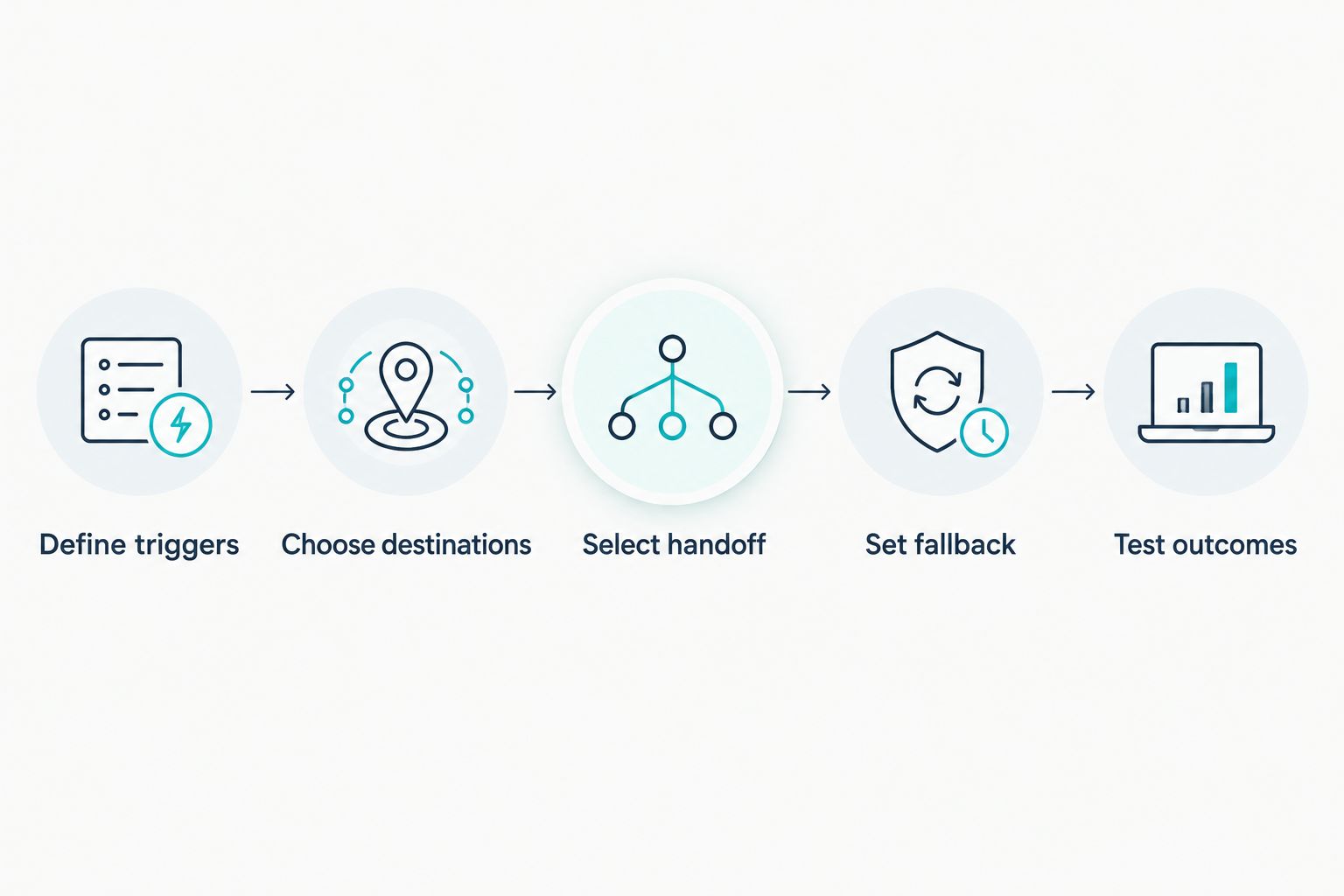
Write the transfer policy before configuring the software. Your policy should explain when automation stops, who takes over, and how an unsuccessful connection is handled.
1. Define triggers
Identify the situations that should prompt a live handoff. Start with an explicit request for a person, a request outside the receptionist's approved instructions, and a conversation that requires an employee's decision.
Do not require a caller to finish an unrelated qualification script before honoring a request for human help. Keep the path clear, subject to your actual staffing and supported routing options.
2. Choose destinations
Match each trigger to a specific destination. That destination might be an employee, a department, or a staffed queue, depending on what your phone setup supports.
For each destination, identify who owns it and when someone answers. A department name alone does not establish coverage.
3. Select handoff
Choose blind or warm transfer based on the recipient's need for context. Use the comparison table above as a decision aid, then confirm that your selected system supports the method.
Also establish what the caller hears while waiting. Avoid unexplained silence and repeated introductions that make the handoff feel like a new call.
4. Set fallback
Define separate behavior for an unanswered call, a busy destination, and a request outside staffed hours. The fallback should tell the caller what happened and offer an available next step.
Do not assume a failed transfer returns to the receptionist. Confirm that behavior in the actual phone setup before relying on it.
5. Test outcomes
Place test calls through the same entry point customers will use. Check the answered path, the unanswered path, and the after-hours path before enabling the workflow for ordinary business calls.
Record the actual outcome rather than marking a test successful because the destination rang. Your 2026 test record should show where the caller ended up and who owns any unfinished request.
Why AI receptionist transfer behavior varies
Transfer behavior depends on the calling setup and the rules around it. Evaluate these factors rather than treating all receptionist systems as interchangeable:
- Phone-system support: The underlying calling service must support the transfer method you want.
- Destination configuration: Confirm whether your intended external number, extension, or queue is supported.
- Handoff method: Blind and warm transfers differ in how the recipient receives the call and its context.
- Staff coverage: Routing to an employee does not make that employee available.
- Failure handling: Busy signals, unanswered calls, and voicemail require explicit decisions.
- Context delivery: Verify whether information arrives through a spoken introduction, another supported channel, or not at all.
Ask the provider to explain which part of the setup controls each behavior. That makes it easier to identify whether a problem belongs to the receptionist instructions, the phone configuration, or staffing.
What happens if nobody answers the transferred call?
The configured fallback determines what happens when nobody answers. Depending on supported behavior, the caller might reach voicemail, return to automated handling, or be offered message-taking; verify the actual path rather than assuming one exists.
An unanswered destination must not be treated as a resolved inquiry. Assign follow-up ownership and make sure the caller understands whether to wait, leave details, or try another route.
Can callers ask for a person whenever they want?
A request for a person should trigger your defined human-handoff policy. Whether an immediate connection succeeds depends on supported routing and someone being available to answer.
If live help is unavailable, say so plainly and offer the configured alternative. Do not make the caller repeatedly rephrase the request to escape automated handling.
Does transferring a call also send the caller's details?
A call transfer does not automatically include a transcript, summary, or customer record. A warm transfer provides an introduction, but any additional information delivery needs its own supported setup.
Ask the provider to demonstrate exactly what the employee receives. Limit the handoff to information needed to handle the request rather than assuming every detail belongs in every notification.
Where AL IntelliFlow fits
AL IntelliFlow is best suited to service-based businesses seeking lead capture, qualification, follow-up, and appointment-booking workflows. Its confirmed positioning is an AI-powered business growth assistant organized around three roles: Strategist, Connector, and Operator.
AL IntelliFlow's lead management capabilities address a different question from live call transfer: what happens to an inquiry and its next action? That is relevant when a conversation needs follow-up instead of an immediate connection.
The boundary matters. AL IntelliFlow's confirmed lead-management capabilities do not establish native voice answering, warm transfers, or compatibility with a particular phone system. Verify any receptionist integration, configuration, and transfer behavior separately before building a calling workflow around it.
FAQ
Can an AI receptionist transfer calls to my mobile phone?
Yes, if the receptionist's phone system supports transferring to your mobile number and that destination is configured. Test both an answered call and an unanswered call, including what happens when mobile voicemail picks up.
What's the difference between a warm transfer and a blind transfer?
A warm transfer introduces the caller to the recipient before completing the handoff; a blind transfer connects without that introduction. Choose based on how much context the employee needs before taking over.
Can an AI receptionist transfer calls after business hours?
Yes, if a supported destination is configured for after-hours routing and someone is available to answer. Otherwise, use a clear fallback instead of implying that live help is available.
Will the AI receptionist stay on the line until someone answers?
That depends on whether the system supports an attended handoff and how it is configured. Ask the provider to demonstrate when the receptionist leaves the call and what happens if the recipient does not answer.
How do I stop callers from getting stuck in a transfer loop?
Define a stopping point and a fallback instead of repeatedly sending the caller between destinations. Test an unanswered transfer and confirm that the caller receives a clear next step.
Does automated appointment booking mean live call transfers are included?
No, appointment booking and live call transfer are separate capabilities. Confirm voice handling, supported transfer destinations, and failure behavior independently of scheduling features.
One last thing
Test the call your team cannot answer before testing the ideal handoff. That is where you find whether the workflow preserves the request or merely moves the caller somewhere else.
For a 2026 rollout, give each unfinished call a next action and an owner. A callback request with clear responsibility is more useful than a transfer marked complete while the caller is still waiting for help.
Related guides
- Can an AI receptionist screen calls before they reach your team?
- How does missed-call text-back work?
- Missed call to booked appointment: complete workflow
Explore AL IntelliFlow and start its free 14-day trial to evaluate lead capture, follow-up, and appointment-booking workflows for your business. Confirm any separate receptionist setup before relying on live call transfers.