Missed call text back works by detecting an unanswered business call and automatically sending the caller an SMS, provided your phone setup supports the trigger and the destination can receive texts. In 2026, the useful distinction is between sending that first acknowledgment and managing the replies: booking, qualification, and human handoff require their own configured workflows.
- How does missed call text back work? An unanswered call triggers an SMS, then replies enter a follow-up workflow.
- A text acknowledgment does not answer a live call or automatically book an appointment.
- AL IntelliFlow supports service-business lead management; confirm any missed-call trigger or receptionist setup separately.
- Test answered calls, repeat callers, replies, and human handoff before enabling automation.
Why this matters
When you are finishing a job, meeting a customer, or handling another call, an unanswered inquiry leaves the caller without a next step. A text acknowledgment gives that person another way to explain what they need. It does not replace your responsibility to respond.
The goal is not merely to send a message. It is to give an unanswered inquiry an owner and a next action. A caller who replies but receives no follow-up has reached another dead end.
For your 2026 setup, evaluate the entire path from ringing phone to handled request. The missed call to booked appointment workflow covers the broader process; this guide explains the trigger, the first message, and what must happen afterward.
How does missed call text back work?
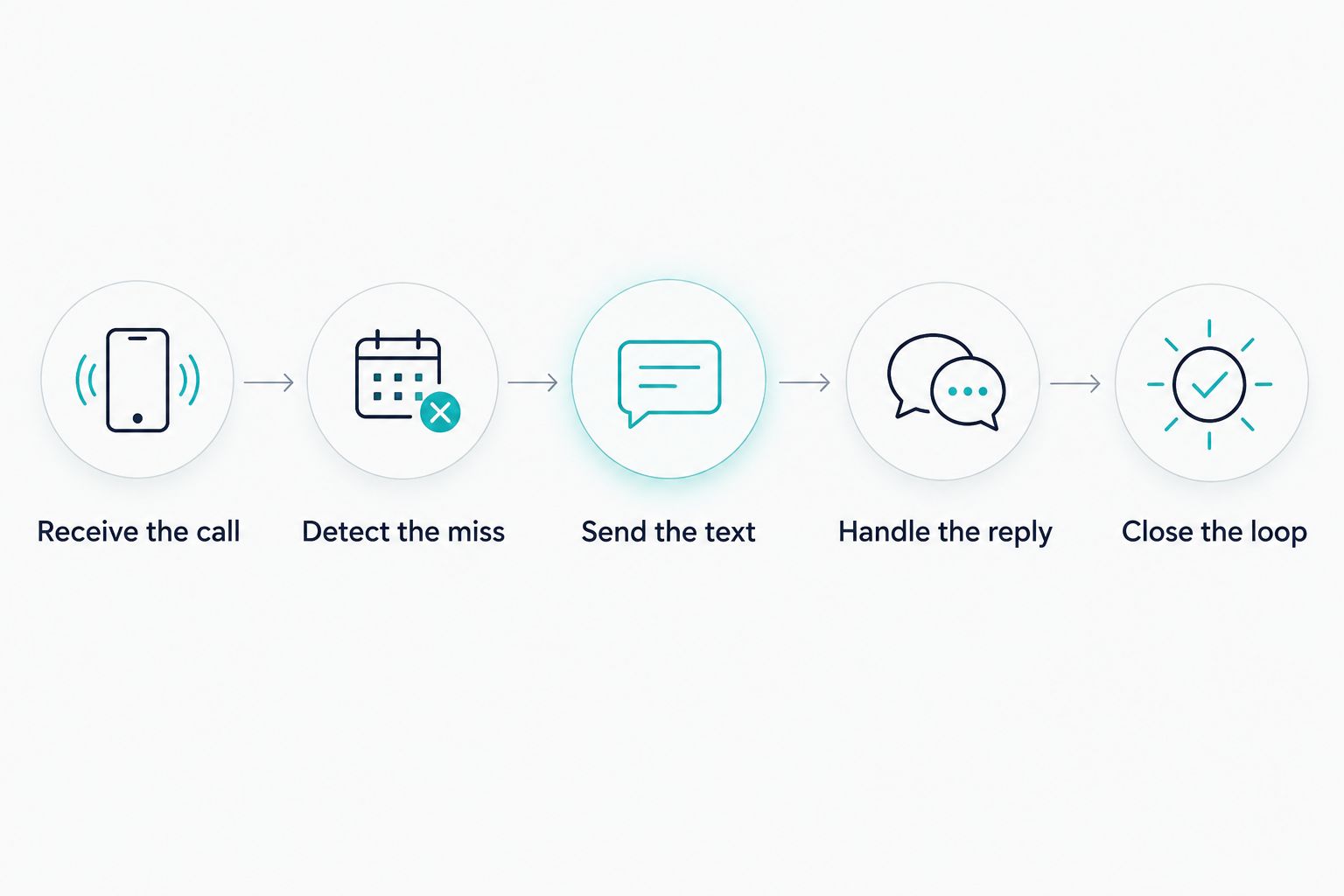
A typical missed-call text-back workflow has 5 steps. The exact controls depend on the phone service and messaging system, so use this sequence as a setup checklist rather than a promise about any particular platform.
- Receive the call. A customer calls your business number. Your phone system routes the call according to your existing answering arrangement.
- Detect the miss. The phone system records an outcome that your workflow treats as unanswered. Confirm how that outcome behaves when calls are forwarded or voicemail answers.
- Send the text. A configured rule sends an acknowledgment to the caller's number when the destination supports SMS and the send meets your messaging requirements.
- Handle the reply. The caller's response reaches a monitored conversation or work queue. A person or configured automation takes the next action.
- Close the loop. Your team completes the callback, handles the request, or confirms an appointment through the appropriate scheduling process.
Each step has a separate job. Detecting a missed call does not prove that a message was delivered, and receiving a reply does not prove that someone handled the request.
What does the caller experience?
Imagine a customer calling a landscaping business while the owner is working outside. Nobody answers, so the configured workflow sends a short message identifying the business and inviting the customer to describe the job.
The customer replies that they want help with an overgrown yard. That response needs to reach someone who can ask about the location, explain the next step, and arrange a conversation. The example illustrates the workflow, not a confirmed feature of any named product.
An acknowledgment is successful only at its own task: opening a reply channel. Treat the subsequent conversation as a separate responsibility.
What should the first text say?
Your first message should identify the business, acknowledge the missed call, and ask a straightforward question. Keep the request narrow enough that the caller can answer without completing a lengthy intake process.
An illustrative template is: Sorry we missed your call. Please reply with what you need help with, and our team will follow up. Add your actual business name before using it, and change the follow-up wording to match what your team can deliver.
Avoid promising an immediate callback unless someone is responsible for providing it. Do not describe the sender as a person who has already reviewed the request if the message is automatic.
Useful first-message principles include:
- Make the sender clear. The caller should recognize which business is contacting them.
- Ask for the next useful detail. Start with the reason for the call rather than an entire questionnaire.
- Use accurate expectations. Describe your real follow-up process, not an idealized response time.
- Keep the conversation relevant. An acknowledgment should address the inquiry, not become an unrelated promotional sequence.
Once the customer explains the request, decide whether another question is necessary. Asking for information your team will not use adds friction without improving the handoff.
Missed-call texts, callbacks, and receptionists are different
In 2026, evaluate these options by the job you need done rather than treating every automated response as a receptionist. A text-back workflow responds after an unanswered call; a receptionist handles the incoming conversation itself.
| Option | Best for | Main advantage | Main limitation |
|---|---|---|---|
| Missed-call text back | Giving unanswered callers a written reply channel | Sends a configured acknowledgment without a manual first message | Does not answer the original call; replies still need handling |
| Manual callback | Requests that need a direct conversation | Lets a team member ask questions and explain the next step | Depends on someone noticing the missed call and making contact |
| AI receptionist | Businesses evaluating automated live-call handling | Can handle a live conversation when the selected system supports that function | Requires verification of capabilities, configuration, and handoff behavior |
Choose missed-call text back for acknowledgment, not as proof that you have live-call coverage. If answering the phone is the main problem, investigate receptionist capabilities separately.
A manual callback can remain part of an automated workflow. For example, a customer's reply can establish what the request concerns before your team returns the call. Automation and human conversation do not need to be competing choices.
Why missed-call text-back behavior varies
The workflow depends on how your systems define a missed call and what happens after that event. Before choosing software, get clear answers about these setup factors:
- Call routing. Ask which system records the final outcome when a call passes through forwarding or multiple destinations.
- Voicemail behavior. Check whether voicemail pickup changes the event used to trigger a text.
- Messaging support. Verify that your sending arrangement supports SMS and that delivery failures are visible.
- Repeat-call handling. Ask how the workflow avoids unnecessary repeated acknowledgments during an active conversation.
- Reply ownership. Establish where responses appear and who is responsible for reviewing them.
- Scheduling boundaries. Confirm what must happen before a requested appointment becomes a confirmed booking.
These are evaluation questions, not capabilities you should assume are included. A system that sends the first message still needs a workable plan for exceptions.
Pay particular attention to forwarded calls. Test the actual routing you use rather than a simplified demonstration number. Otherwise, your test proves only that the demonstration works.
How do you set up and test missed-call text back?
Start your 2026 setup with a written description of the desired behavior. State which unanswered calls should trigger a message, what the message should say, and where a customer's reply should go.
Next, verify the phone and messaging connection with the provider responsible for it. Do not change your business number or routing arrangement based on an assumption that every system connects the same way.
Use a controlled test checklist:
- Unanswered call: Does the intended acknowledgment send, and does the caller receive it?
- Answered call: Does the system avoid sending a missed-call acknowledgment after a successful conversation?
- Voicemail pickup: Does the actual result match your intended rule?
- Repeat call: Does the caller receive unnecessary duplicate messages?
- Customer reply: Can the responsible person find the reply and respond?
- Callback request: Does the request reach the person expected to return the call?
- Delivery problem: Can your team identify a failed message rather than assuming contact was made?
Record what happened at each stage. Separate the call outcome, message status, customer response, and completed action so you can locate a problem without guessing.
Do not enable a workflow simply because the first test message arrives. The more revealing test is whether your team can handle a reply correctly when the original caller asks for something outside the standard path.
What happens after a caller replies?
A reply should move the inquiry toward a useful next action. That might mean answering a basic question, collecting the information needed for a callback, or directing the customer into a verified appointment process.
Assign responsibility before you turn on automation. Someone needs to know when a conversation requires attention, how to take over, and when the request is complete.
For a service business, practical intake questions concern the work itself: what help the customer needs, where the service is required, and how they prefer to continue the conversation. Ask only for details needed to handle that inquiry.
When scheduling is involved, distinguish a requested time from a confirmed appointment. A text saying the customer wants an appointment is not a booking confirmation. Confirmation belongs to the scheduling process you have verified.
Where does AL IntelliFlow fit?
AL IntelliFlow is best for service businesses seeking AI-powered lead capture, qualification, follow-up, and appointment booking. Those are confirmed areas of the platform's business-growth offering.
AL IntelliFlow organizes its approach around 3 roles: Strategist, Connector, and Operator. In practical terms, use those roles to think about planning the process, engaging customers, and managing operational work.
The boundary matters: lead management does not establish native missed-call detection, SMS delivery, or live receptionist support. Confirm the specific connection and configuration required for your phone workflow before treating it as part of the platform.
The benefit is a lead-management focus suited to service businesses. The limitation for this particular use case is that the missed-call trigger and any receptionist behavior need separate verification; the broader platform description is not evidence that those functions are included.
Can missed-call text back work after hours?
After-hours text back works when the configured phone and messaging workflow supports that behavior. The acknowledgment should explain the actual next step without implying that staff are currently available.
An after-hours message can invite the caller to describe the request for later review. Keep urgent requests out of an unattended conversation path that cannot provide the required response.
Does missed-call text back need AI?
No. Sending a preset SMS after a qualifying call event is a rule-based task and does not inherently require AI.
AI-assisted follow-up is a separate layer for handling conversation or planning subsequent actions. Verify its boundaries and human handoff rather than assuming that a text-back feature includes them.
Can a missed-call text automatically book an appointment?
A missed-call acknowledgment alone does not book an appointment. Booking requires a connected scheduling process that establishes the service, the chosen time, and the confirmation.
Treat text back as the opening step. Test the scheduling workflow separately before telling callers their appointments are confirmed.
FAQ
How does missed call text back work for a small business?
Missed call text back uses an unanswered-call event to trigger an SMS acknowledgment. Your configured workflow then routes any reply to a person or automation responsible for the next action.
Does missed-call text back answer the phone?
No, missed-call text back does not answer the original phone call. Live-call handling requires a person or a separately verified receptionist system.
Can I keep my existing business number?
Keeping your existing number depends on the phone service and messaging setup you select. Confirm the supported arrangement before changing your routing or moving a number.
Will callers receive a text if they leave voicemail?
Whether voicemail triggers a text depends on how your setup records and uses the call outcome. Test a voicemail call through your actual business routing.
Can missed-call text back stop duplicate messages?
Duplicate prevention depends on the workflow's available controls and configuration. Test repeat calls and active conversations before enabling automatic acknowledgments.
Does AL IntelliFlow include an AI receptionist?
AL IntelliFlow's confirmed offering includes lead capture, qualification, follow-up, appointment booking, and operational workflows. Do not assume those capabilities include live-call answering; receptionist functions require separate verification and potentially additional configuration.
What should I check before enabling missed-call texts in 2026?
Before enabling missed-call texts in 2026, verify the call trigger, message delivery, reply ownership, and human handoff. Test answered calls, voicemail, repeat callers, and scheduling separately.
One last thing
A delivered acknowledgment is not a handled lead. For your 2026 workflow, review conversations that received a reply but never reached a clear next action; that is where ownership breaks down.
Make a simple operational rule: every genuine inquiry ends with an answer, an assigned callback, a confirmed appointment, or a documented reason no further action is needed. The message starts the work. Your process finishes it.
Related guides
- Missed-call text-back software options
- Website lead to text reply workflow
- Lead follow-up tools for service businesses
Explore AL IntelliFlow and start its free 14-day trial to evaluate its lead-management approach for your business.