
An AI receptionist is worth it for a small business when it turns otherwise missed inquiries into completed, profitable appointments without creating more cleanup work. It is not worth it when your current response process already works or callers need judgment that the system cannot provide. In 2026, judge the purchase by completed jobs, staff time saved, and errors—not by how convincing a demonstration sounds.
- Is an AI receptionist worth it for a small business? Yes, when recovered appointments outweigh operating costs and cleanup.
- Alintelliflow fits service businesses seeking lead capture, automated follow-up, and appointment booking.
- Keep human handling for complaints, exceptions, and conversations requiring judgment.
- Measure completed jobs and staff time saved, not just answered calls or scheduled appointments.
Why this matters
Your business does not earn revenue just because someone answers an inquiry. The customer still needs to describe the job, meet your service criteria, accept the next step, and attend the appointment. Automation earns its place when it connects those steps instead of merely creating another inbox.
Alintelliflow provides lead capture, qualification, automated follow-up, and appointment booking for service-based businesses. Those functions address the broader workflow, not just the opening conversation. When evaluating an AI receptionist in 2026, inspect what happens after the initial response as closely as the response itself.
The practical question is simple: does the system move suitable customers toward work you can actually deliver? If someone still has to reconstruct the conversation, correct the booking, and chase the customer, include that work in your decision.
Is an AI receptionist worth it for a small business in 2026?
Yes, when you have a specific intake problem and a repeatable next step. A missed inquiry during a job, an unanswered question after closing, or an unreturned callback gives you a process to improve. Buying software without identifying that process makes the result harder to evaluate.
Compare the approach with your existing workflow before committing. The table below describes operating choices, not guaranteed capabilities of any particular vendor.
| Approach | Best for | Main advantage | Main limitation |
|---|---|---|---|
| AI receptionist | Repeatable intake and appointment requests | Automates approved conversation steps when supported | Requires clear rules, testing, and an exception path |
| Human receptionist | Complex inquiries and sensitive conversations | Applies judgment and handles unusual requests | Coverage depends on staffing and schedules |
| Voicemail and callbacks | Businesses comfortable reviewing messages later | Keeps intake simple and leaves decisions with staff | Requires someone to retrieve messages and follow through |
| Hybrid handling | Routine intake with human escalation | Separates predictable tasks from judgment calls | Needs a clear handoff and an accountable owner |
Do not choose by feature count. Match the approach to the reason inquiries stall. A business losing track of messages needs ownership and follow-through; a business struggling with complex advice needs qualified human attention.
An AI receptionist also does not create customer demand. If too few suitable people contact your business, fixing intake is a different task from attracting inquiries. Keep those problems separate so you do not credit—or blame—the receptionist for your marketing results.
AI receptionist: best for repeatable intake
An AI receptionist fits a workflow where you can write down what the system should ask, what counts as a suitable inquiry, and what happens next. Examples include collecting contact details, identifying the requested service, and offering an approved booking step. Confirm that the provider supports each task in your actual setup.
The advantage is consistency within that defined scope. You can establish the information your business needs before someone takes over. The limitation is equally important: a script cannot settle every exception, and a generated answer is not automatically an authorized answer.
Recommendation: use automation for bounded intake, not unrestricted promises. Keep disputed charges, unusual requests, and decisions requiring professional judgment outside its independent authority. A clear boundary gives you a testable workflow instead of an open-ended conversation experiment.
Human receptionist: best for judgment-heavy conversations
Human handling fits calls where context changes the answer. Complaints, conflicting requests, and customers who need a careful explanation require more than collecting fields. A person can ask whether the standard process is appropriate before applying it.
The advantage is judgment and accountability. The limitation is that a person still needs coverage, documentation, and a reliable follow-up process. Hiring someone does not remove the need to define who owns an inquiry after the conversation ends.
Recommendation: keep a human responsible for exceptions. Even when automation handles the opening exchange, someone needs authority to resolve a failed handoff or an incorrect booking. Make that responsibility explicit rather than assuming the team will notice.
Hybrid handling: best for routine work with exceptions
Hybrid handling assigns predictable tasks to automation and leaves consequential decisions with your team. The system collects information or follows an approved booking process; a person handles requests outside that scope. This is a workflow choice, not a promise that every vendor supports every handoff.
The advantage is a narrower automation boundary. The limitation is coordination: a transferred request is useless if no one sees it or knows what to do. Decide where exceptions appear and who acknowledges them.
Recommendation: require a visible handoff before expanding automation. Your team should receive the customer's request, the information already collected, and the reason human attention is needed. Test that transfer from the customer's side and the employee's side.
Why an AI receptionist's value varies
The same intake tool can solve a pressing problem in one business and add unnecessary work in another. Evaluate these factors against your own records and operating rules:
- Missed inquiries: Identify which contacts currently go unanswered or receive a delayed response. Separate suitable prospects from spam and unrelated requests.
- Contribution per completed job: Use what remains after delivering the service, not the headline sales amount. A booking alone does not establish financial value.
- Intake complexity: List the questions that have approved answers and the situations that require a person. Undefined rules make performance difficult to assess.
- Booking accuracy: Check whether the workflow respects the correct service, calendar, staff member, and appointment requirements. An incorrect booking creates work instead of removing it.
- Human cleanup: Include time spent reviewing conversations, correcting records, and returning escalated requests. Automation is not time saved if it shifts the same work elsewhere.
- Follow-through ownership: Name the person responsible when a customer does not complete the next step. An automated message and a resolved inquiry are different outcomes.
Measure the bottleneck you intend to fix. If the problem is unanswered inquiries, track what happens to those inquiries after rollout. If the problem is administrative interruptions, track the tasks your team no longer performs and the new review work it takes on.
How do you test whether an AI receptionist is worth it?
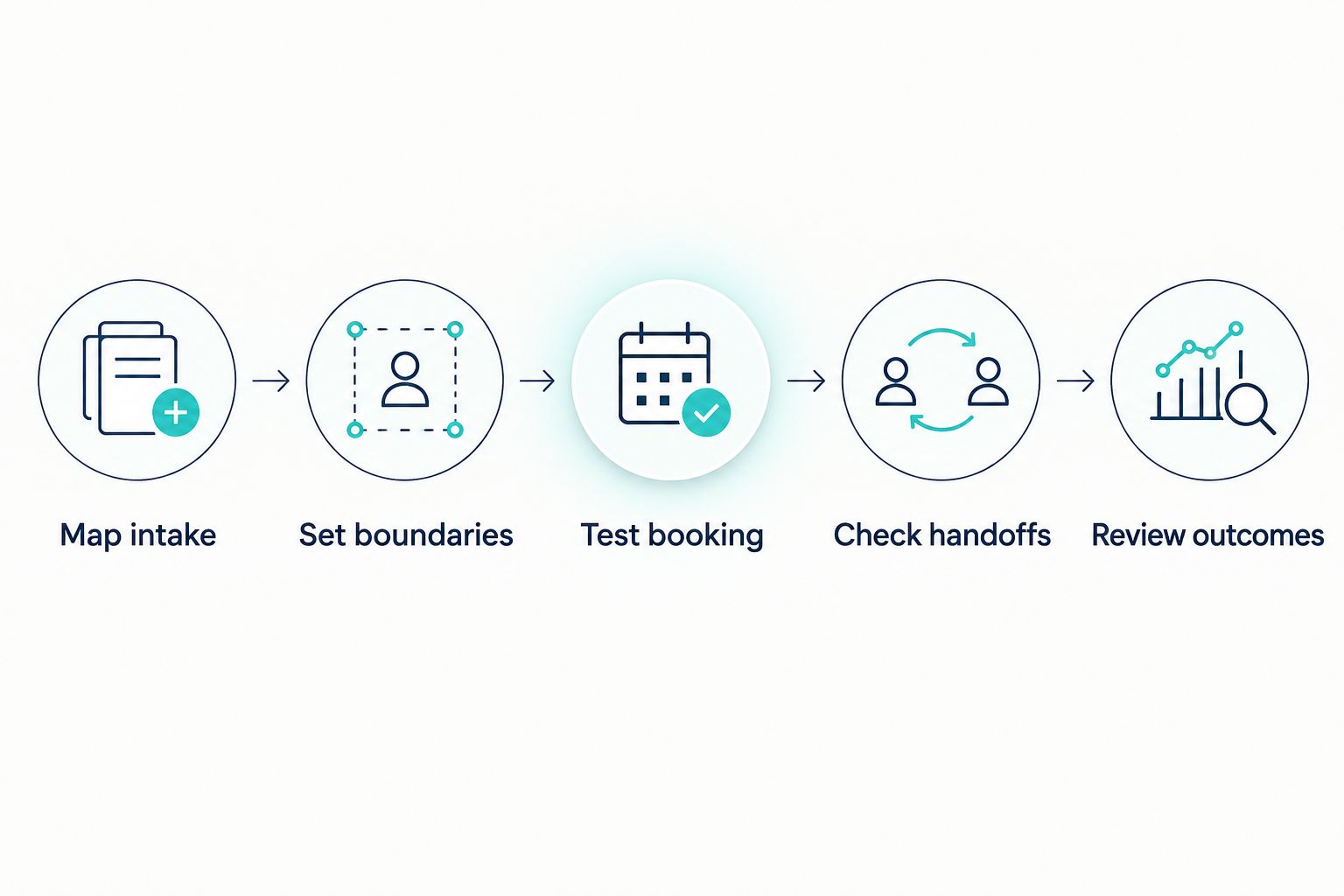
Use your 2026 inquiry records as the baseline, then test the proposed workflow with scenarios drawn from your actual business. Keep the scope narrow enough that you can explain what succeeded and what failed.
- Map intake. Document where inquiries arrive, what staff ask, and where information is recorded. Identify the exact point where the current process breaks.
- Set boundaries. Specify approved answers, required questions, and prohibited commitments. Decide which requests must reach a person before anything is confirmed.
- Test booking. Run realistic appointment requests through the proposed setup. Check the resulting record rather than accepting a spoken confirmation as proof.
- Check handoffs. Test an unclear request, an unhappy customer, and a request outside your service scope. Verify that the designated person receives usable context.
- Review outcomes. Compare completed work, correction tasks, and staff effort with the existing process. Keep only the automation that improves the outcome you selected.
These steps describe an evaluation method, not a vendor certification. A successful demonstration proves that a demonstration worked. Your decision depends on whether the workflow handles your service rules and reaches the people responsible for exceptions.
What should you ask during a demonstration?
Ask the provider to handle your scenarios, not just its prepared examples. Include a customer who changes the request midway through, a booking that should not be accepted, and a question the system should decline to answer. Watch the resulting records and notifications.
Useful questions include:
- Where does the collected information go?
- What makes the system stop and request human help?
- Can staff see what the customer was told?
- How are incorrect details corrected?
- What happens when the booking process fails?
- Who maintains the business rules after setup?
Get specific answers about your intended configuration. Do not assume that a feature shown in a demonstration is included in the service you are evaluating. The accepted scope should match the workflow your team expects to use.
How do you calculate whether the expense pays off?
Compare additional contribution and genuine labor savings with total operating effort. Use completed jobs attributable to recovered inquiries, not every appointment the system touches. Otherwise, you risk counting customers who would have booked through your existing process anyway.
Your calculation should include:
- Contribution from additional completed jobs.
- Staff time genuinely removed from intake and follow-up.
- The provider's current charges and any applicable usage terms.
- Setup, maintenance, supervision, and correction work.
Keep revenue and contribution separate. A service can generate sales while leaving little after delivery costs. Also keep staff capacity separate from cash savings: freeing an owner's time has operational value, but it does not automatically reduce payroll.
For your 2026 evaluation, record how you attribute each recovered inquiry. Mark uncertain attribution separately rather than treating every new booking as proof. The financial case is stronger when you can explain the result without guessing.
Can an AI receptionist replace a receptionist?
An AI receptionist can take over defined tasks, not automatically the entire receptionist role. Intake and appointment requests are different from resolving complaints, interpreting exceptions, or coordinating decisions across your team.
List the current role's responsibilities before discussing replacement. Anything without a tested automated process still needs a named human owner.
Is an AI receptionist worth it if you already answer every call?
An AI receptionist needs a different benefit if missed calls are not your problem. Evaluate whether it removes documented follow-up work or appointment administration instead.
If the existing process handles inquiries accurately and leaves no meaningful workload to remove, keep it. A new system should earn its place against what already works.
Where does Alintelliflow fit?
Alintelliflow is best for service businesses seeking lead capture, automated follow-up, and appointment booking. Its stated offering also includes lead qualification and routine workflow automation, making the full inquiry-to-appointment process the relevant evaluation scope.
For Alintelliflow lead capture and appointment booking, begin with the task your team needs removed. Then verify the required channels, connections, escalation behavior, and booking rules for your configuration. Do not treat workflow software as proof of any specific telephone-answering capability.
The fit is strongest when those stated functions match your problem. The limitation is that a broader growth workflow and a dedicated voice receptionist are not interchangeable purchasing requirements. Write down the required behavior before choosing the product category.
Evaluate your lead workflow
Match lead capture, follow-up, and appointment booking to the intake problem your team needs solved.
FAQ
Is an AI receptionist worth it for a small business in 2026?
An AI receptionist is worth it when recovered completed jobs and staff time saved outweigh its operating costs and cleanup work. Evaluate it against a specific intake problem, not a general promise of automation.
What's the best way to tell if an AI receptionist will help my business?
The best test is a defined workflow using your real intake rules and customer scenarios. Inspect booking records, exception handoffs, and the work staff must still complete.
Is an AI receptionist better than a human receptionist?
An AI receptionist fits repeatable, bounded tasks; a human receptionist fits conversations requiring judgment. Compare the responsibilities you need covered rather than treating the roles as identical.
Can an AI receptionist book appointments for my business?
Appointment booking depends on the provider and your configuration. Verify the correct service, calendar, appointment requirements, and failure handling before relying on it.
How do I calculate the return from an AI receptionist?
Compare contribution from additional completed jobs and genuine staff time savings with all operating costs and review work. Do not count every scheduled appointment as additional revenue.
Should I use an AI receptionist if my customers ask complicated questions?
Keep complicated questions with qualified staff unless a narrow, approved response is sufficient. Define when automation must stop and transfer the request.
What does Alintelliflow help service businesses do?
Alintelliflow provides lead capture, lead qualification, automated follow-up, appointment booking, and routine workflow automation. Evaluate those functions against your business's inquiry-to-appointment process.
One last thing
A politely refused booking can be a successful result. If the requested service is outside your scope or the appointment does not meet your rules, accepting it creates a problem for both the customer and your team.
Include a request that should be declined in your 2026 evaluation. The system should follow your approved boundary and provide the correct next step—not invent a promise to finish the conversation.