
Yes—AI can follow up with leads after hours when your system connects incoming inquiries to an automated workflow with approved messages, timing rules, and a clear handoff to your team. It can acknowledge an inquiry, ask qualifying questions, and guide someone toward an appointment, but automated follow-up does not automatically include live phone answering or permission to contact someone through every channel.
- Can AI follow up with leads after hours? Yes, with configured lead capture, messaging, scheduling, and handoff rules.
- AL IntelliFlow supports service-business lead capture, qualification, automated follow-up, and appointment booking.
- After-hours lead follow-up and an AI receptionist are different capabilities; verify voice integrations separately.
- Start with one inquiry source, define stop conditions, and test the next-business-day handoff.
Why this matters
Your business hours and your customers’ research hours do not always match. Someone can request an estimate while you are finishing a job, spending time with family, or away from the office. The operational problem is what happens between that inquiry and your next human response.
After-hours automation should keep the conversation moving without promising work your business has not accepted. For a practical example of the starting point, see the new website lead to instant text reply workflow. Treat the channel and connections in any workflow as setup requirements, not capabilities every platform includes by default.
Can AI follow up with leads automatically after hours?
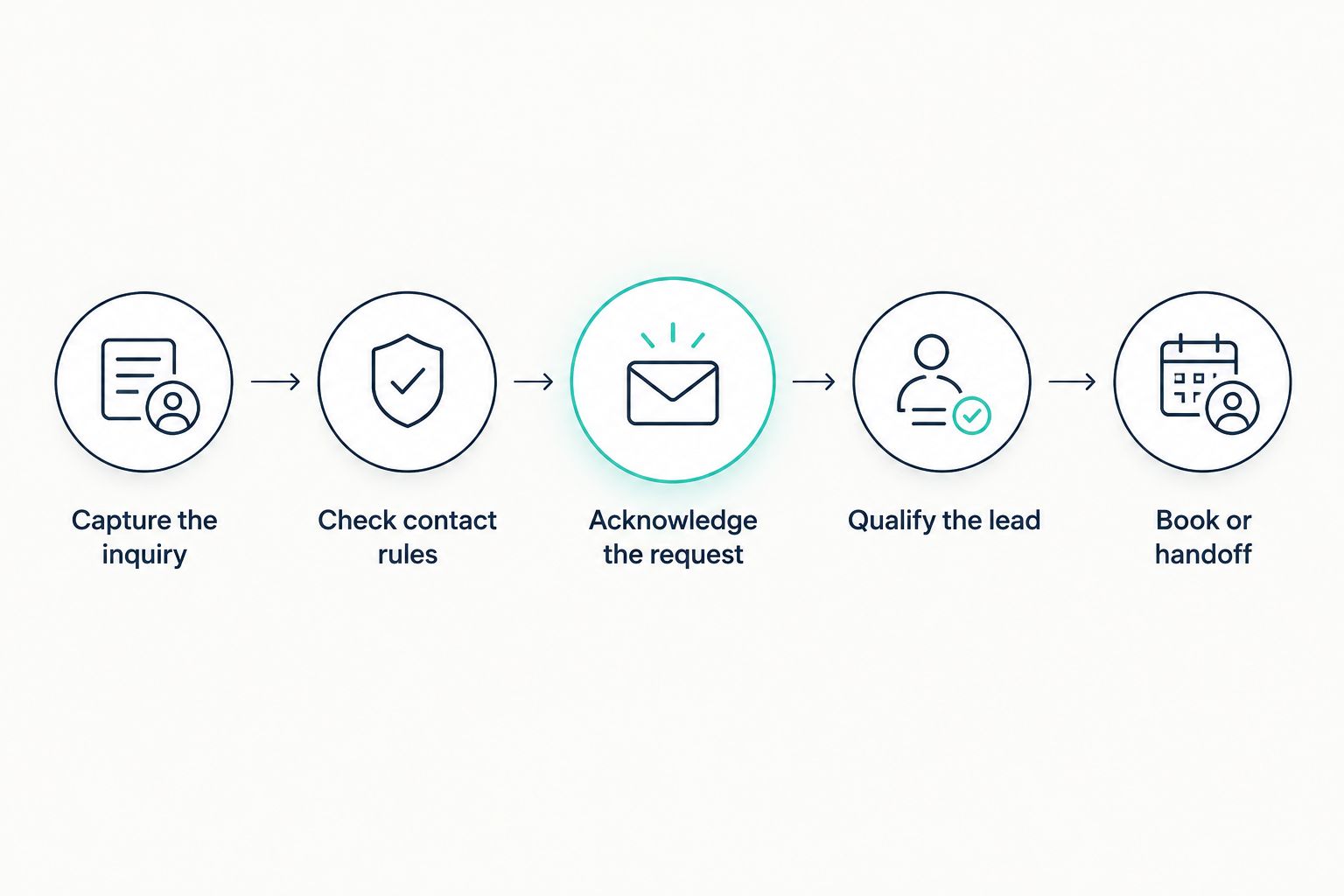
Yes. An appropriately configured system can process a new inquiry outside your working hours and continue a conversation within the boundaries you set. For your 2026 setup, separate the workflow into the following steps rather than treating “automatic follow-up” as a single switch.
Capture the inquiry
Start with a source your chosen system actually supports. That might be a website inquiry or another connected lead source; verify the connection before building the response sequence.
Decide which details the workflow needs to retain. A name, contact method, requested service, and original message give your team useful context. Avoid collecting information simply because a form allows another field.
Check contact rules
Before sending anything, determine whether the person requested a reply through that channel and whether your configured sending window allows it. An incoming inquiry and an older lead sitting in your database are different starting points.
Do not treat after-hours coverage as permission for unrestricted outbound messaging. Establish your contact preferences and suppression rules before activating the workflow, including what happens when someone asks you to stop.
Acknowledge the request
The first response should confirm that the inquiry reached your business and explain the next step. Keep it specific to what the person asked, without pretending a team member has reviewed the request.
For an estimate request, an appropriate acknowledgment explains that the business has received the details and needs additional information before assessing the work. It should not invent an estimate, promise a visit, or suggest that a booking already exists.
Qualify the lead
Ask questions that change the next action. For a service business, those questions can cover the requested work, service location, and preferred appointment window.
Keep the conversation focused. If the answer will not affect routing, booking, or human review, remove the question. When the prospect gives an unclear answer, the workflow needs a defined way to ask for clarification or pass the conversation to a person.
Book or hand off
Offer booking only through a verified scheduling setup that reflects the appointments your business actually accepts. Otherwise, collect the person’s preference and explain that your team will confirm it.
The handoff should preserve the original inquiry, answers already collected, and the next action. A customer should not have to repeat the entire conversation because the automation stopped when the office opened.
Which follow-up approach fits your business?
You do not need conversational AI for every inquiry. Choose the approach based on what needs to happen after a lead arrives, not on how sophisticated the software sounds.
| Approach | Best for | Advantage | Limitation |
|---|---|---|---|
| Manual follow-up | Inquiries requiring personal judgment | A person can assess unusual details before responding | A team member must be available to act |
| Rules-based automation | Predictable acknowledgments and fixed next steps | You control the message and trigger directly | Fixed branches need explicit handling for unexpected replies |
| AI-assisted follow-up | Inquiries requiring conversational qualification | The conversation can respond to the lead’s answers | Instructions, connected systems, and exception handling still need testing |
Use rules for fixed decisions and AI for conversations that need interpretation. Keep people responsible for commitments outside the workflow’s approved scope.
In 2026, evaluate these approaches against the same sample inquiries. A polished demonstration does not establish whether the system handles your service boundaries, incomplete answers, or a request to speak with someone.
Why after-hours follow-up varies
The result depends on the workflow around the AI, not just the wording of its replies. These factors determine what your setup can responsibly do:
- Inquiry source: The source must connect to the workflow and pass along the information needed for a useful response.
- Contact channel: Email, text, chat, and voice require their own supported connections and response rules. Support for one does not establish support for the others.
- Sending window: Separate a response to an active inquiry from a later reminder. Set timing around the customer’s preferences and your approved operating rules.
- Qualification criteria: Define which answers indicate a suitable inquiry, an unsupported request, or a situation requiring a person.
- Scheduling connection: Direct booking depends on verified calendar access and correctly configured appointment rules.
- Human coverage: Specify who owns exceptions and what the customer hears when that person is unavailable.
Write these decisions down before choosing your first message. Otherwise, a friendly opening can lead into a conversation with no reliable next step.
Where AL IntelliFlow fits
AL IntelliFlow is best for service-based businesses seeking AI-assisted lead capture, qualification, follow-up, and appointment booking. Its business-growth platform is organized around three roles: Strategist, Connector, and Operator.
Those roles provide a useful way to think about the work: planning the customer journey, engaging customers, and handling routine operations. Keep the evaluation grounded in your actual inquiry process rather than assuming a role name confirms a particular integration.
AL IntelliFlow’s confirmed lead-management capabilities are relevant to this problem. However, they do not establish that a particular phone system, messaging channel, or calendar connection is ready for your business. Evaluate AL IntelliFlow for lead management separately from AI receptionist capabilities, which require their own verified integrations or configuration.
The benefit is a platform focused on the tasks between an inquiry and an appointment. The boundary is equally important: automation does not remove the need to define your service rules, approve messages, or assign a person to exceptions.
How should you launch after-hours follow-up in 2026?
Begin with a narrow workflow you can inspect from start to finish. Expanding a process before its basic handoff works creates more places for an inquiry to get stuck.
Choose a clear starting point
Select an inquiry source with a repeatable next step, such as a service-request form. Confirm that the information reaches the intended destination and remains attached to the conversation.
Avoid combining every inquiry type immediately. A new estimate request, an existing customer’s complaint, and a supplier’s message need different handling even if they arrive through the same form.
Define the permitted outcome
Decide whether the workflow should acknowledge, qualify, request a preferred appointment time, or complete a booking through a verified connection. Make that outcome explicit.
Also define what the workflow cannot do. For example, instruct it not to agree to unusual work, negotiate an exception, or confirm a team member’s attendance without the required approval.
Write stop and handoff conditions
Stop automated follow-up when its purpose is complete. A booked appointment should not remain in a sequence asking whether the person wants to book.
Other handoff triggers include a request for a human, contradictory details, and a question outside the approved information. Give each trigger an owner and a clear customer-facing next step.
Test the whole conversation
For your 2026 launch, test beyond the first reply. Submit an incomplete inquiry, correct an earlier answer, request an unsupported service, and ask to stop receiving follow-up.
Inspect the resulting record as well as the message. Your team needs to see what happened, what remains unresolved, and who should act next. A good reply cannot compensate for a missing handoff.
Keep useful automation separate from unsupported promises
After-hours follow-up should reduce administrative friction, not create commitments your team has to undo. Give the system approved information about your services and a clear response when that information does not answer the question.
A prospective customer asking whether you serve their location needs an answer grounded in your actual service boundaries. If those boundaries are not configured, the workflow should collect the location for review rather than invent coverage.
The same principle applies to appointment requests. Recording a preferred time is not the same as confirming a reservation. Make the distinction visible in the message and in the record your team receives.
The safest operational boundary is simple: automate the next approved action, not an unsupported business decision. That keeps the workflow useful without presenting it as a substitute for every conversation.
What should you measure after launch?
For a 2026 review, follow each inquiry through the process rather than judging success by the volume of messages sent. More activity is not evidence that the customer reached a useful outcome.
Track whether inquiries entered the workflow, whether responses reached their intended destination, and whether qualification produced actionable information. Then inspect bookings, human handoffs, requests to stop, and unresolved conversations.
Use your own baseline before claiming improvement. Compare equivalent inquiry sources and review the actual conversations behind the totals. If a lead abandoned the process after an unnecessary question, rewriting that step is more useful than adding another reminder.
Also check the morning transition. Confirm that your team can identify open conversations and take ownership without sending a conflicting message. After-hours coverage is incomplete if the next business day begins with uncertainty.
Can AI follow up overnight without disturbing customers?
AI can process inquiries overnight without sending every follow-up immediately. Configure separate rules for internal processing, responses to active conversations, and later outbound reminders.
A workflow can collect and organize an inquiry while holding a message for an approved sending window, if the selected system supports that configuration. Verify that behavior during testing rather than assuming “after hours” means the same thing across every channel.
Can AI book an appointment while the office is closed?
AI can book an appointment outside office hours when a supported scheduling connection and booking rules permit it. Without that verified setup, the appropriate outcome is to capture a preferred time for confirmation.
Keep service eligibility and appointment requirements in the decision. An open calendar slot alone does not establish that every requested job fits it.
Does automated lead follow-up include answering phone calls?
Automated lead follow-up does not automatically include answering phone calls. Voice answering requires an AI receptionist or another configured voice solution, while lead management handles the inquiry and its next steps.
Evaluate these functions separately in 2026. Ask for a demonstration of the exact call-to-follow-up process you intend to use, including what reaches your team afterward.
FAQ
Can AI follow up with leads after hours automatically?
Yes, AI can follow up after hours when incoming inquiries connect to a configured workflow. The setup needs approved responses, contact rules, and a defined booking or human-handoff outcome.
What's the best first workflow for a small service business?
A narrowly defined inquiry-to-response workflow is the best starting point. Choose a supported lead source, ask only necessary qualifying questions, and define who handles exceptions.
Will AI keep messaging someone after they book?
The workflow should stop booking reminders when the appointment is confirmed. Verify that the booking event updates the follow-up sequence, especially when separate systems are involved.
Can I use AI follow-up without an AI receptionist?
Yes, lead follow-up and phone answering are separate functions. You can evaluate a workflow for captured inquiries without assuming it includes live voice answering.
Does AL IntelliFlow support automated lead follow-up?
AL IntelliFlow supports lead capture, qualification, automated follow-up, and appointment booking. Verify the specific channels and connections required for your after-hours workflow before activation.
Can AI guarantee more bookings from after-hours leads?
No, automated follow-up does not guarantee bookings. Evaluate your own inquiry outcomes, conversation quality, and handoff completion rather than assuming a revenue result.
What happens when a lead asks something the AI cannot answer?
The workflow should acknowledge the limit and hand the inquiry to a person. Preserve the conversation and make the next step clear instead of generating an unsupported answer.
One last thing
Your morning handoff deserves as much attention as your overnight reply. Test the workflow from the employee’s side: open the record, identify the customer’s request, find the answers already collected, and determine the next action.
If that process requires searching across disconnected messages, fix it before expanding automation. The goal is not simply to respond while you sleep. It is to leave your business with a clear, useful conversation when work resumes.
Related guides
- How AI appointment scheduling works with your calendar
- Can an AI receptionist qualify leads before a human responds?
- Does an AI receptionist replace a human front desk employee?
Explore AL IntelliFlow and start its free 14-day trial to evaluate lead capture, follow-up, and appointment booking against your business’s actual workflow.