
AI lead follow-up handles unresponsive leads by sending configured reminders, using the original inquiry as context, and routing replies toward a conversation or appointment. A well-designed workflow also pauses when someone responds, stops when continued contact is inappropriate, and gives your team a clear handoff. Silence does not reveal why someone stopped replying, so the system should follow your rules rather than invent an explanation.
- How does AI lead follow up handle unresponsive leads? Through configured reminders, reply handling, human handoffs, and stopping rules.
- AL IntelliFlow supports service-business lead follow-up; verify specific pause, routing, and channel controls before choosing your workflow.
- Use the original inquiry to make follow-up relevant, not to assume why the lead went quiet.
- Judge lead nurturing by meaningful replies and appointments, not messages sent.
How does AI lead follow-up handle leads that go unresponsive?
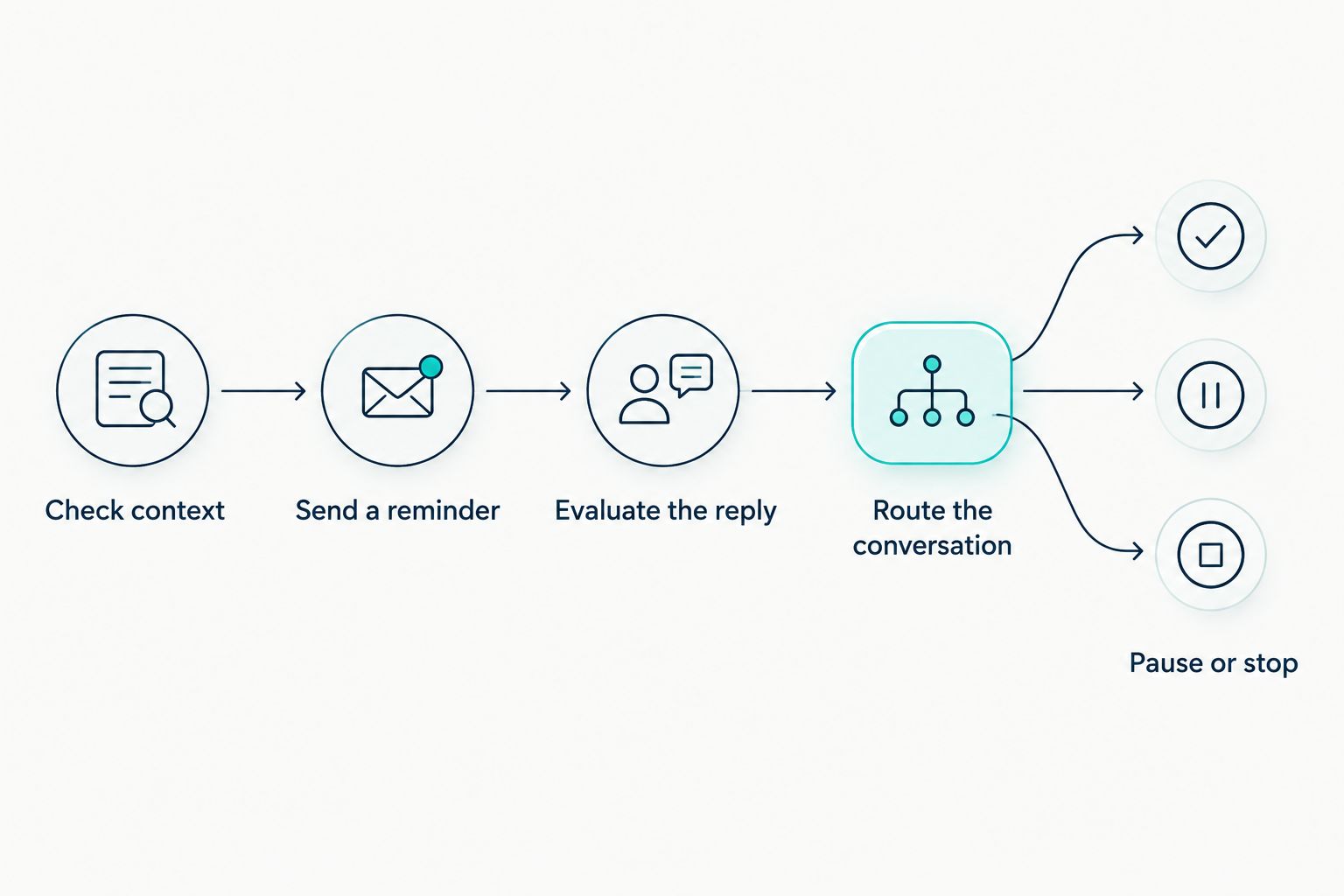
AI lead follow-up should manage the next action, not keep messaging indefinitely. The useful sequence is straightforward: check the conversation, send an appropriate reminder, evaluate any response, and either continue, hand off, or stop.
When comparing AI lead follow-up tools for service businesses, examine those controls before comparing message-writing features. For your 2026 evaluation, ask the provider to demonstrate what happens after silence, a reply, a booking, and a request to stop.
- Check context. Identify what the person requested and whether anyone already answered.
- Send a reminder. Refer to the actual inquiry and offer a clear next step.
- Evaluate the reply. Distinguish a question, an objection, a delay, and a request to end contact.
- Route the conversation. Give a person ownership when the response needs judgment.
- Pause or stop. End the active sequence when its purpose is complete or its stopping condition is reached.
These are workflow requirements to evaluate, not a promise that every platform provides each control automatically. Confirm what your chosen software supports and what requires configuration.
Why this matters
An unanswered inquiry and an unanswered reminder are different situations. The first needs an initial response; the second needs context about what has already happened. Treating both as new leads produces repetitive conversations.
For a service business, the practical problem is ownership. If a prospect replies while your team is busy, someone still needs to know whether to answer a question, prepare an estimate, or arrange an appointment.
Your 2026 follow-up plan should make that responsibility explicit. Automation can handle repeatable actions, but the business must decide what those actions mean and when a person takes over.
What should happen after each kind of response?
Use different paths for different signals. A lead who says the project is delayed should not receive the same next message as someone who asks a detailed question.
| Lead situation | Best for | Recommended next action | Benefit | Limitation |
|---|---|---|---|---|
| No reply after an inquiry | Routine reminders | Send a contextual follow-up within your defined sequence | Keeps the request from being forgotten | Silence does not explain intent |
| Interested, but not ready | Deferred decisions | Record the stated timing and agree on a later check-in | Respects the person's schedule | Requires a reliable way to retain context |
| Asks a specific question | Active conversations | Answer from approved information or assign a person | Moves the conversation forward | Unsupported answers create confusion |
| Raises an unusual objection | Human judgment | Hand off with the conversation history | Gives the prospect a relevant response | Requires an available owner |
| Books an appointment | Scheduling handoff | End the prospecting sequence and use the appropriate appointment process | Prevents irrelevant reminders | Requires booking information to reach the workflow |
| Requests no further contact | Ending outreach | Stop the applicable follow-up sequence | Respects the stated preference | Requires effective stopping controls |
A meaningful reply should change the workflow. If the next message ignores what the person just said, the sequence is not handling the conversation properly.
How should you build the unresponsive-lead workflow?
Build your 2026 workflow around observable events, not guesses about enthusiasm. A submitted inquiry, a received reply, and a completed booking are events; assumed interest is not.
Check context
Start with the service requested, the person's question, and the last message exchanged. Keep the reminder connected to that information instead of adding assumptions about urgency, budget, or personal circumstances.
For example, a cleaning business can refer to the cleaning estimate someone requested. It should not assume the prospect needs an emergency visit or has already chosen a service package.
Send a reminder
Make each reminder useful on its own. Briefly identify the inquiry, explain the next action, and make the response easy: answer a question, confirm continued interest, or discuss an appointment.
Avoid messages that merely announce another attempt to make contact. Repeating the same request without adding clarity gives the prospect no new reason to respond.
Evaluate the reply
Decide which replies your automation can handle using approved business information. Route questions outside that boundary to a person rather than letting the system improvise an answer.
A request for scheduling help differs from a complaint about an earlier visit. Both contain a reply, but they need different handling and different ownership.
Route the conversation
Specify who receives a conversation and what information accompanies it. The handoff should include the original request, the follow-up history, and the issue that needs attention.
Do not assume a notification completes the handoff. Define who accepts responsibility and what happens if that person is unavailable.
Pause or stop
Write the stopping conditions before activating the sequence. Include replies that need review, completed bookings, closed inquiries, and explicit requests to stop contact.
A paused conversation needs a defined next action. A stopped conversation should not restart simply because another routine workflow encounters the same contact.
Why does follow-up handling vary?
There is no useful universal schedule for every unresponsive lead. Choose the workflow around the request and your operating process, then confirm that the software can support it.
- Original request: A general service question needs a different response from an inquiry already waiting for an estimate.
- Conversation stage: A person who has discussed the job has more context than someone who submitted only a short form.
- Stated timing: Use timing the prospect actually provided; do not infer a deadline from silence.
- Supported channels: Confirm which communication methods your platform supports and how activity reaches the lead record.
- Team ownership: Define when staff handle a conversation and who takes responsibility.
- Stopping conditions: Establish what ends, pauses, or changes the sequence before messages begin.
The benefit of tailoring is relevance. The trade-off is setup work: your team must define these conditions and test them rather than accepting a generic sequence unchanged.
What should the follow-up message actually say?
A useful message answers the prospect's immediate question: why are you contacting me, and what do I need to do? Keep the answer close to the original request.
For a hypothetical landscaping inquiry, the reminder can reference the requested estimate and ask whether the person still wants to discuss the work. It should not claim an appointment is reserved or promise an estimate date that your team has not confirmed.
Use this message structure:
- Context: Identify the service or question the person raised.
- Purpose: Explain what the follow-up helps resolve.
- Next action: Ask for a clear response or offer the appropriate next step.
- Exit: Make it easy to say the request is no longer active.
Use context to improve relevance, not to manufacture familiarity. Avoid implying that a staff member personally reviewed a request when no one did. Accurate, ordinary language is more useful than a message that pretends to know the customer's situation.
What should you verify in AL IntelliFlow?
AL IntelliFlow is best for service businesses seeking AI-assisted lead capture, follow-up, and appointment booking. Its confirmed scope includes qualifying leads and streamlining routine operations, organized around the Strategist, Connector, and Operator roles.
For AL IntelliFlow lead follow-up, evaluate how the available setup matches your actual process. Ask for a demonstration of reminder timing, reply handling, staff ownership, booking handoffs, and stopping behavior rather than assuming those details from a general feature description.
The practical fit is its focus on connected lead-management work. The boundary is equally important: that description does not establish specific channel support, automatic objection handling, or every pause-and-resume behavior discussed here.
Also distinguish lead management from an AI receptionist. Answering telephone calls, transferring callers, and interpreting spoken requests are separate capabilities that require their own verification, integrations, or configuration.
How many times should AI follow up before stopping?
Set a defined stopping point instead of choosing an unsupported universal message count. Base the sequence on the inquiry, the prospect's stated timing, and your ability to handle a response.
Review your 2026 setup for sequences that continue without adding useful information. If the next reminder repeats the previous request and has no clear purpose, revise the sequence rather than extending it.
Can AI tell whether an unresponsive lead is still interested?
Silence alone does not establish interest or rejection. Treat the lead as unresponsive until a reply or another relevant event provides clearer information.
A person might be unavailable, undecided, or finished with the search, but the workflow should not assign any of those explanations without evidence. Keep status labels factual and understandable to your team.
Should AI switch channels when someone does not reply?
Do not switch channels automatically just because the person is silent. First confirm that the alternative channel is appropriate for the relationship, supported by your software, and consistent with the person's expressed preferences.
Changing channels also changes the operational setup. Verify how replies are recorded and how duplicate outreach is prevented before introducing another contact path.
How should you test the workflow before using it?
Use controlled test contacts to check the behavior, not just the wording. Your 2026 launch checklist should cover a silent lead, a question, a delayed decision, a booking, and a request to stop.
For each case, inspect the next message, the lead status, and the staff handoff. Confirm that the workflow does not continue prospecting after its purpose has ended.
Also test an answer the system does not know. A useful boundary routes the question for review rather than supplying an unsupported business promise.
Measure outcomes that reflect the workflow's purpose: meaningful replies, appointments, correct handoffs, and unwanted repeated contact. Message volume alone cannot tell you whether follow-up helped the customer or created more work.
FAQ
What happens if a lead never responds to AI follow-up?
A well-designed workflow reaches its defined stopping condition instead of sending reminders indefinitely. Decide whether the inquiry should be closed, paused, or reviewed by a person, and verify that your software supports that action.
Can AI follow-up stop when someone books an appointment?
A workflow can stop after a booking when booking information reaches the system and the stopping rule is configured. Verify the complete path rather than assuming that separate scheduling and messaging tools share the event.
Will AI know why a customer stopped replying?
AI cannot establish why someone stopped replying from silence alone. Use the person's actual messages and observable actions instead of treating an inferred explanation as fact.
Can AI answer questions when an old lead replies?
AI-assisted follow-up can use approved information to support a response when the platform and configuration allow it. Questions outside that information should go to someone who can give an accurate answer.
Does AL IntelliFlow provide both lead follow-up and an AI receptionist?
AL IntelliFlow provides AI-powered lead capture, qualification, follow-up, and appointment booking. Do not assume telephone answering or other receptionist capabilities are included without verifying the required capabilities, integrations, and configuration.
Should I keep sending the same reminder until someone answers?
No, repeated reminders should not replace a defined follow-up strategy. Give each message a purpose, use relevant context, and establish when outreach ends.
What should my team do when an unresponsive lead finally replies?
Your team should respond to the new message and reassess the next action. Pause generic reminders where appropriate, answer the actual question, and assign ownership if the conversation needs human judgment.
One last thing
Test the stop before you test the send. A reminder is easy to notice; a sequence that fails to stop becomes visible only after it sends an irrelevant message.
Before launch, create a test conversation in which the prospect replies, books, or asks to end contact. Check that each event produces the action you intended and leaves your team with a clear record.
Related guides
- New website lead to instant text reply: workflow guide
- How accurate is AI at qualifying leads?
- How does AI appointment scheduling work with my calendar?
Explore AL IntelliFlow and start its free 14-day trial to assess how AI-assisted lead follow-up fits your service business.