
Yes, an AI receptionist can reschedule appointments on its own when its connected scheduling system supports appointment changes and you authorize it to follow defined rules. It must identify the existing booking, check availability, obtain the customer's agreement, and verify the calendar update; answering a call or taking a message does not establish those capabilities.
- Can an AI receptionist reschedule appointments? Yes, with supported calendar access, customer agreement, and configured scheduling rules.
- AL IntelliFlow fits service businesses seeking lead capture, follow-up, and appointment booking; verify receptionist rescheduling separately.
- Automatic rescheduling suits routine changes; staff approval suits exceptions that need business judgment.
- A rescheduling request is not complete until the calendar confirms the change.
Can an AI receptionist reschedule appointments on its own?
Yes—but only within the authority and calendar functions you give it. An AI receptionist needs more than a conversational interface. It needs a supported way to find, modify, and confirm the correct appointment.
For a 2026 software evaluation, separate the ability to discuss a change from the ability to execute it. A system that says it has passed your request to the office has collected a message, not rescheduled your appointment.
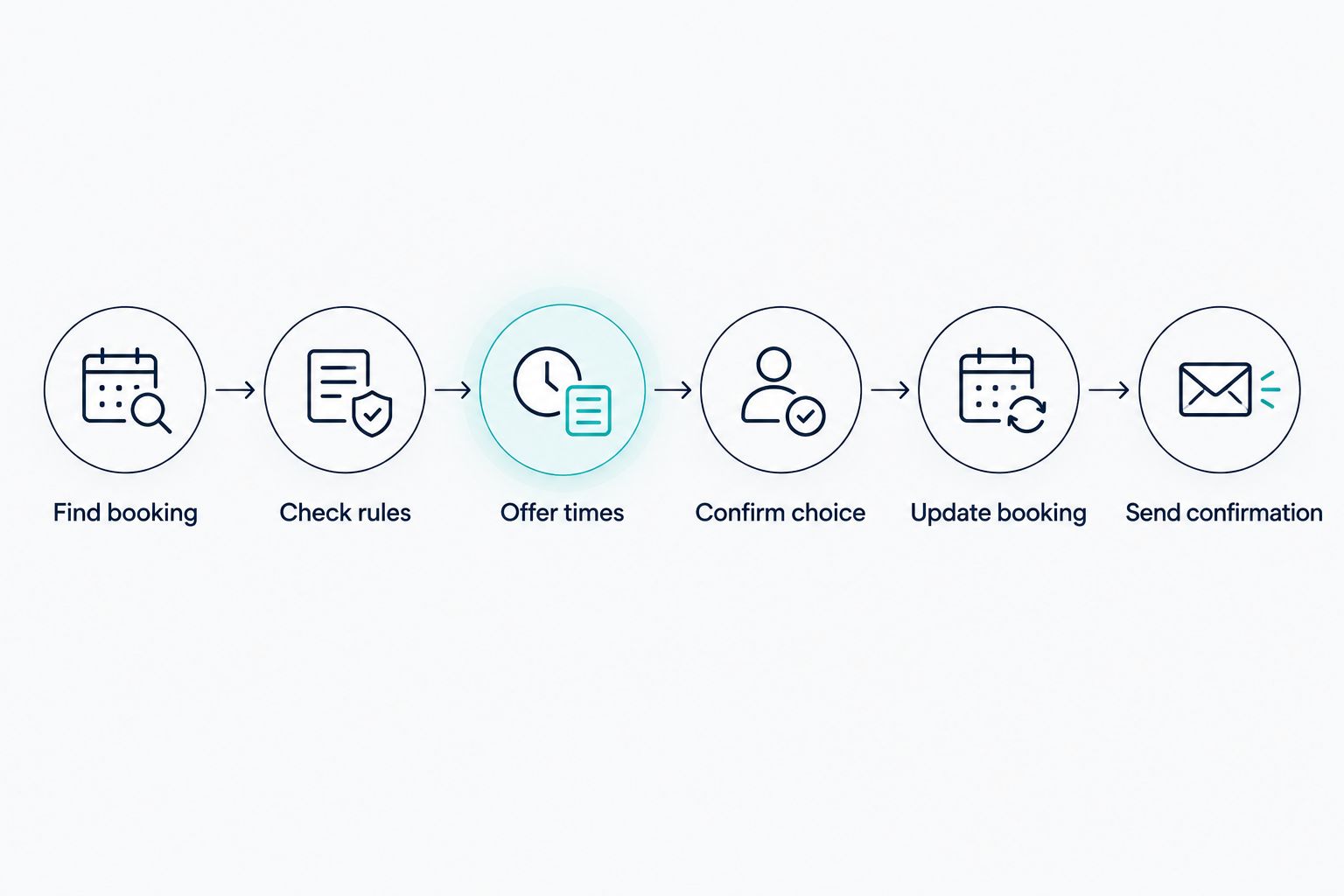
A properly configured workflow should follow this sequence:
- Find booking. Locate the customer's existing appointment and verify that the requester is authorized to change it.
- Check rules. Apply your rescheduling policy, service requirements, and staff restrictions.
- Offer times. Read the scheduling system's current availability and present eligible alternatives.
- Confirm choice. Repeat the selected date, time, service, and location so the customer can agree.
- Update booking. Submit the change and check that the scheduling system accepted it.
- Send confirmation. Provide an accurate confirmation through a supported channel, or explain that staff must finish the request.
The key distinction is calendar access: reading open slots is different from changing an existing booking. The guide to how AI appointment scheduling works with your calendar explains the calendar connection behind this process.
Why this matters
Your customer hears a promise. Your team works from the calendar. If those disagree, someone must resolve the mistake before the appointment begins.
Imagine a customer moving a landscaping estimate to a different day. The receptionist must account for the assigned employee and the service area, not just find an empty calendar slot. An apparently open time is not automatically a workable appointment.
Judge autonomous rescheduling by the booking record, not by how natural the conversation sounds. A polished answer cannot compensate for an unchanged appointment, a duplicate booking, or a confirmation sent before the update succeeds.
Choose how much authority the receptionist gets
Automatic rescheduling, approval-based rescheduling, and message collection are different operating models. None is best for every business. Choose the model that matches the decisions you are willing to delegate.
| Operating model | Best for | What it should do | Advantage | Limitation |
|---|---|---|---|---|
| Automatic rescheduling | Routine changes governed by clear rules | Change an eligible booking after customer agreement | Removes the staff approval step for eligible requests | Requires supported calendar updates and dependable rules |
| Staff-approved rescheduling | Changes requiring business judgment | Collect the request and proposed replacement time for approval | Keeps exception decisions with your team | The customer waits for staff to complete the change |
| Message collection | Businesses evaluating receptionist workflows | Record the request without promising a calendar change | Keeps booking authority with staff | Staff still handles the rescheduling work |
Automatic rescheduling: best for routine changes
Use automatic rescheduling when the service, appointment duration, employee requirements, and change policy are clear. The receptionist should offer only choices that satisfy those constraints.
The advantage is straightforward: an eligible customer request can reach completion without waiting for someone to approve it. The trade-off is that your rules must cover the decisions the system will make. If changing the appointment requires an exception, automatic handling is the wrong path.
Staff-approved rescheduling: best for exceptions
Use staff approval when a change affects something the calendar alone cannot resolve. Examples include moving a visit to a different service address, switching the requested service, or accommodating a customer outside normal scheduling rules.
The receptionist can collect the relevant details, but it should describe the replacement time as a request until staff approves it. That preserves a useful customer conversation without promising an outcome the system has not completed.
Message collection: best for a controlled starting point
Message collection is a practical starting point when you want to understand rescheduling requests before delegating calendar changes. It lets staff review the information the receptionist gathers and identify gaps in your instructions.
Its limitation is equally clear: collecting a request does not remove the scheduling task. Tell the customer who will follow up and avoid wording that makes the original appointment sound canceled.
Why autonomous rescheduling varies
The right question for a 2026 evaluation is not simply whether the receptionist has a scheduling feature. Ask what that feature can change, under which conditions, and how it handles failure.
These factors determine the workflow:
- Calendar permissions. Read access supports availability checks; changing an appointment requires the appropriate supported write access.
- Appointment identification. The workflow must distinguish the intended booking from other appointments associated with the same customer.
- Business rules. Rescheduling restrictions, service duration, employee eligibility, and location requirements define acceptable changes.
- Shared resources. An open employee calendar does not establish that a required room, vehicle, or other resource is available.
- Customer agreement. The receptionist needs a clear selection before changing the booking, rather than treating a question about availability as permission.
- Exception handling. Unclear requests, failed updates, and unsupported changes need a defined route to staff.
Start with the simplest eligible appointment type. Expand automatic handling only after you have verified the booking changes and the exception path for that type.
What should happen when the calendar update fails?
The receptionist should report that the change is incomplete and route the request to staff. It should not send a successful rescheduling confirmation simply because the customer selected a new time.
Preserving the original booking is the operating goal until a replacement is successfully established. Ask the vendor how its workflow protects that booking during a failed change. Do not assume that every scheduling connection handles the sequence in the same way.
A connection error and an unavailable slot also require different responses. A connection error means the system cannot reliably complete the action. An unavailable slot means the selected choice no longer works, so the receptionist needs another eligible option or a staff handoff.
Your customer-facing wording should reflect the actual state: completed, awaiting approval, or unable to complete. Those labels prevent a request from being mistaken for a finished booking.
How do you test autonomous rescheduling before using it?
For your 2026 rollout, test the complete workflow with controlled appointments before allowing it to change customer bookings. A vendor demonstration is useful, but your own appointment rules are the acceptance criteria.
Use this checklist:
- Routine change: Move an eligible appointment and verify the new booking details, including the service and assigned employee.
- Multiple bookings: Give the test customer more than one appointment and check that the receptionist identifies the intended booking.
- Unavailable time: Request a slot that cannot be booked and confirm that the system does not promise it.
- Policy exception: Request a change outside your rules and check that the receptionist sends it for staff review.
- Interrupted request: End the conversation before agreeing to a replacement and inspect whether the original appointment remains intact.
- Failed update: Test the supported failure path and verify that the customer receives an accurate status rather than a success message.
- Repeated request: Submit the same change again and check for duplicate appointments or conflicting confirmations.
Inspect the scheduling record after each test. The spoken response is only part of the evidence; the appointment state is what your team will use.
Keep a simple record of the request, expected action, actual calendar result, and customer-facing response. This gives you a concrete basis for correcting the workflow without relying on whether the conversation sounded convincing.
Where AL IntelliFlow fits
AL IntelliFlow is best for service businesses seeking lead capture, qualification, follow-up, and appointment booking. Its business growth platform is organized around Strategist, Connector, and Operator, with an emphasis on planning, customer engagement, and routine workflows.
Those confirmed capabilities are relevant when inquiries need follow-up and appointments need to be booked. They do not establish that a voice receptionist can independently modify an existing booking in your particular calendar.
For AL IntelliFlow appointment booking, treat autonomous receptionist rescheduling as a separate implementation question. Confirm the required receptionist configuration, supported scheduling connection, update permissions, and handoff behavior before relying on it.
The practical benefit is a focus on the work surrounding customer opportunities. The boundary is equally important: lead management and appointment booking are not proof of every voice-call or calendar-editing capability.
Can an AI receptionist change the assigned employee too?
An AI receptionist can change the assigned employee only when the scheduling system supports that action and your rules authorize it. Rescheduling permission does not automatically include employee reassignment.
For a service business, employee eligibility can depend on the job type or service area. Require the workflow to check those conditions instead of assuming that any available employee is interchangeable.
Will the customer get a new appointment confirmation?
The customer should receive a new confirmation only after the scheduling system verifies the change. The delivery channel depends on what the configured workflow supports.
Review confirmation behavior during your 2026 setup. The message should identify the replacement appointment clearly and avoid leaving the customer unsure whether the original booking still applies.
Can an AI receptionist reschedule without asking the customer?
For a customer-requested change, require clear agreement before the receptionist modifies the appointment. Asking whether another time is available is not the same as authorizing a move.
Business-initiated schedule changes need a separate policy and communication workflow. Do not treat permission to handle incoming rescheduling requests as permission to move appointments whenever the system finds another opening.
FAQ
Can an AI receptionist reschedule appointments automatically in 2026?
Yes, an AI receptionist can reschedule appointments automatically in 2026 when its scheduling connection supports booking changes and your rules authorize them. It must obtain customer agreement and verify the update before reporting success.
Does calendar access mean an AI receptionist can edit my appointments?
No, calendar access does not necessarily include permission to edit appointments. Confirm that the specific connection supports finding and modifying existing bookings, not just reading availability or creating new appointments.
What's the best rescheduling setup for a small service business?
Automatic rescheduling is best for routine changes with clear rules; staff approval is best for exceptions. Start with a narrowly defined appointment type and test the complete calendar update before expanding the workflow.
Can an AI receptionist prevent double bookings?
A rescheduling workflow should check current availability and verify that the scheduling system accepts the selected slot. Test what happens when availability changes during the conversation rather than relying on a general promise about double bookings.
What happens if a customer has several appointments?
The receptionist must identify the specific appointment before changing it. Require confirmation of the relevant service, date, or other booking details so the workflow does not alter the wrong record.
Does AL IntelliFlow include autonomous AI receptionist rescheduling?
AL IntelliFlow's confirmed capabilities include lead capture, qualification, follow-up, appointment booking, and routine workflow support. Verify voice receptionist rescheduling, its scheduling connection, and any required configuration separately.
Can I keep staff approval for certain appointment changes?
Yes, staff approval can be your operating requirement for exceptions. Confirm that the selected workflow supports that handoff and keeps the request clearly marked as pending rather than completed.
One last thing
Test the moment when the customer changes their mind before confirming. A safe workflow must distinguish exploring alternatives from authorizing a calendar edit. That boundary deserves as much attention as whether the receptionist understands the requested day.
For your 2026 acceptance check, inspect the original booking after that conversation. If it changed without clear agreement, revise the workflow before delegating real appointment changes.
Related guides
- How an AI receptionist actually works
- Can an AI receptionist transfer calls to a live person?
- From a missed call to a booked appointment
Explore AL IntelliFlow and start its free 14-day trial to assess its lead management and appointment booking capabilities against your business needs.