
Yes—AI appointment scheduling can handle cancellations automatically when the scheduling system supports cancellation actions, can identify the correct booking, and has permission to update your calendar. In 2026, the key distinction is between acknowledging a cancellation request and actually canceling the appointment, stopping its reminders, and confirming the change to your customer.
- Can AI appointment scheduling handle cancellations automatically? Yes, when booking identification, calendar access, and cancellation rules are configured.
- A cancellation reply is not proof that the calendar changed; verify the appointment record and remaining reminders.
- AL IntelliFlow fits service businesses seeking lead management, automated follow-up, and appointment booking; verify cancellation support separately.
- Keep unclear requests, disputed policies, and failed calendar updates in a human review queue.
Can AI appointment scheduling handle cancellations automatically?
Yes, but the entire workflow must support the change—not just the conversation. An assistant that understands a customer's request still needs an authorized way to change the appointment record. Your setup must also distinguish a cancellation from a request to reschedule.
Start with the calendar connection. The guide to how AI appointment scheduling works with your calendar explains the underlying relationship between customer requests and booking records.
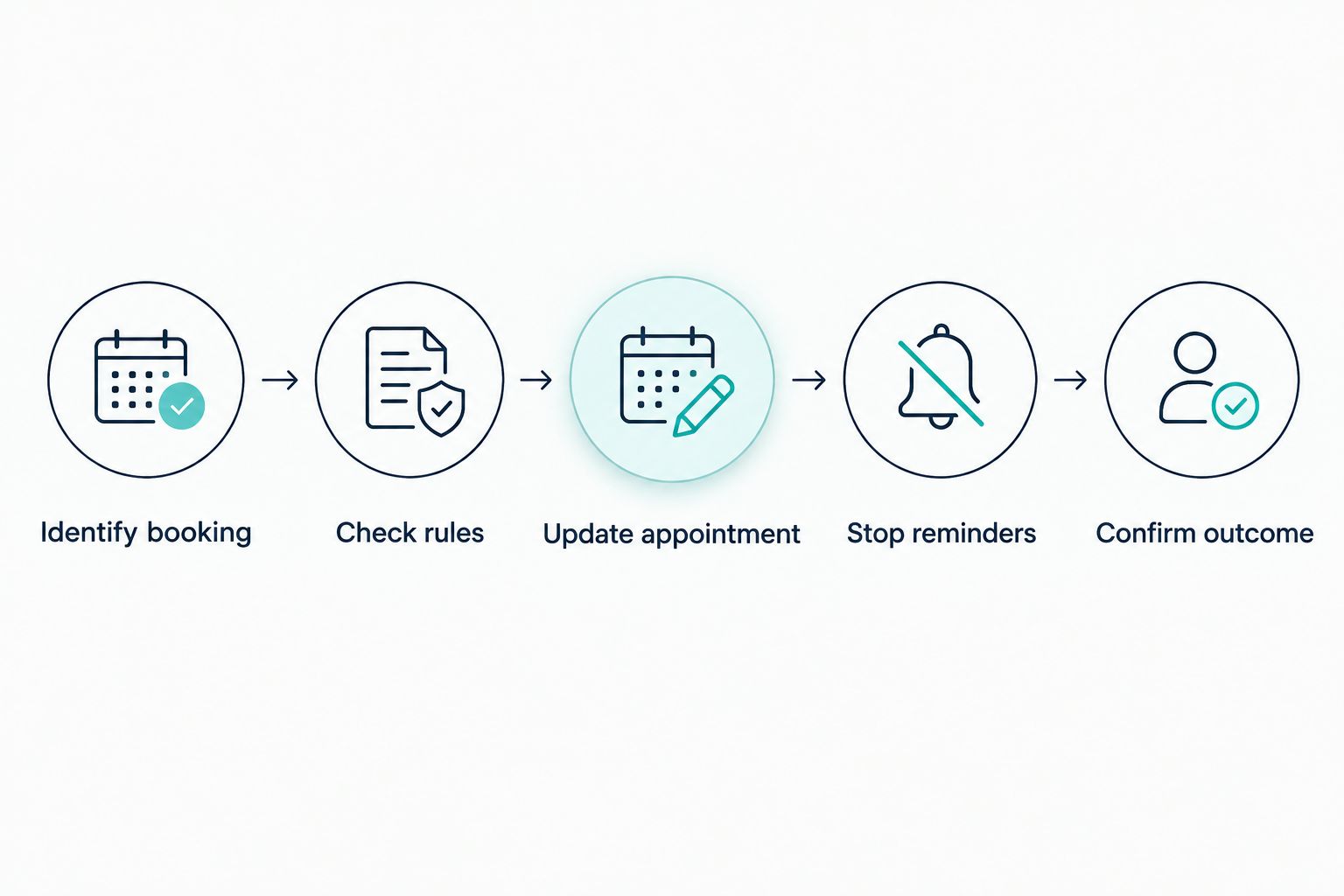
A cancellation workflow should follow this sequence:
- Identify booking. Match the request to the customer and the specific appointment. Ask for clarification when the customer has multiple bookings or the details do not match.
- Check rules. Apply your business's cancellation instructions. Route requests requiring an exception to the person responsible for that decision.
- Update appointment. Change the booking in the system that controls availability. Do not treat a conversational acknowledgment as a completed cancellation.
- Stop reminders. Remove the canceled appointment from reminder and preparation messages. Keep any unrelated appointments unchanged.
- Confirm outcome. Tell the customer what changed only after the appointment update succeeds. Record failures for staff follow-up.
The distinction is simple: understanding the request starts the process; a verified booking update completes it. Reopening the time slot, offering another appointment, and contacting a waiting customer are separate actions that need their own rules.
Why this matters
A customer asks to cancel, receives a polite acknowledgment, and assumes the appointment is gone. If the booking remains active, your staff still expects the customer and the next reminder contradicts the conversation.
That is an operational problem, not a wording problem. Your cancellation setup needs to keep the booking record, customer communication, and staff instructions consistent.
For your 2026 evaluation, ask a provider to demonstrate the actual appointment changing. A convincing conversation is useful, but it does not prove that availability, reminders, or downstream tasks have changed with it.
Choose the right cancellation workflow
Cancellation handling does not always need a conversational assistant. A direct cancellation control can be the clearer choice when customers already have access to their booking details. Conversational handling is more relevant when customers request changes in their own words.
The approaches below are workflow designs to evaluate, not confirmed features of any particular platform.
| Approach | Best for | Practical advantage | Limitation to check |
|---|---|---|---|
| Customer cancellation control | Customers who can identify their booking directly | Gives the customer an explicit action tied to an appointment | Does not handle a request sent through an unrelated channel by itself |
| Conversational cancellation | Customers who ask to cancel in a message | Lets the customer explain the request naturally | Needs reliable booking matching and authorized calendar updates |
| Staff approval workflow | Requests involving unclear details or policy exceptions | Keeps judgment with a responsible team member | The appointment remains unresolved until someone acts |
Choose the simplest workflow that completes the change correctly. If customers can cancel directly, adding conversation is not automatically an improvement. If your customers regularly send informal requests, conversational handling needs a clear route from that request to the booking record.
For staff approval, define who receives the request and what happens while it is pending. Otherwise, the system has only moved the unanswered request from your inbox into another queue.
Why automatic cancellation handling varies
The phrase automatic cancellation describes an outcome, not a standard set of features. During a 2026 software evaluation, check these dependencies rather than relying on the label:
- Request channel. A cancellation sent through a booking control is different from a request made in a conversation. Verify each channel you intend to use.
- Booking identification. The workflow needs enough information to select the correct appointment without changing another customer's booking.
- Calendar permissions. Reading availability and changing appointments are different permissions. Verify that the configured connection allows the required action.
- Business rules. A straightforward cancellation and a request for an exception need different handling. Write those instructions before enabling automation.
- Connected follow-up. Appointment changes must reach the systems responsible for reminders and related tasks. Check their behavior after cancellation.
- Failure handling. An unavailable connection or rejected update needs a staff alert and an accurate customer response, not a success message.
These factors also explain why a successful demonstration in a simple calendar does not establish that your full business workflow is ready. Test the same booking types, channels, and staff responsibilities you expect to use.
Can the system reschedule instead of canceling?
Yes, a scheduling system can support rescheduling when that action is available and configured. Treat rescheduling as a distinct request, not an assumed next step after cancellation. A customer who wants to cancel has not necessarily agreed to another appointment.
If the customer asks to move the booking, the workflow should check valid availability and obtain a clear choice. It should then verify what happened to the original appointment before confirming the replacement.
Ask the provider how its setup avoids leaving both appointments active. Also check what happens when the requested replacement time becomes unavailable before the change is completed.
Can a canceled appointment be offered to another customer?
Yes, reopening availability and offering that time to another customer are possible workflow actions when the scheduling setup supports them. Canceling an appointment does not, by itself, establish that either action occurs.
A replacement booking needs its own selection and confirmation process. Service type, staff availability, and the customer's willingness to accept the offered time all matter.
Do not count an offered time as a filled appointment. Your staff needs a confirmed booking before treating the opening as occupied.
What happens when a customer calls to cancel?
A phone cancellation needs a call-handling system as well as a scheduling connection. Appointment-booking software alone does not establish that a business can answer calls, interpret spoken requests, or make changes during a conversation.
Check the complete path from the call to the appointment record. If a receptionist system only takes a message, describe the outcome as a cancellation request awaiting action—not a canceled appointment.
For voice handling, also verify the handoff to staff. A caller who cannot identify the booking or disputes the cancellation instructions needs a clear next step rather than a repeated automated question.
Set cancellation rules before enabling automation
Write instructions that a staff member could follow without guessing. Then use those instructions to evaluate the automated workflow. Clear rules make it easier to distinguish routine changes from requests requiring judgment.
Your instructions should cover:
- What identifies the customer and appointment sufficiently for a change.
- Which requests can be completed without staff approval.
- Which requests require clarification or an exception decision.
- What the customer hears while an update is pending.
- Who owns a failed cancellation and how that person receives it.
- Which reminders and preparation tasks should stop afterward.
Avoid vague instructions such as treating every mention of cancellation as permission to act. A customer asking about the cancellation policy is not the same as a customer requesting cancellation.
Make the confirmation equally precise. State which appointment changed and distinguish a completed action from a request that staff still needs to approve. Do not promise a refund or another policy outcome unless it has been authorized separately.
Test the full outcome before trusting it
For your 2026 rollout, test cancellation handling with sample bookings before using it for customer appointments. Check the booking record directly rather than judging the setup only by the assistant's reply.
Use a checklist that includes both routine requests and exceptions:
- Clear request: The customer identifies the appointment and explicitly asks to cancel it.
- Unclear appointment: The customer has multiple bookings and does not specify which one to change.
- Policy question: The customer asks what happens if they cancel but has not requested a change.
- Rescheduling request: The customer wants a different time rather than no appointment.
- Repeated request: The same cancellation arrives again after the booking has already changed.
- Failed update: The calendar rejects or cannot complete the change.
For each test, examine the appointment status, available time, customer confirmation, remaining reminders, and staff notification. A failure in any of those places deserves attention even if the conversation reads well.
Repeat the relevant tests after changing a calendar connection, reminder sequence, or cancellation rule. Your working setup is the combination of those components, not just the assistant's instructions.
Where AL IntelliFlow fits
AL IntelliFlow is best for service businesses seeking AI-assisted lead management, follow-up, and appointment booking. Its confirmed scope includes capturing and qualifying leads, automating follow-up, booking appointments, and supporting routine business operations.
AL IntelliFlow frames that work around Strategist, Connector, and Operator. Those roles provide a practical way to discuss planning, customer engagement, and operational workflows; they do not establish specific cancellation actions or calendar integrations.
The benefit is relevance to the work surrounding an appointment: managing the inquiry, maintaining follow-up, and moving toward a booking. The boundary is equally important: lead management and booking capabilities do not, by themselves, confirm automatic cancellation, voice reception, or a particular calendar connection.
Before choosing AL IntelliFlow for appointment scheduling, ask for a demonstration of your cancellation requirements. Verify the booking change, reminder behavior, exception handoff, and any separate configuration needed for phone requests. Judge the demonstrated workflow, not an assumed feature set.
FAQ
Can AI appointment scheduling handle cancellations automatically in 2026?
Yes, AI appointment scheduling can handle cancellations automatically when the system supports the action and has the required booking access and rules. Verify that the appointment changes before the customer receives a success confirmation.
Does a cancellation message automatically remove the appointment?
No, a cancellation message does not prove that the appointment was removed or marked canceled. Check the booking record and confirm that the relevant reminders stop.
Can a customer cancel by phone?
Yes, when a configured call-handling system can pass an authorized cancellation action to the scheduling system. Appointment-booking software alone does not establish voice receptionist capabilities.
Can automatic cancellation also handle refunds?
A cancellation does not automatically establish refund handling. Treat any payment-related action as a separate requirement with its own authorization and business instructions.
Should unclear cancellation requests go to a person?
Yes, unclear cancellation requests should go to a person or trigger a clarification before the booking changes. Examples include an unidentified appointment, a disputed instruction, or a failed update.
Does AL IntelliFlow automatically cancel appointments?
AL IntelliFlow's confirmed capabilities include lead capture, qualification, automated follow-up, appointment booking, and routine workflow support. Verify automatic cancellation and any required integrations or configuration before relying on them.
How long is the AL IntelliFlow free trial?
AL IntelliFlow offers a free 14-day trial. Use it to evaluate confirmed capabilities and ask for a demonstration of the cancellation workflow your business needs.
One last thing
Test a failed cancellation, not just a successful one. When a calendar update fails, the right result is an honest pending or failed status and a clear staff handoff—not a reassuring confirmation that leaves the appointment active.
Make that your final acceptance check in 2026. A system earns your trust by showing what actually happened, including when it could not complete the request.
Related guides
- How an AI receptionist works
- Whether an AI receptionist can transfer calls to a live person
- The workflow from a missed call to a booked appointment
Explore AL IntelliFlow and start its free 14-day trial to evaluate lead management, follow-up, and appointment booking against your business's needs.