
Yes—you can customize what an AI receptionist says when your chosen system supports editable greetings, business information, conversation instructions, and fallback responses. The exact controls depend on the provider and configuration; changing a script does not automatically enable appointment booking, call transfers, or other actions. This 2026 guide explains what to customize, what to verify, and how to test the result before callers hear it.
- Can I customize what an AI receptionist says? Yes, when the receptionist system supports editable scripts and instructions.
- Customize greetings, approved answers, intake questions, and fallback wording; verify each control before choosing a provider.
- AL IntelliFlow supports lead management; voice receptionist capabilities require separate integrations or configuration.
- Test spoken responses and completed actions separately before routing customer calls to the system.
Can I customize what an AI receptionist says to callers?
Yes, but editable wording and permission to take action are different controls. A greeting tells callers who answered. Instructions tell the receptionist how to respond, while connected systems determine whether it can complete a task.
If you need the basics first, read how an AI receptionist actually works. Then use this sequence to turn your business requirements into a testable conversation:
- Write the greeting. Identify your business and explain the receptionist's role without suggesting a human answered.
- Approve the facts. Supply current service information and remove anything staff have not confirmed.
- Define intake questions. Ask for information your team needs to understand the request and follow up.
- Set response boundaries. Specify when the receptionist should stop answering and request staff assistance.
- Test the outcome. Check both what callers hear and what happens to their requests afterward.
Treat these as evaluation criteria, not a promise that every system exposes the same settings. Ask a provider to demonstrate each control using your own example calls.
Why this matters: your script makes promises
A receptionist can sound helpful while creating a problem for your team. Saying an appointment is confirmed is wrong if the system has only collected a preferred time. Saying someone will call shortly creates an expectation your staff must meet.
Your customization work should therefore begin with commitments, not personality. Decide what the receptionist is authorized to promise before choosing a friendly greeting or adjusting its tone.
For your 2026 setup, use your actual operating procedures as the source of truth. If staff cannot consistently honor a statement, remove it from the script. A clear limitation is better than a polished promise your business cannot keep.
What should you customize first?
Start with the parts of a call that determine whether the request reaches the right person. Voice style matters, but it cannot repair inaccurate service information or an unclear next step.
The following are configuration areas to ask about, not confirmed features of a particular platform.
| Configuration area | Best for | Advantage | Limitation to check |
|---|---|---|---|
| Fixed greeting | Consistent business identification | Gives you control over the opening message | Does not govern the rest of the conversation |
| Approved business information | Routine service questions | Gives answers a defined factual source | Requires updates when business details change |
| Conversation instructions | Flexible intake conversations | Defines tone, question order, and boundaries | Exact wording can differ between calls |
| Fallback wording | Unanswered or unusual requests | Gives callers an honest next step | Requires a real follow-up process |
| Action rules | Booking or staff handoff | Connects the conversation to an operational task | Requires supported connections and configuration |
Choose controls based on the calls you need handled, not the length of the feature list. Ask to hear an ordinary inquiry, an unexpected question, and an unsuccessful action before deciding whether a system fits.
Greeting: identify the business and set expectations
Write a brief opening that names your business and describes the help available. Avoid a long list of services before the caller has explained the reason for calling.
Make the assistant's role clear. Do not instruct it to invent a staff identity or imply that it personally inspected a property, spoke with a technician, or reviewed information it cannot access.
Approved information: give answers a factual boundary
Prepare a maintained reference covering the services you actually offer, the locations you serve, and the questions staff can answer without checking elsewhere. Mark information that requires individual confirmation.
A cleaning business, for example, should distinguish a general service description from a commitment to handle a specific property. The receptionist should not turn a broad description into an individualized promise.
Intake questions: collect enough to move the request forward
Ask 1 question at a time as a starting script rule. This gives callers a clear response task and makes the conversation easier to review during testing.
Collect only information that serves a defined purpose. If your team needs a service address before determining whether a request fits, explain that need plainly rather than asking unrelated questions first.
Fallback wording: make uncertainty useful
Define what the receptionist should do when an answer is absent, contradictory, or outside its assigned role. A fallback should acknowledge the limit and offer an approved next step.
Do not replace an unknown answer with a confident guess. Also avoid promising a callback deadline unless your team has explicitly committed to meeting it.
How do I turn a script into a working call flow?
Build the flow around the caller's request rather than a speech you want delivered. Use the sequence below as a planning document, then confirm which parts your selected receptionist system supports.
The basic sequence is Greeting, Request, Intake, Next step, Confirmation. Each stage has a separate job: establish who answered, understand the need, collect useful details, select an authorized action, and summarize the actual outcome.
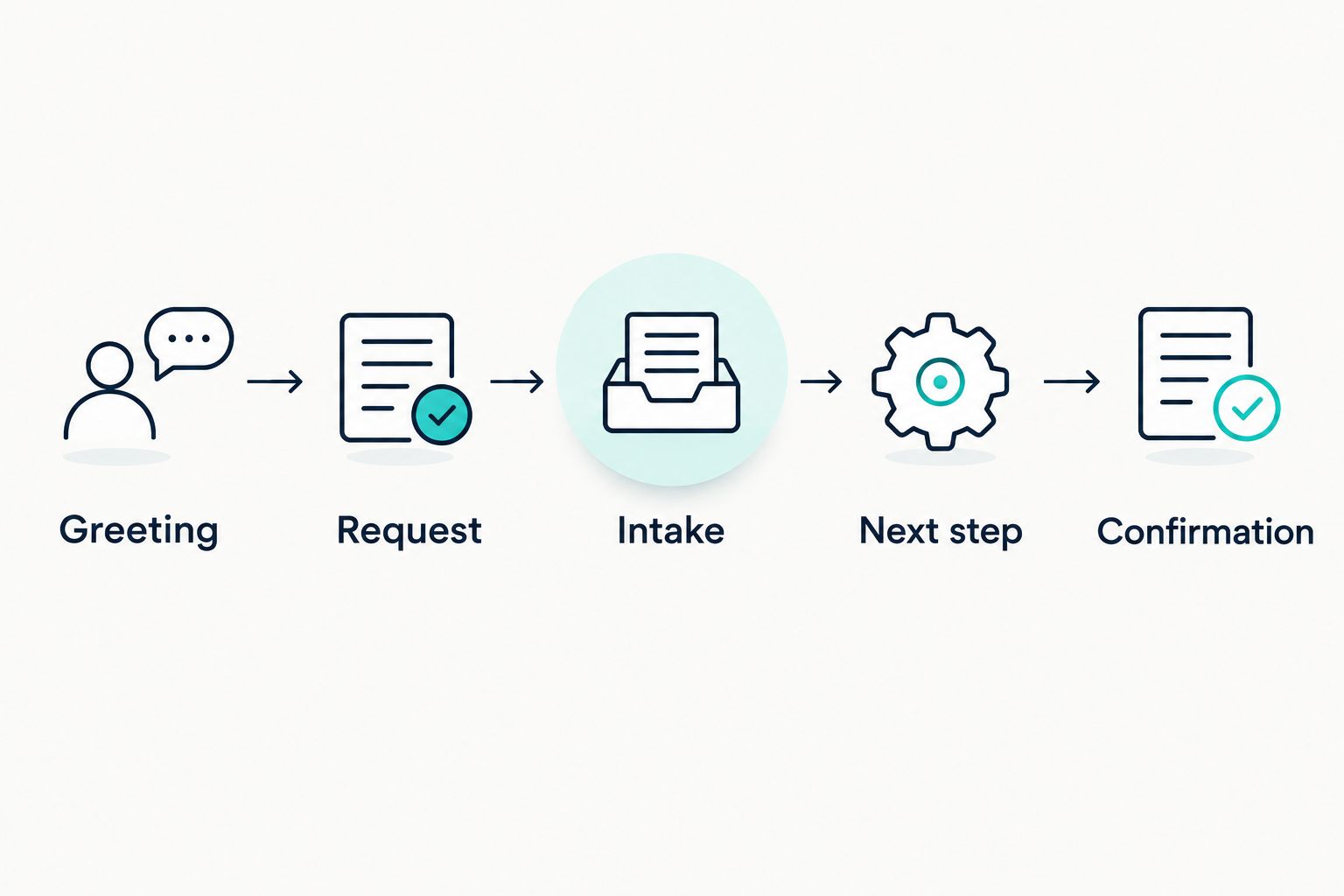
For a landscaping inquiry, the request might concern ongoing maintenance or a separate project. Your intake instructions should distinguish those needs before collecting details that apply to only one of them.
Next, define the authorized outcome. If the setup only passes a request to your team, the closing response should say that the request has been collected—not that work has been scheduled.
Finally, decide what happens when the flow breaks. A caller who changes the subject, corrects an address, or asks for staff should not be forced through questions that no longer fit.
Keep wording instructions separate from action permissions
Write the conversational rule and the operational rule separately. One instruction describes how to explain booking; another determines whether a booking can actually be created.
Use the same distinction for transfers. A sentence offering to connect a caller is not proof that a live transfer is configured, staffed, or successful.
Give someone responsibility for changes
Assign an owner to approve script edits and maintain business information. Otherwise, an outdated answer can remain in place after your team changes a service or process.
Keep a dated copy of the approved instructions. Your 2026 review should compare the live configuration against that copy, not against someone's recollection of an earlier setup.
Why does AI receptionist customization vary?
Customization depends on the controls available and the business process behind them. Evaluate these factors directly instead of assuming that a conversational voice includes every operational capability.
- Editing access: Check whether you can change wording yourself or must request changes through the provider.
- Instruction scope: Confirm whether settings govern only the greeting or also intake, responses, and call endings.
- Information sources: Identify where approved answers come from and who maintains them.
- Connected actions: Verify booking, handoff, and follow-up behavior independently from spoken responses.
- Fallback handling: Check what happens when information is missing or an action fails.
- Testing access: Ask how you can hear and check changes before exposing callers to them.
Request a demonstration using your business scenario. A general demonstration can show that a conversation sounds natural without proving that your instructions produce the right outcome.
Can I make the receptionist follow an exact script?
You can require exact wording only where the selected system provides that control. A fixed greeting and an open-ended conversation are different requirements, so ask the provider to demonstrate both.
Identify which sentences must remain unchanged and which can be paraphrased. If exact delivery is essential to your process, verify the spoken result rather than relying on a written configuration alone.
Can I change what the receptionist says after hours?
After-hours wording requires a system that supports the relevant scheduling or routing rules. Confirm that capability before writing a separate message.
The message should describe what your business actually does outside staffed hours. Collecting an inquiry is not the same as dispatching a person, and recording a preferred appointment is not a confirmed booking.
Can I stop the receptionist from making things up?
You cannot establish reliability simply by adding an instruction to be accurate. Provide approved information, define prohibited commitments, and test questions the reference material does not answer.
Make the fallback response part of the script, not an afterthought. Ask how the system handles conflicting information and requests that exceed its permissions before directing callers to it.
How should I test customization before launch?
Use a small acceptance checklist rather than judging a single friendly demonstration. For a practical 2026 starting point, make 5 test calls covering the situations below; this is a suggested exercise, not a performance benchmark.
- Routine inquiry: Ask about an approved service and check the answer against your source information.
- Unknown answer: Ask something deliberately absent from the reference and check the fallback.
- Corrected detail: Change a detail during intake and verify the final summary uses the correction.
- Staff request: Ask for a person and check the configured handoff or message-taking outcome.
- Unfinished action: Test a booking or transfer that cannot be completed and listen for an honest explanation.
Review the outcome as well as the wording. A courteous closing message does not establish that a request reached the intended destination or that an appointment exists.
Before approving launch, have the person responsible for follow-up check the resulting request. They should be able to understand what the caller wanted and what the receptionist actually promised.
Where AL IntelliFlow fits
AL IntelliFlow is best for service businesses seeking lead capture, qualification, follow-up, and appointment booking support. Its business growth approach centers on three roles: Strategist, Connector, and Operator.
AL IntelliFlow's lead management capabilities are distinct from a configured voice receptionist. Voice answering, script controls, and telephone actions require separate integrations or configuration; do not assume they are included because a platform supports customer engagement.
Define the handoff before choosing the software setup. Your receptionist conversation should produce a usable request, and your follow-up process should give that request a clear next step.
FAQ
Can I customize what an AI receptionist says to callers?
Yes, when the selected receptionist system supports editable greetings, instructions, and approved information. Verify each control with a demonstration using your business scenario.
Can I write my own AI receptionist greeting?
You can write your own greeting when the system supports a custom opening message. Check whether that control applies only to the greeting or to other parts of the conversation too.
Can I make an AI receptionist sound like my business?
You can define the tone you want and evaluate whether the system follows it. Use plain instructions about formality, sentence length, and terminology rather than vague requests to sound friendly.
Can I change the script without changing the voice?
Check whether the provider separates script settings from voice settings. Ask for a demonstration rather than assuming the controls operate independently.
Will changing the script let my receptionist book appointments?
No, changing the script alone does not enable appointment booking. Booking requires supported scheduling access, configured rules, and confirmation that the action succeeded.
What should my AI receptionist say when it does not know an answer?
Your AI receptionist should acknowledge the limit and offer an approved next step. It should not guess or promise a response deadline your team has not authorized.
Does AL IntelliFlow include a customizable phone receptionist?
AL IntelliFlow provides lead capture, qualification, follow-up, appointment booking, and workflow support. Voice receptionist capabilities require separate integrations or configuration, so confirm the proposed setup before treating telephone script controls as included.
One last thing
Test the closing sentence as carefully as the greeting. The opening shapes the conversation, but the ending tells the caller what to expect next. For your 2026 launch checklist, reject any closing message that claims an action succeeded without confirmation.
Related guides
- Can an AI receptionist really answer calls like a human?
- Can an AI receptionist transfer calls to a live person?
- Can an AI receptionist send appointment confirmations by text?
Explore AL IntelliFlow and start its free 14-day trial to evaluate its lead capture, follow-up, and appointment booking support for your business.