Yes—an AI receptionist can send appointment confirmations by text when its setup includes SMS messaging and access to the confirmed booking details. The text can come from the receptionist platform itself or from a connected scheduling and messaging workflow. Answering a call does not automatically mean a system can send texts, so verify the messaging connection, booking trigger, and reply handling before relying on it.
- Can an AI receptionist send appointment confirmations by text? Yes, with SMS support and a confirmed booking trigger.
- Appointment confirmations should use saved calendar details, not an unverified summary of the call.
- AL IntelliFlow suits service businesses seeking lead management and appointment booking; verify receptionist and SMS requirements separately.
- Test new bookings, rescheduling, and failed messages before letting the workflow run unattended.
Can an AI receptionist send appointment confirmations by text?
Yes. The required workflow connects the conversation, the saved appointment, and the outgoing message. A confirmation should follow a successful booking—not merely a caller asking for a time.
For the scheduling side, see how AI appointment scheduling works with your calendar. Calendar access and text messaging are separate requirements; having one does not establish the other.
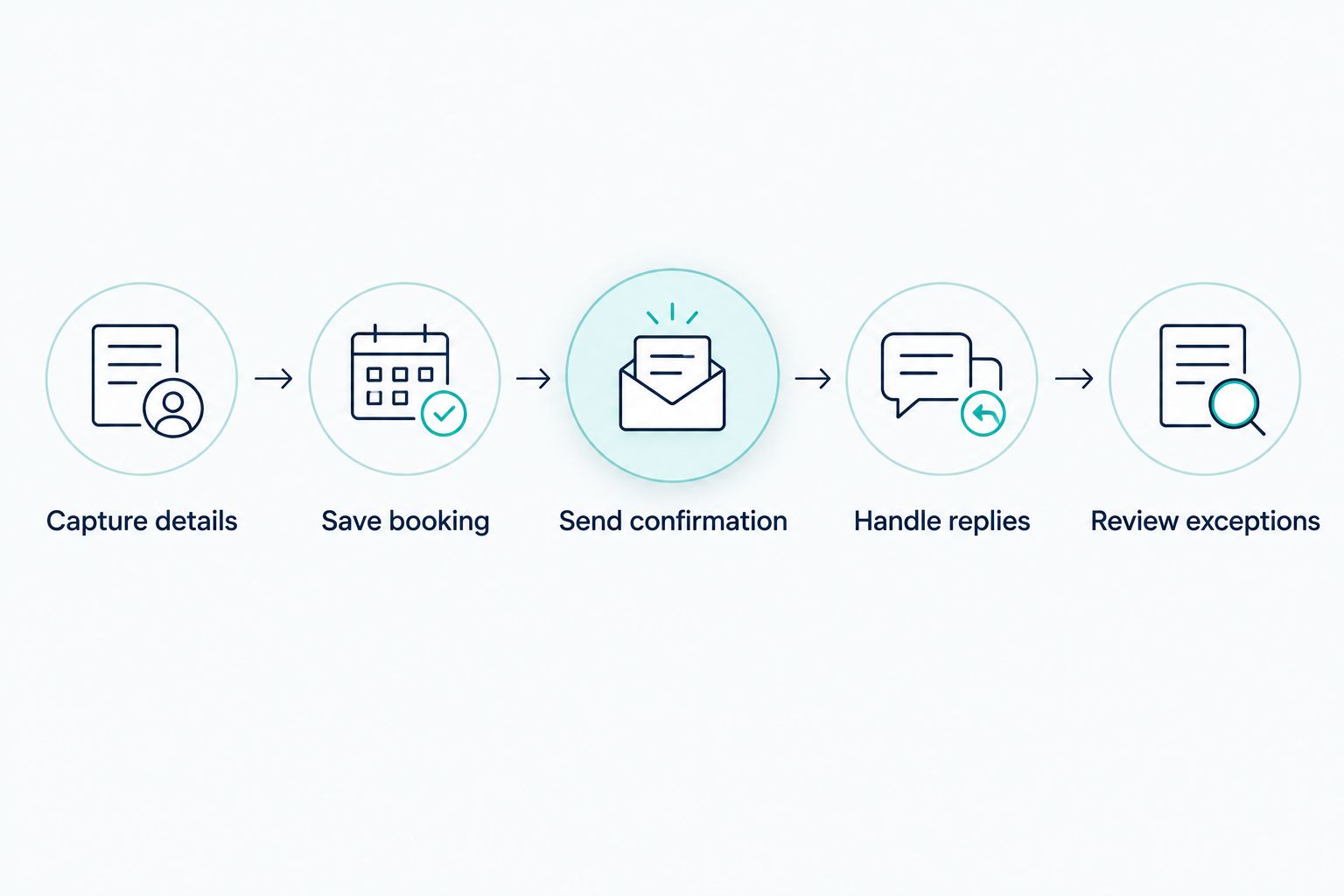
A dependable confirmation sequence follows these steps:
- Capture details. Collect the customer's name, mobile number, requested service, and relevant booking information. Read back important details when the appointment is arranged by phone.
- Save booking. Create the appointment in the calendar or scheduling system that your team actually uses. A requested appointment remains a request until the booking succeeds.
- Send confirmation. Use the saved appointment's date, time, time zone, and location to build the text. Include a clear business name so the recipient recognizes the sender.
- Handle replies. Decide whether customers can confirm, ask questions, or request a change by replying. Assign responsibility for replies that need a person.
- Review exceptions. Give staff a way to identify failed messages, incorrect numbers, and bookings requiring attention. Do not treat an attempted text as proof that the customer received it.
This is the process to ask a vendor to demonstrate in 2026. A conversation demo alone does not prove that the appointment reaches your calendar or that the text reaches the correct phone.
Why this matters
A customer who finishes a booking call still needs something they can refer back to. A text puts the appointment details on their phone without requiring them to remember the conversation or write everything down.
For a service business, the useful outcome is clarity: what was booked, when it happens, and how to request a change. The message should remove uncertainty, not create another conversation your team cannot manage.
Consider a customer booking an on-site estimate. If the text contains the wrong address, an accurate phone conversation has still produced an operational problem. If it says the appointment is confirmed while the calendar shows only a pending request, your team and customer have different expectations.
When evaluating a system in 2026, judge the complete handoff rather than how natural the voice sounds. The booking record, customer message, and staff view should agree.
Which setup sends the appointment confirmation?
An AI receptionist does not need to perform every part of the workflow itself. The important distinction is where the confirmation originates and who maintains that connection.
These are setup options to evaluate, not claims that every receptionist supports them:
| Setup | Best for | Main advantage | Main limitation |
|---|---|---|---|
| Receptionist with built-in SMS | Businesses seeking fewer separate workflow components | Booking and messaging can sit within the same supported setup | You still need to verify booking triggers, replies, and failure handling |
| Receptionist connected to a scheduling or messaging workflow | Businesses keeping an existing appointment system | The saved booking can drive the confirmation | Connections need configuration, testing, and an assigned owner |
| Staff-sent confirmation | Businesses that require personal review before confirming | Staff can check unusual requests before sending | Every confirmation depends on someone completing the task |
Choose the setup that matches your booking process, not the one with the longest feature list. Built-in messaging is useful only if it sends accurate information at the right point. A connected workflow is useful only if your team can maintain it.
Ask where the appointment record lives, which system sends the text, and where replies appear. If the answers point to different systems, ask the vendor to show the handoff between them.
Also identify who fixes a broken connection. Your receptionist, calendar, and messaging service should not leave staff guessing which part failed when a customer reports receiving no confirmation.
What should an appointment confirmation text include?
A confirmation should answer the customer's immediate questions without recreating the entire booking conversation. Keep the message focused on information that is already verified.
Include:
- Business identity: the name the customer recognizes from the booking.
- Appointment details: the saved date, start time, and time zone where needed.
- Service or purpose: enough context to distinguish this appointment from another booking.
- Location: the confirmed address or instructions for finding the meeting details.
- Next action: whether the customer needs to reply or simply keep the message.
- Change instructions: the supported way to request rescheduling or cancellation.
Do not include an instruction to reply unless someone or a configured workflow will handle that reply. A message that invites questions but sends them to an unattended inbox creates avoidable work for the customer.
For an on-site service, verify whether the confirmed time is an arrival window or a fixed appointment. The text should reflect the actual booking arrangement rather than imply a precise arrival time your business has not promised.
For a remote appointment, check that any meeting details come from the saved booking. Do not let a generated message invent a meeting link, address, preparation requirement, or cancellation policy.
Why appointment confirmation behavior varies
Different systems produce different results because they connect different parts of the booking process. In your 2026 evaluation, check these factors before accepting a general claim that a receptionist “supports texting.”
- Messaging support: outbound SMS, inbound replies, and staff visibility are distinct capabilities. Confirm the specific functions you need.
- Booking status: a pending request, a saved appointment, and a staff-approved appointment are different events. Choose the event that should trigger confirmation.
- Calendar connection: the outgoing message needs accurate booking details from the system your team treats as authoritative.
- Customer information: an incorrect number or missing time zone can make an otherwise functioning workflow send an unusable confirmation.
- Change handling: rescheduling and cancellation need their own rules so customers do not retain outdated instructions.
- Exception ownership: failed sends and unanswered replies need a person or an established operational process to resolve them.
These factors are more useful than asking whether a system has an AI label. They describe the actual work your business needs done.
How do you prevent duplicate or incorrect texts?
Give one workflow responsibility for the initial confirmation. If both the scheduling tool and the receptionist send the same message, customers can receive duplicates even though each system is working as configured.
Before activating a new workflow, check the confirmation settings in every connected system. Decide which sender owns the initial message and which sender, if any, owns later reminders.
Then check how the workflow treats changes. An updated appointment should not keep an old reminder active, and a canceled appointment should not continue through the normal confirmation sequence.
Use the calendar record as the source of appointment facts. A conversational summary is useful context, but it should not override the saved time, address, or appointment status.
Can customers reply to confirm or reschedule?
Yes, when the messaging setup supports inbound texts and has a defined process for handling them. Outbound confirmation alone does not establish that customer replies are monitored or that replies can change appointments.
Decide what a reply means before inviting one. A customer's acknowledgment can be recorded without giving the system permission to change the appointment. A request for a different time requires a separate booking decision.
For automated rescheduling, verify that the system checks availability and updates the existing booking. For staff-managed changes, make sure the request reaches the responsible person and that the customer is not told a change is complete before it happens.
Do not equate understanding a reply with completing the requested action. The conversation and the calendar update must both succeed.
Does sending a confirmation mean the customer received it?
No. Creating or sending a message is not the same as proving that the customer received and read it. Messaging systems distinguish between different sending and delivery states, and the information available depends on the provider.
Ask which message statuses staff can see and what happens after a failed send. A wrong number, a number that cannot receive texts, or a messaging failure needs an exception process rather than another assumption.
Even a delivery indication does not establish that the customer read the appointment details. If acknowledgment matters to your business, define how you request it and what staff should do when it does not arrive.
Is an appointment confirmation the same as a reminder?
No. A confirmation records the booking after it is completed; a reminder refers back to the appointment later. They serve different purposes and need different triggers.
The confirmation should establish the agreed details. A reminder should use the current appointment record so it reflects changes made since booking.
For your 2026 setup, inspect both workflows together. A correct confirmation does not help if a later reminder points the customer to a canceled time or an outdated location.
How to test the workflow before using it with customers
Start with 3 test bookings: a new appointment, a rescheduled appointment, and a canceled appointment. These are a practical starting checklist, not evidence that a system is ready for every situation.
For the new booking, compare the calendar entry with the outgoing text. Check the recipient, date, time, service, location, and reply instructions. Confirm that the text is triggered by the completed booking rather than an earlier conversation event.
For the rescheduled booking, inspect both the updated confirmation and any future reminders. The old appointment details should not remain active in the workflow.
For the canceled booking, check that scheduled appointment messages stop. If your process sends a cancellation acknowledgment, verify that it describes the cancellation rather than suggesting the appointment remains booked.
Next, test an incorrect number and a reply that asks for help. Ask 2 staff members to locate the booking, message history, and unresolved request independently. This recommended exercise checks whether the process is understandable without relying on its original setup owner.
Keep a record of the outcomes during your 2026 rollout. Fix failures before expanding the workflow, and repeat the relevant checks after changing calendar settings, message templates, or connections.
Where AL IntelliFlow fits
AL IntelliFlow is best for service businesses seeking lead management, follow-up, and appointment booking support. Its business growth platform is organized around three roles: Strategist, Connector, and Operator.
The practical fit is the work surrounding an inquiry: capturing and qualifying leads, following up, booking appointments, and streamlining routine operations. That scope is relevant when your team struggles to keep customer conversations moving toward a clear next step.
The boundary matters just as much. AL IntelliFlow's confirmed lead management capabilities do not establish native telephone reception, SMS confirmations, two-way texting, or a specific calendar integration. Ask which receptionist and messaging functions require separate integrations or configuration before planning this workflow around the platform.
FAQ
Can an AI receptionist send appointment confirmations by text?
Yes, an AI receptionist can send appointment confirmations by text when its setup includes SMS support and a trigger tied to the confirmed booking. Verify that the message uses the saved appointment details.
Does every AI receptionist include text messaging?
No, telephone answering and text messaging are separate capabilities. Check outbound SMS, inbound replies, and message visibility individually.
Can customers reply to an appointment confirmation?
Customers can reply when the messaging setup supports inbound texts. Verify where replies appear and who handles requests that need staff attention.
Can an AI receptionist automatically reschedule after a text reply?
Automatic rescheduling requires permission and a working connection to the appointment system. Recognizing a request is not the same as updating the booking.
What should I test before enabling text confirmations in 2026?
Start with 3 test bookings: a new appointment, a rescheduled appointment, and a canceled appointment. Then check failed sends and replies requiring staff help.
Does AL IntelliFlow include a built-in AI receptionist and SMS confirmations?
AL IntelliFlow's confirmed capabilities cover lead capture, qualification, follow-up, appointment booking, and routine workflows. Verify receptionist and SMS requirements separately rather than assuming those functions are included.
Will appointment confirmation texts guarantee fewer no-shows?
No, appointment confirmation texts do not guarantee fewer no-shows. They give customers a written booking reference, but attendance remains a separate outcome.
One last thing
Ask the vendor to demonstrate a booking that fails—not just one that succeeds. The system should withhold a confirmation when no appointment has been saved. That single test exposes the difference between a helpful conversation and a dependable booking workflow.
Related guides
- How an AI receptionist actually works
- Can an AI receptionist reschedule appointments on its own?
- Can appointment scheduling handle cancellations automatically?
Explore AL IntelliFlow and start its free 14-day trial. Use the trial to evaluate its lead management and appointment booking fit, and verify the separate requirements for your receptionist and text confirmation workflow.