Yes—an AI receptionist can work with your existing business phone number when your phone provider and receptionist service support call forwarding, number porting, or compatible phone-system routing. Keeping the number does not automatically preserve texting, outbound caller ID, or your current voicemail setup; confirm each separately before changing anything.
- Can an AI receptionist work with my existing phone number? Yes, with supported forwarding, porting, or phone-system routing.
- Call forwarding keeps your current provider; number porting moves your number to another provider.
- Voice calls, text messages, outbound caller ID, and voicemail need separate checks.
- AL IntelliFlow supports lead management; receptionist connections require separate verification and configuration.
Why this matters
Your business number already appears on signs, invoices, saved contacts, and business listings. You do not need to replace that public number just because you want help answering calls.
The decision is about where calls go after someone dials, not whether you need a new number on your website. Before comparing routing options, understand how an AI receptionist actually works, including the distinction between answering a call and completing the follow-up afterward.
For your 2026 setup, write down what must stay unchanged: the public number, staff access to calls, text messaging, and the route to a person. Use that list to evaluate providers instead of accepting a general promise that a service works with existing numbers.
Can an AI receptionist work with my existing phone number?
Yes, provided there is a supported route from your existing number to the receptionist. The 3 routing options below solve different problems. None establishes compatibility with a particular service until both providers confirm the details.
| Routing option | Best for | Main advantage | Main limitation |
|---|---|---|---|
| Call forwarding | Trying reception coverage while keeping your carrier | Redirects calls without transferring the public number | Available forwarding rules depend on your phone service |
| Number porting | Moving the number to a supported new provider | Keeps the public number while changing the underlying provider | Requires transfer coordination and checks on linked services |
| Existing phone-system routing | Businesses already using configurable business phones | Places reception within an existing call flow | Requires compatible routing features and configuration |
Ask the receptionist provider to describe the exact route in plain English. A useful answer identifies who hosts your number, where incoming calls arrive, and what happens when the receptionist cannot complete the request.
Call forwarding: best for keeping your current carrier
Call forwarding sends incoming calls from your existing number to another destination. Your customers continue dialing the number they already know.
Depending on your provider, forwarding can apply to every call or only under supported conditions, such as no answer or a busy line. Ask which conditions your actual plan supports rather than following generic activation instructions.
For example, a service business might want staff to answer first, with unanswered calls passed to a receptionist. That arrangement needs a supported no-answer rule; forwarding every call would produce a different result.
The limitation is control. Your carrier determines which forwarding conditions are available, and a forwarded voice call does not establish that incoming texts also reach the receptionist service.
Number porting: best for changing providers without changing numbers
Number porting transfers your existing number to another provider. Customers keep dialing the same number, but a different provider handles its underlying service.
This option suits a business that intends to change its phone arrangement, rather than simply test an additional answering destination. The receiving provider must confirm that it can accept the specific number.
Do not cancel the current service before the transfer is complete. Coordinate the transfer with the receiving provider and check whether the existing account also supports other numbers or services you need to retain.
Porting is a larger change than forwarding. Confirm voice service, messaging, staff access, and the cutover plan before authorizing it; keeping the digits does not mean every existing function transfers unchanged.
Existing phone-system routing: best for preserving a business call flow
A configurable business phone system can route calls according to rules, menus, extensions, or schedules. Connecting a receptionist through that system depends on the capabilities of both systems.
This approach suits a business that already has a useful call flow. For example, you might want reception coverage for general inquiries while keeping a separate route for existing customers who need a staff member.
The limitation is configuration complexity. Ask the phone administrator and receptionist provider to agree on the connection method, transfer destination, and fallback behavior before making changes.
Why compatibility varies
A claim that a receptionist supports existing numbers is only the beginning. For a 2026 evaluation, get clear answers on these factors:
- Number eligibility: The receiving provider must confirm whether it supports your specific number and location if you plan to port.
- Current phone service: A mobile line, traditional landline, and hosted business phone system offer different routing controls.
- Forwarding rules: Confirm whether your service supports forwarding all calls, unanswered calls, busy calls, or scheduled routing.
- Messaging setup: Voice routing and text-message delivery need separate verification. Do not assume one configuration handles both.
- Transfer behavior: Establish how a caller reaches staff without being sent back into the same reception route.
- Fallback handling: Decide where calls go when the receptionist connection is unavailable or a transfer goes unanswered.
Ask each provider to describe the parts it controls. Your carrier can explain forwarding; the receptionist provider can explain its receiving and transfer requirements. Neither answer alone proves the complete call flow works.
How do I connect an AI receptionist without disrupting calls?
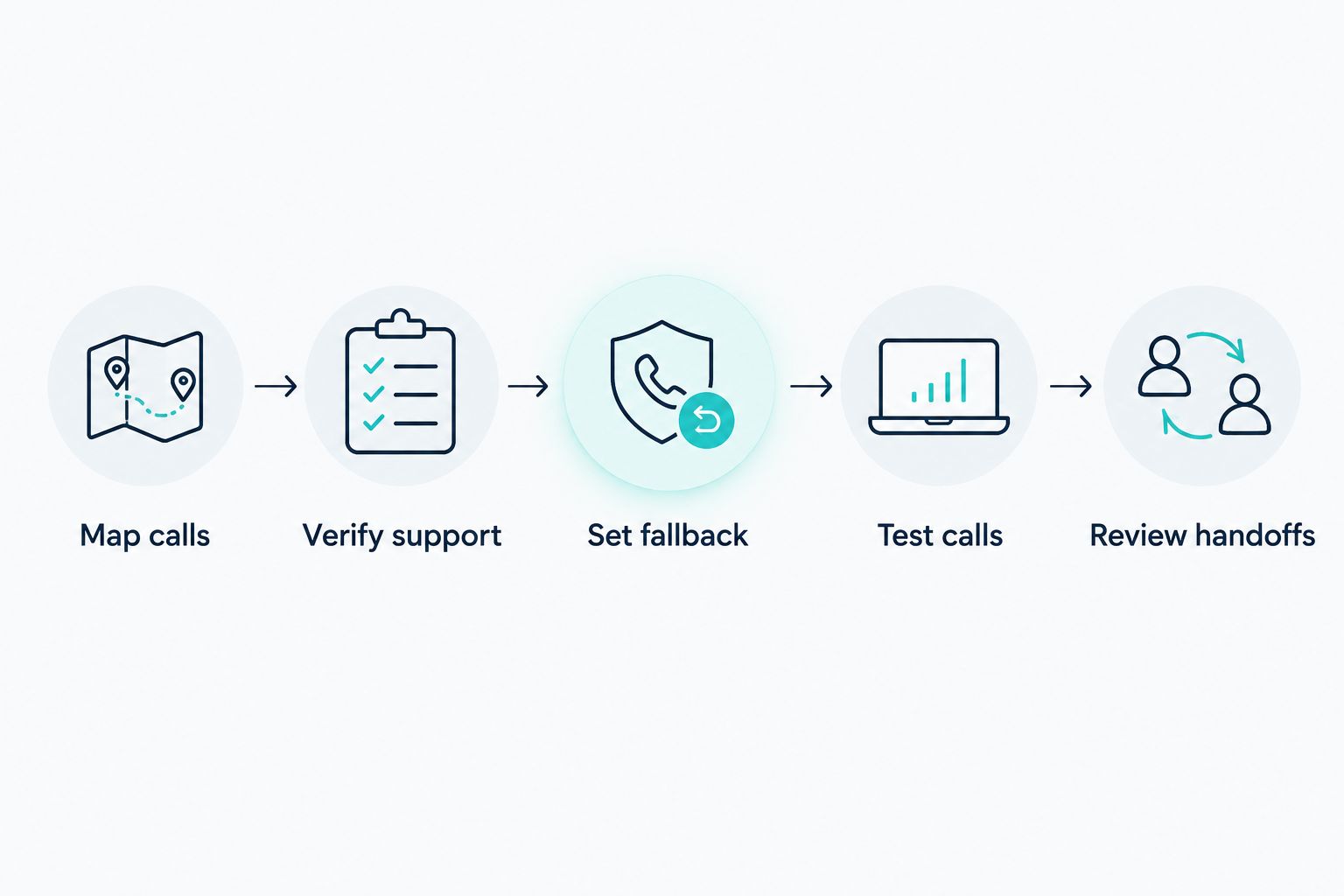
Start with a written call path, then test it before expanding coverage. Treat this as a change to a customer-facing service, not just an account setting.
1. Map calls
List the number customers dial, the provider hosting it, and where calls currently ring. Include voicemail, menus, extensions, and any separate messaging arrangement.
Record who can authorize account changes. This prevents a setup from stalling because the person configuring reception does not control the phone account.
2. Verify support
Give both providers the proposed call path and ask them to confirm it. Request instructions for your specific service rather than using forwarding codes found in an unrelated guide.
Also ask whether the caller's number remains visible after forwarding and what number appears when staff return a call. Inbound routing and outbound identity are separate checks.
3. Set fallback
Choose the destination for calls the receptionist cannot complete. That might be a staff line or voicemail, depending on what your configuration supports.
Do not send transfers back to a number that automatically forwards into the same receptionist. That creates a loop instead of a handoff.
4. Test calls
Place calls from outside your business phone system. Test the route customers will actually use, including unanswered transfers and any time-based rules.
Write down the observed result, not just whether the call connected. A successful connection is not enough if the caller reaches the wrong person or cannot leave a message.
5. Review handoffs
Check what happens after the conversation ends. Confirm who receives the inquiry, what information they receive, and who owns the next action.
Keep a copy of the original routing settings. Before wider use, confirm the process for restoring them if the new arrangement does not behave as intended.
What should I test before switching on reception coverage?
Use this proposed checklist of 6 test calls for your 2026 rollout. These are acceptance checks, not performance claims or a guarantee of reliability.
| Test call | What to verify |
|---|---|
| General inquiry | The greeting is correct and the caller reaches the intended destination |
| Unanswered call | The configured no-answer route actually activates |
| Busy-line call | Busy handling matches the rule your provider supports |
| Staff transfer | The intended person receives the call without a routing loop |
| Unanswered transfer | The caller reaches the agreed fallback instead of a dead end |
| After-hours call | The route follows your configured schedule and time zone |
Mark a test as not applicable when your chosen setup does not include that behavior. For example, an all-calls forwarding arrangement does not need a staff-first no-answer rule.
Test messaging separately if you rely on business texts. Also check returned calls separately: an incoming call reaching reception says nothing about the number a customer sees when someone calls back.
Will I have to change my business number on Google or my website?
No, not when you retain the same public number through supported forwarding or porting. Customers continue dialing the existing number, so those listings do not need a number change solely because the answering destination changes.
Check that the published number still reaches the intended route after configuration. A correct listing cannot compensate for an incorrect forwarding destination.
Can staff still answer calls before the AI receptionist?
Yes, when your phone system supports a staff-first routing rule. Ask about no-answer forwarding or a supported call-flow arrangement rather than assuming every service provides it.
For your 2026 configuration, define who gets the first opportunity to answer and where unanswered calls go. Then test both outcomes from an outside phone.
Will text messages still work on my existing number?
Not automatically: forwarding voice calls does not establish text-message routing. Confirm where incoming texts arrive, who can reply, and which number recipients see.
If you are porting, ask the receiving provider to confirm messaging support and activation separately from voice service. Do not retire your current messaging process until the replacement is verified.
Where AL IntelliFlow fits after the call
AL IntelliFlow is best for service businesses seeking lead capture, qualification, follow-up, and appointment booking support. Its confirmed role is helping businesses manage opportunities and routine workflows—not an assumed replacement for their phone carrier.
AL IntelliFlow organizes its business growth support around Strategist, Connector, and Operator. That framework is relevant when your challenge extends beyond answering: deciding the next action, engaging an inquiry, and keeping routine work moving.
For example, consider a caller requesting an estimate. Answering the phone is one task; recording the request, qualifying the opportunity, and arranging the next step are separate tasks that need clear ownership.
The boundary matters: AL IntelliFlow's confirmed lead management capabilities do not establish native voice answering, number porting, or compatibility with your current carrier. Receptionist capabilities require separate verification, integrations, or configuration. Evaluate the phone connection and the follow-up workflow independently.
FAQ
Can I keep my business number when adding an AI receptionist?
Yes, when your providers support forwarding, porting, or compatible phone-system routing. Confirm the route for your specific number before changing your current service.
Do I need to port my number to use an AI receptionist?
No, porting is not always necessary. Supported call forwarding or existing phone-system routing can connect calls without transferring the number to another provider.
Can I use an AI receptionist with a business cell phone?
Yes, if the mobile carrier supports the required forwarding and the receptionist service accepts that route. Check the forwarding conditions, voicemail behavior, and handling of incoming texts separately.
Will forwarding calls also forward my text messages?
No, voice call forwarding does not itself establish text-message forwarding. Verify the messaging arrangement separately with the providers involved.
Can an AI receptionist transfer callers back to my team?
Yes, if the receptionist service and phone configuration support transfers. Use an appropriate staff destination and test unanswered transfers so callers do not enter a forwarding loop.
Should I cancel my old phone service before porting?
No, keep the current service active while the receiving provider coordinates the transfer. Confirm completion and review any linked services before canceling anything.
How do I check that my existing number works with reception?
Place outside test calls through every route you intend to use. Check the greeting, staff transfers, fallback destination, caller information, and after-hours behavior; test texting separately.
One last thing
Keeping the same phone number does not mean keeping the same call experience. A routing change can alter which voicemail answers, whether staff ring first, and what happens after an unanswered transfer.
Before your 2026 launch, ask someone unfamiliar with the setup to call as a customer. Have them request a person and describe what happened. That exercise checks the experience your configuration is supposed to deliver—not just whether a dashboard shows it as active.
Related guides
- Can an AI receptionist transfer calls to a live person?
- Can an AI receptionist handle multiple phone lines at once?
- How does missed-call text-back work?
Explore AL IntelliFlow and start its free 14-day trial to assess its lead capture, follow-up, and appointment booking support for your business.