
Yes—an AI receptionist can help reduce no-shows when its configured workflow confirms appointment details, reminds customers, and handles requests to cancel or reschedule. Answering calls alone does not solve missed appointments; the system also needs accurate booking information and a clear handoff for unresolved requests. For your 2026 evaluation, judge the complete appointment workflow rather than the receptionist label.
- Can an AI receptionist reduce no-shows? Yes, when appointment reminders and rescheduling connect to accurate booking records.
- AL IntelliFlow supports lead management and appointment booking; AI receptionist capabilities require separate integrations or configuration.
- Compare attended appointments, cancellations, and no-shows—not just calls answered or reminders sent.
- Keep a human handoff for appointment changes the configured system cannot resolve.
Can an AI receptionist reduce no-shows?
An AI receptionist helps address preventable appointment failures only when the booking workflow carries the conversation through to a recorded outcome. A reminder without a usable response path leaves the customer responsible for finding someone who can help.
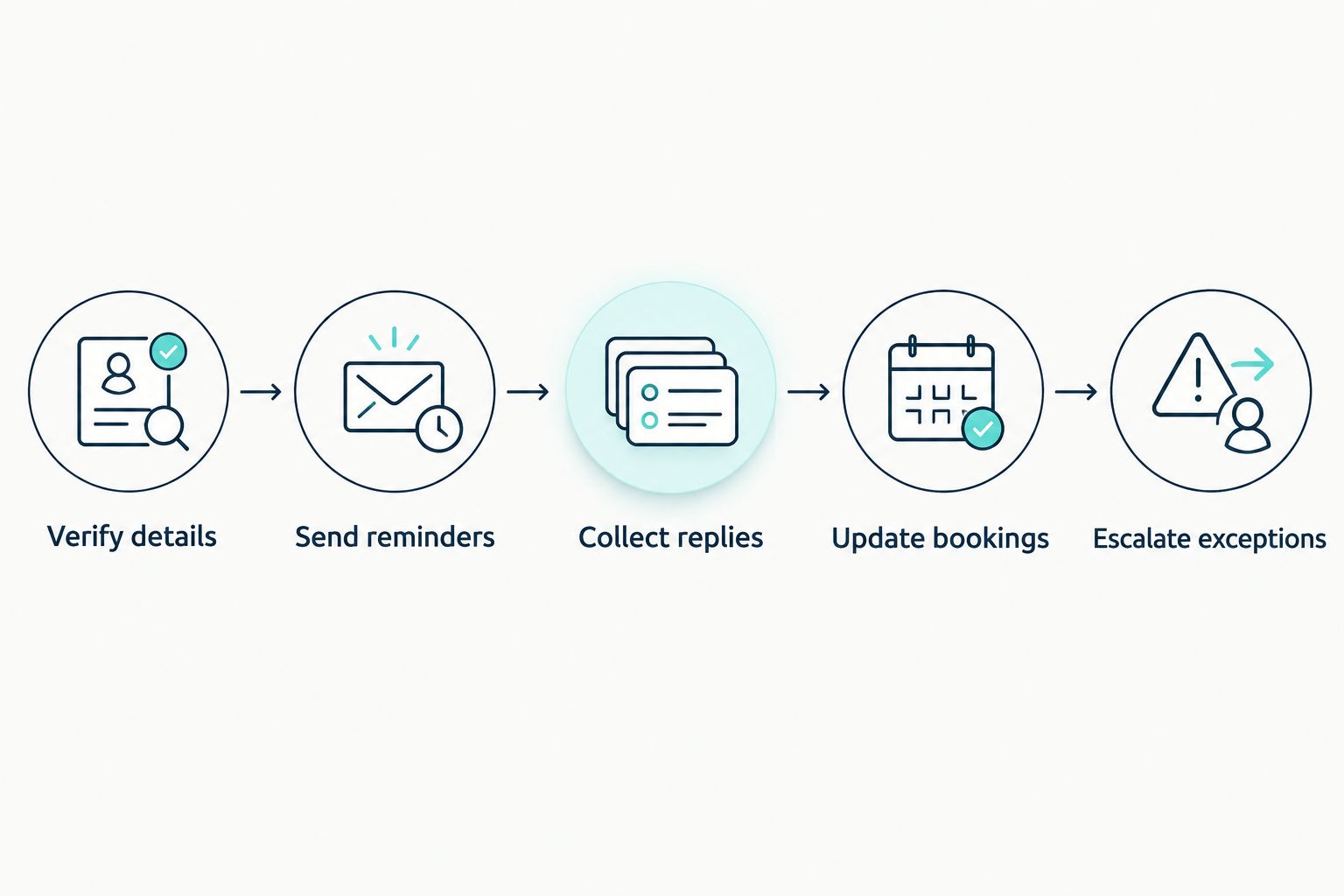
If you are comparing systems in 2026, start with how an AI receptionist actually works. Then check whether the proposed setup supports these five steps, rather than assuming every receptionist includes them:
- Verify details. Confirm the service, appointment date, time, location, and contact information before treating the booking as complete.
- Send reminders. Configure reminders around your actual appointment process and the communication channels the customer has agreed to use.
- Collect replies. Give the customer a clear way to confirm, ask a question, cancel, or request another time.
- Update bookings. Make sure an accepted change reaches the booking record. A conversation about rescheduling is not a completed reschedule.
- Escalate exceptions. Assign unresolved requests to a person who can act before the appointment becomes a missed visit.
These are evaluation requirements, not a claim that every AI receptionist includes them. Ask the provider to demonstrate each step in the proposed configuration.
Why this matters
Your appointment process has separate jobs: securing the booking, helping the customer prepare, and recording what happens next. Treating them as one event hides the places where follow-up stops.
Consider an appliance repair visit. The customer receives a reminder but realizes they cannot provide access at the booked time. If nobody handles that reply, sending another reminder does not resolve the conflict.
Design for the customer's next action, not just message delivery. The practical question is whether your process turns a reply into a confirmed appointment, an accepted change, or an assigned task.
Which appointment follow-up approach fits your business?
You do not need conversational software for every reminder. Choose the approach that matches the requests customers make and the work your team can reliably manage.
| Approach | Best for | Practical advantage | Limitation |
|---|---|---|---|
| Staff-managed follow-up | Businesses needing personal judgment on appointment changes | A person can clarify unusual requests and apply business rules | Staff must remember, send, and record each follow-up |
| Scheduled reminders | Businesses with straightforward appointments and a separate response process | Routine appointment information follows a repeatable schedule | Sending a message does not resolve a customer reply |
| Configured conversational receptionist | Businesses evaluating automated handling of routine appointment conversations | Can connect reminders, replies, and booking actions when those functions are supported | Requires verification of booking access, change rules, and human handoffs |
For your 2026 shortlist, ask each provider to show what happens after the customer says they cannot attend. That demonstration reveals more than a polished greeting.
Staff-managed follow-up
Staff-managed follow-up is best for appointment changes that require judgment. A customer might need a different service, have a special access requirement, or ask for an exception that your business has not authorized software to decide.
The trade-off is the work involved. Give every appointment follow-up an owner and a recorded outcome; otherwise, a conversation can end without the schedule changing.
Choose staff-managed follow-up when judgment matters more than repetition. Keep the process explicit so it does not depend on somebody remembering an informal conversation.
Scheduled reminders
Scheduled reminders are best for straightforward appointment information. They can tell customers what they booked, where to attend, and how to contact you about a change.
Their limitation is the response path. Before adding more messages, check whether replies reach someone who can update the appointment.
Choose scheduled reminders when your main task is repeatable communication. Do not treat a sent reminder as confirmation that the customer will attend.
Configured conversational receptionists
A configured conversational receptionist is best for evaluating repeatable appointment conversations that go beyond sending a message. The relevant capability is not whether the system sounds natural; it is whether it can perform the booking action your business permits.
Separate conversation handling from scheduling authority. A system that understands a rescheduling request still needs a supported way to check availability, accept a replacement appointment, and record the change.
Choose conversational handling only after the complete workflow passes your checks. Keep staff responsible for requests outside the approved rules.
Why no-show results vary
An AI receptionist cannot remove every reason somebody misses an appointment. Its role is to address communication and workflow gaps that your configured system can actually handle.
Review these factors before attributing an attendance change to software:
- Booking accuracy. Incorrect dates, locations, or contact details undermine the follow-up process before a reminder goes out.
- Message clarity. Customers need to understand which appointment the message concerns and what action to take.
- Response handling. A cancellation or rescheduling request needs an owner and an outcome, not just an entry in a conversation history.
- Scheduling rules. The system needs clear boundaries for available appointments, accepted changes, and requests requiring staff approval.
- Record consistency. Your team and the configured system need a shared understanding of the current appointment status.
- Customer circumstances. Reminders do not resolve every change in a customer's plans or ability to attend.
Do not prescribe a universal reminder schedule. Start with your appointment process, then assess whether the timing gives customers a useful opportunity to respond.
What should you verify before turning the workflow on?
Test the exact setup you intend to use in 2026. A feature description does not establish how your calendar, customer replies, and staff responsibilities work together.
Use a routine booking and walk through the process as a customer. Check the appointment details, send a change request through the supported response channel, and inspect the booking record afterward.
Make the booking details unambiguous
Verify that the customer-facing message and staff-facing record describe the same appointment. For an on-site service, include the service address; for a visit to your business, include the correct location.
Check time-zone handling wherever it applies. A correct calendar entry is not enough if the customer receives an unclear appointment time.
Check changes, not just confirmations
Ask what happens when a customer requests a replacement time that is unavailable. The system should not present a requested change as accepted unless the booking process actually accepts it.
Also inspect cancellation handling. Once your business records a cancellation, continuing to send attendance reminders creates a contradiction your team must resolve.
Define the human handoff
Specify which requests require staff and who receives them. Include a way for the assigned person to see the request, act on it, and record the outcome.
Your test is complete only when the handoff reaches the person responsible. A message sitting in a queue is not the same as a resolved appointment request.
How do you measure whether no-shows actually fall?
Measure attendance outcomes, not communication activity. Calls answered, messages sent, and replies received describe the process; they do not establish that customers attended.
For a 2026 evaluation, keep the appointment definitions and reporting scope consistent before and after the change. Record attended appointments, cancellations, reschedules, and missed appointments separately.
Use a no-show rate defined as missed appointments divided by appointments expected to take place. Decide how you exclude accepted cancellations and moved appointments before comparing periods, and apply the same rule throughout.
A customer who reschedules has not attended the original appointment, but that outcome is different from disappearing without notice. Track whether the replacement appointment is eventually attended instead of counting the rescheduling conversation as success.
Look at the underlying reasons as well. If staff record that a customer received the wrong address, fix that information rather than increasing reminder frequency.
Keep other process changes visible. If your team changes booking rules, reminder wording, and follow-up responsibilities at the same time, an attendance change does not establish which change caused it.
Where AL IntelliFlow fits in the appointment workflow
AL IntelliFlow is best for service businesses seeking lead management, automated follow-up, and appointment booking support. Those are confirmed capabilities; voice receptionist functions should not be assumed from the platform's growth-assistant positioning.
AL IntelliFlow presents its business growth assistant through three roles: Strategist, Connector, and Operator. Use those roles as a practical planning lens: define the process, engage the customer, and organize the routine work needed to move an opportunity forward.
The boundary matters. AL IntelliFlow's lead management features are distinct from AI receptionist capabilities that require separate integrations or configuration; verify reminder delivery, reply handling, and calendar changes for your proposed setup.
The fit is lead and appointment workflow support. The limitation is that the confirmed platform description does not establish a complete voice-based no-show prevention system.
Will reminders work if customers cannot reschedule?
Reminders alone do not resolve a scheduling conflict. Give customers a clear path to request a change, and explain when a person must approve it.
A request should remain a request until the replacement booking is accepted. That distinction prevents your team and the customer from acting on different schedules.
Do you need an AI receptionist or better follow-up rules?
Start with better follow-up rules if your team has not defined who handles replies and updates bookings. Automating an unclear process leaves the same decisions unresolved.
Evaluate an AI receptionist when repeatable conversations need a supported response-and-action workflow. Choose based on demonstrated functions, not the label alone.
Does answering more calls prove that no-shows decreased?
Answering more calls does not prove that no-shows decreased. Call handling measures access to your business; attendance measures whether a booked customer arrived or completed the scheduled visit.
Track both separately. Better access and better attendance are different outcomes, even when they belong to the same customer journey.
FAQ
Can an AI receptionist reduce no-shows for a small business?
Yes, an AI receptionist can help address preventable no-shows when its configured workflow supports accurate appointment details, reminders, replies, and booking changes. Answering calls alone does not establish an attendance improvement.
Will every AI receptionist send appointment reminders?
Do not assume every AI receptionist sends appointment reminders. Verify the supported channels, booking information, and reminder configuration with the provider before choosing a setup.
Is an automated reminder the same as an AI receptionist?
No, an automated reminder sends scheduled information, while conversational receptionist handling addresses customer conversations. Whether those conversations can change a booking depends on the supported configuration.
What happens when a customer wants to reschedule?
A rescheduling request needs an accepted replacement booking or a handoff to someone who can arrange it. Receiving the request is not the same as updating the appointment.
How do I know whether appointment attendance improved?
Compare attendance outcomes using consistent appointment definitions before and after the workflow change. Keep cancellations, reschedules, and no-shows separate, and track attendance at replacement appointments.
Does AL IntelliFlow include every AI receptionist function?
AL IntelliFlow's confirmed capabilities include lead capture, qualification, automated follow-up, appointment booking, and routine workflow support. AI receptionist capabilities require separate integrations or configuration and should be verified for the proposed setup.
Can software guarantee that customers will attend?
No, software cannot guarantee attendance. It can support communication and workflow tasks, but it cannot remove every change in a customer's circumstances.
One last thing
An unanswered rescheduling request is an unresolved appointment, not a successful reminder. Inspect those requests before adding more automation.
Choose an upcoming appointment and follow its record from booking through the customer's response. If nobody can tell you who owns the next action, fix that responsibility first.
Related guides
- How AI appointment scheduling works with your calendar
- The workflow from a missed call to a booked appointment
- Can an AI receptionist transfer calls to a live person?
Explore AL IntelliFlow and start its free 14-day trial to evaluate its lead management, follow-up, and appointment booking support for your business.