
Yes—an AI receptionist can support after-hours emergency call handling by taking details and initiating a configured handoff, but only when those functions are verified in the chosen system. It is not an emergency dispatcher, cannot guarantee someone will answer, and must not replace 911 for immediate danger in the United States.
- Can an AI receptionist handle emergency calls? Only as verified intake and escalation support, not emergency response.
- After-hours call handling needs an available human, a backup route, and explicit instructions when transfers fail.
- AL IntelliFlow supports lead management; voice answering and emergency routing require separately verified capabilities.
- For immediate danger in the United States, call 911 rather than waiting for a business callback.
Why this matters
Answering a call and resolving an emergency are different jobs. An automated greeting does not establish that your business has accepted responsibility for a response, dispatched someone, or confirmed an arrival time.
For your 2026 setup, separate ordinary inquiries from urgent service requests and immediate danger. Start with how an AI receptionist actually works, then evaluate the specific handoff functions your provider supports.
Your after-hours process is only complete when the caller knows what happens next—even when nobody answers. A polished conversation without a dependable next step leaves the central problem unresolved.
Can an AI receptionist handle emergency calls after hours?
An AI receptionist can participate in emergency call handling when your selected system supports the required functions and you configure them correctly. Treat it as an intake and routing layer, not as the person who decides whether a situation is safe.
Use these 3 call categories to define your process. They are a planning framework, not a diagnosis or an assurance that software can reliably recognize every situation.
| Call category | Best for | Required handling | Benefit | Limitation |
|---|---|---|---|---|
| Routine inquiry | Appointment requests and general questions | Capture the request and explain the next business response | Keeps ordinary inquiries organized | A scheduled appointment does not provide emergency help |
| Urgent service request | Business-defined issues needing an on-call decision | Attempt a verified human handoff with a backup route | Gives the on-call team useful context | A transfer attempt does not prove someone accepted the request |
| Immediate danger | Callers reporting an immediate threat to safety | Direct the caller to emergency services rather than a business queue | Avoids presenting a callback as emergency response | A business receptionist is not an emergency dispatcher |
A caller's use of the word emergency does not automatically establish which category applies. Equally, the absence of that word does not establish that an issue is routine. Write your routing rules around the caller's stated situation, with a clear route to human help when the system cannot proceed appropriately.
For a 2026 deployment, require a demonstration of the entire call path. Hearing a greeting or seeing a transcript proves only that part of the process works; it does not verify escalation, backup coverage, or the caller's experience after a failed transfer.
Routine inquiries: capture the request without implying urgency coverage
For ordinary after-hours inquiries, your goal is straightforward: record what the caller needs and explain when your business will address it. Appointment requests, questions about services, and requests for a callback belong in this path when no urgent issue is reported.
Ask for the minimum information needed to continue the conversation. A name, callback number, and brief description are useful starting points; additional questions should have a clear business purpose.
Do not describe routine message capture as emergency coverage. If a caller reports an urgent problem during an appointment conversation, your process should stop treating the call as ordinary scheduling and follow the appropriate escalation instructions.
The benefit is organized follow-up. The limitation is equally important: storing a request does not mean anyone has reviewed it, accepted it, or committed to act.
Urgent service requests: require a human acceptance step
For business-defined urgent requests, design the process around a reachable person who can decide what your business will do. The receptionist should not promise a visit, availability, or resolution unless an authorized person has confirmed it.
A property maintenance example makes the distinction clear. A caller reporting water entering a building needs a different route from someone requesting a routine inspection. The automated conversation should not bury both requests in the same ordinary appointment queue.
If your selected system supports live transfers, verify what happens when the destination rings without an answer. Review whether an AI receptionist can transfer calls to a live person, then test the behavior of the actual service you intend to use.
The advantage of a configured handoff is that a human receives context before deciding how to respond. Its limitation is dependence on the receiving team: software cannot create on-call coverage where none exists.
Immediate danger: do not substitute a business callback for 911
In the United States, call 911 for an emergency requiring immediate police, fire, or ambulance assistance. A business receptionist must not present a callback, appointment, or ordinary message queue as a replacement for that help.
Keep emergency instructions direct. Do not require callers reporting immediate danger to finish a sales questionnaire before hearing the appropriate emergency-services direction.
An automated system should not declare that a situation is safe or provide improvised medical advice. Your business call script should stay within its role: explain the business process and avoid creating the impression that emergency services have been contacted.
For your 2026 review, examine the exact wording used when a caller reports immediate danger. Distinguish an instruction to contact emergency services from an actual connection; never imply that a connection occurred unless the system has genuinely completed one.
Why after-hours emergency call handling varies
The answer depends on the phone system and operating process, not just the conversational quality of the receptionist. Evaluate these factors before treating any service as part of an urgent-call workflow:
- Supported functions: Confirm whether the selected system can answer voice calls, transfer them, send notifications, and expose the outcome of each action.
- Routing configuration: Specify which business requests enter the urgent path and which remain ordinary messages. Do not leave these distinctions to an open-ended instruction.
- Human coverage: Identify who receives the request and who covers an unavailable primary contact. A contact list is not an on-call schedule.
- Failed handoffs: Define what happens after no answer, voicemail, a rejected call, or an interrupted connection. Each outcome needs an explicit next step.
- Caller understanding: State whether the request was recorded, whether someone accepted it, and what the caller should do next. Avoid promises the business has not confirmed.
- Operational ownership: Assign responsibility for keeping contacts, coverage, scripts, and routing rules current. An outdated destination defeats an otherwise clear process.
These factors also explain why a successful daytime demonstration is insufficient. After-hours conditions must be tested with the people, destinations, and fallback instructions you actually plan to use.
How should you set up an after-hours escalation process?
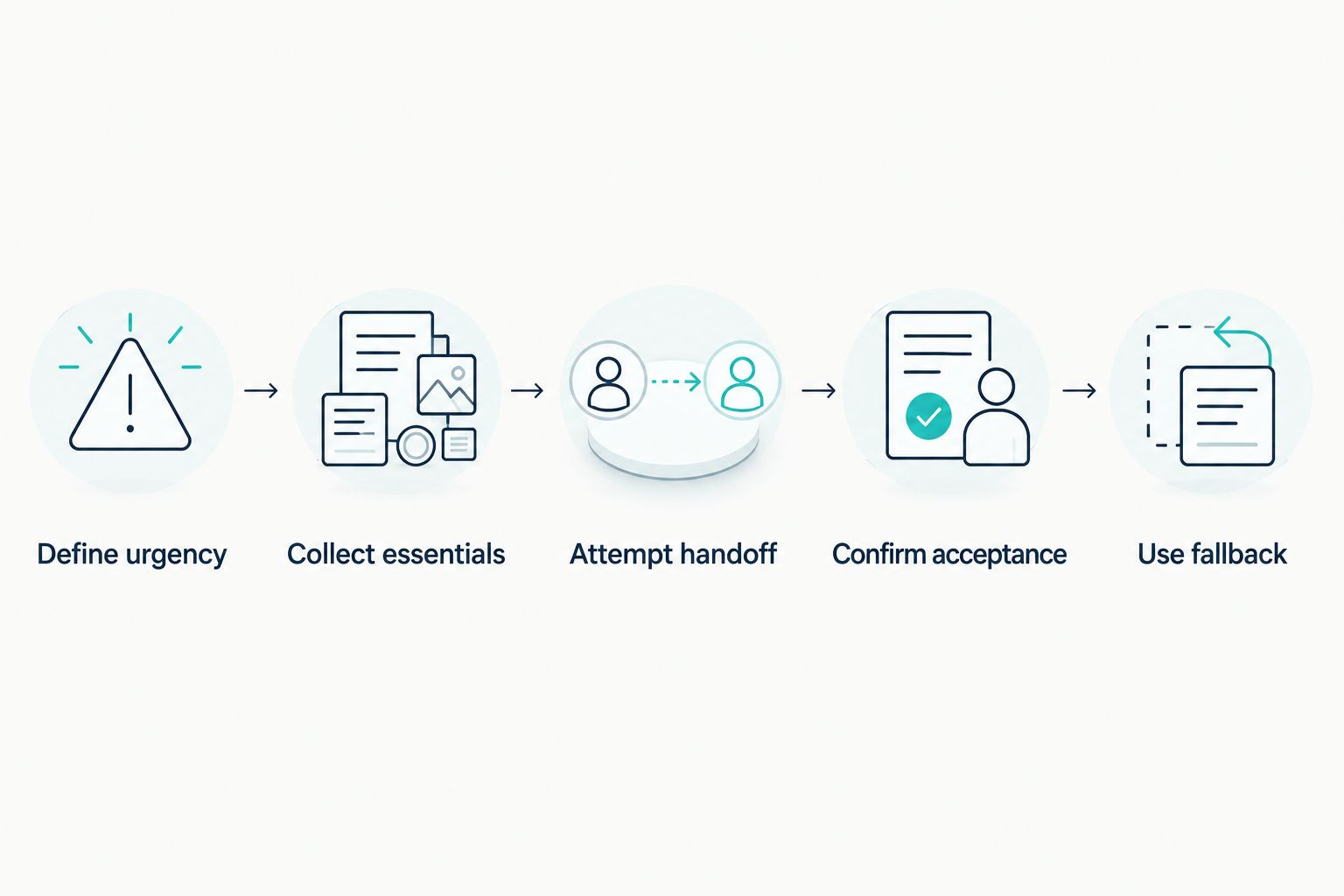
Use this sequence as a design checklist for your provider and team. It describes what to verify, not features available in every AI receptionist.
- Define urgency. Document your business's ordinary requests, urgent service requests, and emergency-services instructions. Keep the categories understandable to callers and staff.
- Collect essentials. Specify the minimum information an on-call person needs. Do not let optional qualification questions delay an urgent handoff.
- Attempt handoff. Use a verified transfer or notification method supported by the chosen system. Define what counts as a successful connection.
- Confirm acceptance. Require evidence that a responsible person has accepted the request before representing it as handled. A notification alone does not establish acceptance.
- Use fallback. Give unanswered calls a defined next step and accurate caller instructions. Do not leave the caller waiting for an unspecified response.
The sequence separates taking a message from accepting responsibility for it. That distinction should remain visible to both the caller and your team throughout the process.
What should you test before enabling after-hours routing?
For a 2026 launch, start with 4 test calls: a routine inquiry, an urgent request with a successful handoff, an urgent request with no answer, and a caller reporting immediate danger. These are recommended test scenarios, not a certification or a complete safety assessment.
For each scenario, listen to the whole interaction. Check the greeting, questions, transfer behavior, failure instructions, and closing statement. A transcript alone does not show whether a caller was left on hold or disconnected during a handoff.
Add ambiguous language to your tests. A caller who says something is wrong without clearly describing it should not receive an unsupported assurance that the issue can wait. Also test a caller who asks for a person rather than continuing the automated conversation.
Approve the failed-handoff experience, not just the successful transfer. Ask your provider to demonstrate how the caller learns that nobody accepted the request and how your team sees that unresolved outcome.
Repeat relevant tests after changing your phone configuration, scripts, or on-call coverage. Record the tested behavior so your business is not relying on memory or a provider's general description.
Where does AL IntelliFlow fit in this workflow?
AL IntelliFlow is best for service businesses seeking lead capture, qualification, follow-up, and appointment booking—not a substitute for emergency response. Its confirmed positioning centers on three roles: Strategist, Connector, and Operator.
In this context, planning, customer engagement, and routine operations sit alongside—not in place of—an urgent-call process. AL IntelliFlow's lead management capabilities can support the ordinary inquiry side of your business without establishing that it answers emergency voice calls or completes live transfers.
The benefit is support for the work that otherwise requires repeated administrative attention. The boundary is voice reception and emergency routing: those capabilities require separate verification, integration, or configuration rather than an assumption based on lead management features.
Keep your 2026 evaluation specific. Ask what is included, what requires a separate service, and what happens when a call cannot reach a person. Assess demonstrated behavior rather than treating a product category as proof of a capability.
FAQ
Can an AI receptionist handle emergency calls after hours?
An AI receptionist can support emergency intake and escalation only when the chosen system's functions and routing are verified. It is not an emergency dispatcher and cannot guarantee a human response.
Should callers contact my business or 911 for immediate danger?
In the United States, callers should contact 911 for an emergency requiring immediate police, fire, or ambulance assistance. A business callback or appointment is not a substitute for emergency services.
Can an AI receptionist transfer an urgent call to my on-call employee?
A live transfer is possible only if the selected service supports it and the routing is configured correctly. Test answered calls, unanswered calls, and the fallback instructions before using that route.
What happens if nobody answers an emergency transfer?
Your process needs a defined fallback when nobody answers, rather than treating the transfer attempt as a completed response. Tell the caller what happened and avoid promising an unconfirmed callback or arrival.
Can an AI receptionist decide whether a situation is safe?
Do not use an AI receptionist as the authority that declares a situation safe. Keep the system within verified intake and routing functions, with appropriate emergency-services instructions and human escalation.
Does AL IntelliFlow provide emergency voice answering?
AL IntelliFlow's confirmed capabilities cover lead capture, qualification, follow-up, appointment booking, and routine workflows. Emergency voice answering and live-call escalation require separate verification and configuration.
What should I test before using after-hours call automation?
Start with 4 test calls: a routine inquiry, an answered urgent handoff, an unanswered urgent handoff, and a caller reporting immediate danger. Check the full caller experience and repeat relevant tests after configuration changes.
One last thing
Ask your provider to demonstrate a failed transfer before showing you a successful one. The fallback reveals whether your process is honest about its limits or simply sounds reassuring.
If nobody accepts the request, the caller must not leave believing help is already on the way. Make acceptance—not answering—the milestone your team checks.
Related guides
- Can an AI receptionist screen calls before they reach your team?
- How does missed-call text back work?
For your routine lead capture, follow-up, and appointment workflows, explore AL IntelliFlow and start its free 14-day trial. Evaluate emergency voice handling separately before making it part of your after-hours process.