
Yes, AI receptionists can speak multiple languages when the voice system supports those languages and is configured to handle them. In 2026, you should verify language recognition, spoken responses, appointment details, and human handoffs separately: a multilingual conversation does not prove the entire booking and follow-up process works in that language.
- Can AI receptionists speak multiple languages? Yes, but spoken language support and multilingual appointment booking require separate checks.
- Test real phone calls, regional accents, language switching, and the information your team receives afterward.
- AL IntelliFlow supports lead management; confirm separate receptionist configuration before assuming multilingual voice capabilities.
- Choose language coverage around your customers, not the longest advertised language list.
Can AI receptionists speak multiple languages?
Yes—but evaluate the complete customer interaction, not just the greeting. A voice receptionist needs to understand incoming speech, interpret the request, and produce an understandable spoken response. Your business also needs the caller’s details to reach the right person or workflow.
These are different jobs. A system that replies fluently still needs to capture a name correctly, distinguish a question from a booking request, and avoid inventing an answer when it lacks business information.
For the underlying process, see how an AI receptionist actually works. When comparing multilingual configurations in 2026, use the following distinctions rather than treating all language support as equivalent.
| Language approach | Best for | Advantage | Limitation to test |
|---|---|---|---|
| Caller-selected language | Businesses with clearly defined language needs | Gives callers an explicit choice | Callers need to understand the selection instructions |
| Automatic language detection | Callers who naturally start speaking in their preferred language | Avoids an initial selection step | Short greetings and mixed-language speech need testing |
| Language switching during a call | Customers who alternate between supported languages | Accommodates changes in language preference | Switching must preserve the original request and details |
| Human language handoff | Requests that exceed the automated system’s scope | Gives callers access to human judgment | Requires an available person or a clear callback process |
These are configurations to ask about, not capabilities every receptionist includes. Buy against a demonstrated workflow, not a category label.
Why this matters for your business
A customer calling about a cleaning appointment should not have to struggle through an unfamiliar language before explaining the job. Offering an understandable conversation removes that communication barrier. It does not, by itself, settle whether your business can fulfill the request.
Imagine a caller who asks about a service in Spanish but gives a street name in English. The receptionist needs to retain the address, understand the requested service, and explain the next step clearly. A polished greeting is only the beginning.
Your team also needs a usable record. If the caller receives a helpful answer but the employee receives an unclear summary, the problem has moved rather than disappeared.
For your 2026 evaluation, define success as a caller reaching the correct next step with accurate information. That is more useful than judging whether the voice sounds impressive during a prepared demonstration.
Caller-selected language: best for predictable language needs
A caller-selected setup asks the customer to choose a supported language before the main conversation. This makes the selection explicit rather than leaving it entirely to speech recognition.
Best for: businesses whose customers primarily use a small, known set of languages. For an English-and-Spanish example, there are 2 languages to validate across the greeting, conversation, and next step—not just the opening menu.
The advantage is clarity: both the caller and system begin with an agreed language. The drawback is friction. A confusing prompt, an unfamiliar menu instruction, or an inaccessible selection method defeats the purpose.
Ask the provider to demonstrate the actual entry point. Can the caller speak a preference, use a phone keypad, or ask to change later? Treat each method as something to verify, not something automatically included.
Keep the opening short. The customer wants help with a service request, not a tour of the system’s capabilities.
Automatic language detection: best for natural opening conversations
Automatic detection attempts to identify the language from the caller’s speech. Where supported, this lets the caller begin in their preferred language without navigating a separate selection menu.
Best for: businesses that want callers to start with their request rather than a language choice. The benefit is a simpler opening; the limitation is uncertainty when the opening contains little useful speech.
A name, a brief greeting, or background conversation does not provide the same context as a complete sentence. Test what happens when the system cannot confidently identify the caller’s language.
The correct fallback is clarification, not an extended conversation in the wrong language. Ask whether the receptionist can confirm the preference and whether callers can correct the selection.
In a 2026 demonstration, bring your own opening phrases. A provider’s prepared example establishes less than a call using the words your customers actually use.
Language switching: best for mixed-language conversations
Language switching means changing the conversation language without starting the request over. It is distinct from offering separate English and Spanish call paths.
Best for: callers who use one language for general conversation and another for particular terms. The advantage is flexibility; the limitation is the need to preserve context accurately through the change.
For example, a caller might describe a cleaning job in Spanish, name a service package in English, then ask for the confirmation in Spanish. Ask the provider to demonstrate that exact pattern if it reflects your customer base.
Check whether the system keeps the service request, address, and contact details intact. Speaking the next sentence in another language is not enough if earlier information disappears or changes.
Do not assume a voice-language switch also changes the language of a confirmation message. Voice, written follow-up, and internal records need separate validation.
Why multilingual receptionist performance varies
Multilingual quality depends on the complete voice workflow. The underlying components and the way your business configures them both matter.
- Speech recognition: The system must convert the caller’s speech into usable information. Test names, addresses, regional pronunciation, and service terminology.
- Language selection: A selected language, automatic detection, and switching are different behaviors. Confirm which behavior your setup supports.
- Spoken output: The reply must be understandable to your customers. Have a fluent speaker assess pronunciation and clarity.
- Business instructions: The receptionist needs approved information about your services and next steps. Language fluency does not supply missing business facts.
- Connected workflows: Booking, messages, and lead records must carry the correct details beyond the call. Check each destination separately.
- Fallback design: The system needs a clear response when it cannot understand or complete a request. Verify clarification, escalation, and callback handling.
A broad language list does not answer any of these questions on its own. Narrower coverage that works for your callers is a better purchasing criterion than unused language coverage.
How do you test a multilingual AI receptionist before choosing one?
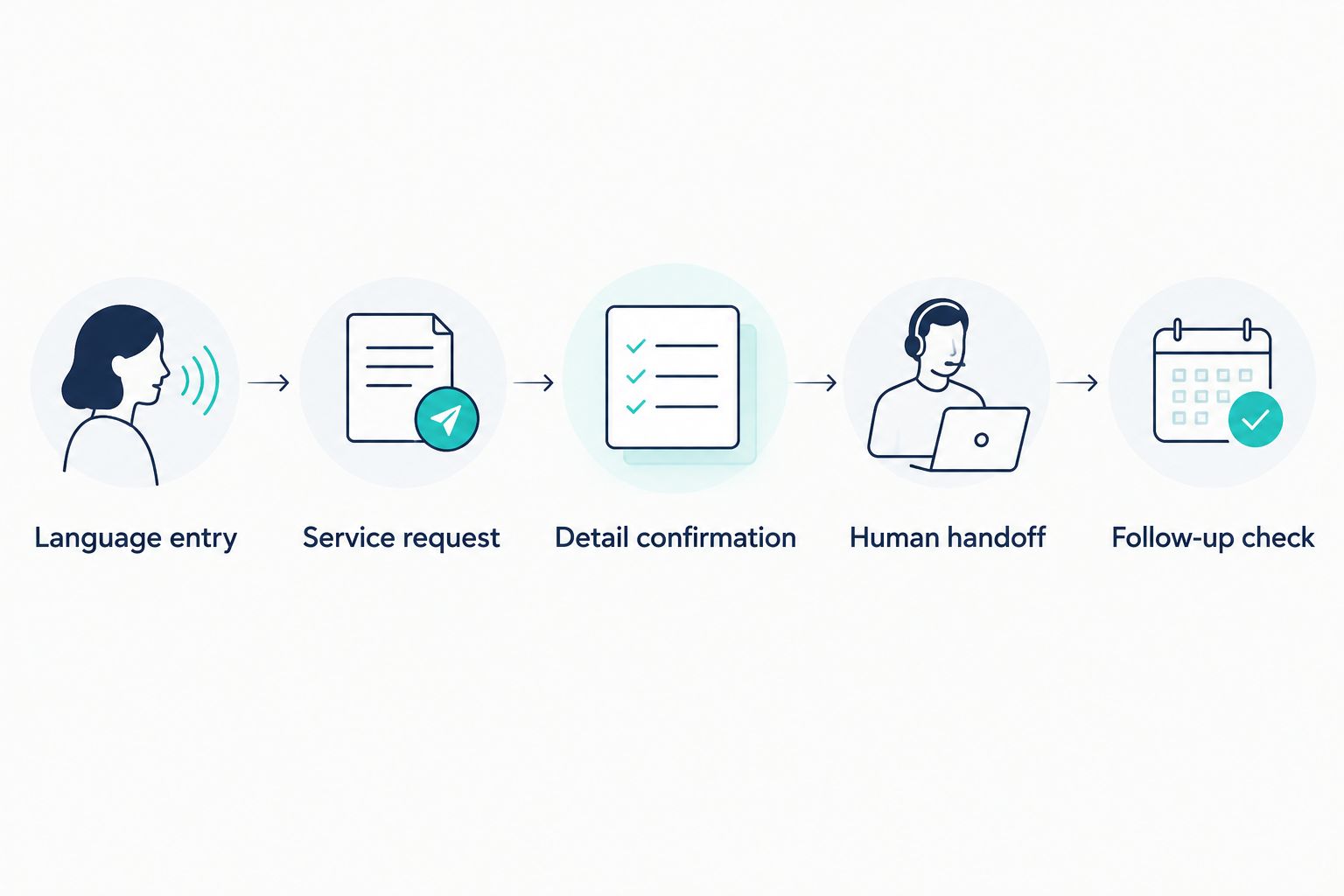
Start with an ordinary customer request and follow it through to the record your team receives. Test the same request in every language you intend to offer, using speakers familiar with how your customers talk.
For your 2026 pilot, use 3 test calls per language as an initial checklist: a routine inquiry, a corrected detail, and a request requiring human help. This is a starting exercise, not a quality guarantee or a substitute for broader testing.
1. Language entry
Call the actual phone entry point. Begin naturally, without telling the system in advance which language you will use unless caller selection is the intended workflow.
Check whether the greeting, selection prompt, and first answer make sense. If the language is wrong, test how easily the caller can correct it.
2. Service request
Ask a question your business receives regularly. Use approved service information as the reference, and check whether the receptionist stays within that information.
Include a realistic follow-up question. A useful test examines a conversation, not an isolated translated sentence.
3. Detail confirmation
Provide a name, callback number, and relevant appointment or job details. Correct something during the conversation and check that the final record reflects the correction.
For dates and times, ask the receptionist to repeat the full appointment details rather than relying on a vague acknowledgment. The spoken confirmation and saved record should agree.
4. Human handoff
Ask for help outside the approved automated scope. Verify what the caller hears and what the employee receives.
If live transfer is unavailable, test the callback process instead. Do not let a promised handoff end with no clear owner or next step.
5. Follow-up check
Inspect the booking, lead record, and any confirmation generated by the tested configuration. Check the customer-facing language separately from the internal summary language.
The final question is practical: can your employee act on the request without making the caller repeat everything?
Can an AI receptionist understand different accents?
AI receptionists can process accented speech, but performance depends on the speech system, caller, and audio conditions. Treat your customers’ accents as test cases rather than assuming a language listing proves equivalent performance across regional speech patterns.
Ask fluent speakers to use ordinary conversational wording. Include background noise and corrections in your evaluation without making the test artificially difficult.
A receptionist that asks a clear clarification question is more useful than one that confidently saves the wrong address.
Can an AI receptionist switch languages during a call?
Some AI receptionist configurations support switching languages during a call; verify it on the actual system you intend to use. Support for multiple languages does not automatically establish support for switching between them mid-conversation.
Test whether the request survives the switch. The caller should not lose the appointment details or have to repeat the original reason for calling.
Does multilingual calling include multilingual follow-up?
No, multilingual calling does not automatically include multilingual follow-up. Spoken responses, written messages, and internal summaries are separate parts of the workflow.
Ask to see the resulting confirmation and lead record. If your employees need an English summary while the customer needs another language, verify both outputs directly.
Where AL IntelliFlow fits in the workflow
AL IntelliFlow is best for service businesses seeking lead capture, qualification, follow-up, and appointment booking support. Those confirmed lead management capabilities are distinct from multilingual voice reception, which requires separate verification of integrations or configuration.
AL IntelliFlow describes its business growth assistant through 3 roles: Strategist, Connector, and Operator. For this use case, think about the business plan, the customer interaction, and the operational next step—not just the voice answering the phone.
The practical benefit of that lead management focus is addressing what happens after an inquiry arrives. The boundary is equally important: do not assume a particular spoken language, automatic detection, live call transfer, or translated message is included without confirmation.
For a 2026 evaluation, separate your requirements into two checklists: what the receptionist must do during the call, and what the lead workflow must do afterward. Then confirm which system owns each task.
FAQ
Can AI receptionists speak multiple languages?
Yes, AI receptionists can speak multiple languages when their voice system supports and is configured for those languages. Verify understanding, spoken replies, and the resulting booking or lead record separately.
Can an AI receptionist speak English and Spanish?
An AI receptionist can speak English and Spanish if both languages are supported in the selected configuration. Test actual calls in both languages rather than relying only on a language list.
Will an AI receptionist automatically know which language I speak?
Automatic language detection is a capability to verify, not a feature to assume. Other configurations ask callers to select a language, and short greetings need a clear clarification fallback.
Can callers change languages in the middle of a call?
Callers can change languages when the receptionist supports mid-call language switching. Test whether the system preserves the original request and confirmed details after the change.
Can a multilingual AI receptionist book appointments?
A multilingual AI receptionist can book appointments when booking is part of its verified configuration. Confirm that the spoken appointment details match the saved booking and customer confirmation.
Does multilingual voice support also translate text messages?
No, multilingual voice support does not automatically establish translated text-message support. Check the language of written confirmations and follow-up separately.
Is AL IntelliFlow a confirmed multilingual AI receptionist?
AL IntelliFlow is described as a lead capture, qualification, follow-up, and appointment booking platform. Verify multilingual voice receptionist capabilities separately through the relevant integrations or configuration.
One last thing
Test the correction, not just the first answer. Have a caller change an address, revise a service request, or ask to use another language after the conversation begins.
That exercise exposes whether the workflow keeps accurate information when a real conversation stops following the script. A natural-sounding voice is useful; an accurate next step is the business requirement.
Related guides
- Can an AI receptionist answer calls like a human?
- Can an AI receptionist transfer calls to a live person?
- How AI appointment scheduling works with your calendar
Explore AL IntelliFlow and start its free 14-day trial to evaluate its lead management workflows for your service business.