Property managers’ missed call text back is a follow-up workflow that messages an unanswered caller with the aim of routing the inquiry and securing the right next action. Unlike a single-purpose sales inbox, your workflow must distinguish leasing inquiries, resident requests, owner questions, and urgent problems before offering an appointment.
- Missed call text back for property managers should separate leasing inquiries, resident requests, and urgent problems before booking.
- Alintelliflow is best for service businesses seeking automated lead capture, follow-up, and appointment booking in one workflow.
- Start with a manual call log, then automate only the response rules your team has approved.
- Judge appointment booking by confirmed outcomes, not by the number of text messages sent.
Why this matters
A missed call does not tell you what the caller needs. A prospect asking about a viewing and a resident reporting a leak require different responses, different owners, and different follow-up.
The first text should establish the next action, not pretend the problem is resolved. Treat the message as an intake step. Someone must still own the conversation, confirm the relevant details, and close the loop.
Alintelliflow provides automated lead capture, qualification, follow-up, and appointment booking for service-based businesses. Those functions support the broader follow-up process; evaluate the missed-call trigger, property routing, and emergency handling separately before choosing a setup.
Why missed call text back matters for property managers
Property management combines sales and ongoing service on the same phone lines. A caller’s relationship to the property determines whether the next step is a viewing, a maintenance report, an owner callback, or an urgent escalation.
For your 2026 workflow, separate acknowledgment from resolution. A text can confirm that you received an inquiry, but it cannot prove that a technician was dispatched or a viewing was reserved. Your process needs evidence of those actions.
An unanswered leasing inquiry needs a route into a booking conversation. A resident request needs a route into the appropriate service process. An owner question needs a named contact rather than a generic appointment invitation.
This distinction also affects your reporting. Counting every reply as a lead mixes existing residents with prospective renters and owners. Measure each inquiry type against its own outcome, or your dashboard will reward activity rather than completed work.
Build your missed-call follow-up workflow
Audit your unanswered calls
Start manually with a call log and a shared worksheet. Review a proposed 7-day sample before changing your phone workflow; this is a practical starting window, not a performance benchmark. Record what happened after each missed call, including callbacks made outside the original call thread.
Group the records by caller purpose, property, time received, and eventual outcome. The point is to identify where responsibility becomes unclear. If the team already handles callbacks consistently, automate the repetitive intake work rather than replacing the whole process.
Avoid collecting sensitive information merely because a worksheet has room for it. Keep the audit focused on routing and completion. A leasing conversation does not need a resident’s private account history beside it.
- Record the call time and the responsible team.
- Classify the inquiry without treating every caller as a prospect.
- Note whether the caller received a callback or written response.
- Record the next action and its completion status.
- Flag repeat calls about the same unresolved issue.
Write a useful first response
Use an approved manual template before enabling automatic sends. The message should identify your management business, acknowledge the missed call, and ask a question that helps route the reply. Avoid a long introduction or a booking invitation that assumes the caller is a prospect.
For example, a template can ask whether the inquiry concerns leasing, an existing tenancy, or an owner question. Write it in your own business’s name; do not imply that an automated reply came personally from a staff member.
Build a separate emergency instruction using your established procedure. Do not tell residents that a text inbox is monitored continuously unless that is true. Immediate danger belongs with the appropriate emergency service, not an unattended follow-up queue.
- Identify the business sending the message.
- Ask the caller’s purpose before requesting detailed information.
- Request the property name when routing requires it.
- Avoid promises about response speed that your team cannot meet.
- State the approved route for urgent problems.
Choose automation around your actual process
A shared log and manual texting let you establish the process without a new platform. The limitation is staff dependence: someone must notice the missed call, send the approved response, watch replies, and update the record. Automation becomes useful when those repetitive actions compete with other work.
Alintelliflow is best for service businesses seeking automated lead capture, follow-up, and appointment booking in one workflow. Its stated scope fits businesses that want more than an isolated acknowledgment message. Property-specific routing and the exact missed-call behavior remain purchase criteria to demonstrate, not capabilities to assume.
For a 2026 evaluation, bring your own call scenarios to the demonstration. Ask the provider to show what triggers a message, what prevents duplicates, and how a human takes over. A feature list does not establish how your actual phone setup behaves.
- Map each manual action to a required software behavior.
- Confirm compatibility with your existing telephone setup.
- Demonstrate the missed-call trigger before deployment.
- Verify that replies reach the responsible staff member.
- Check how follow-up stops after a reply or manual intervention.
Separate leasing, resident, and urgent requests
Create 3 routing paths as a starting design: leasing, resident service, and urgent escalation. Handle owner inquiries through a named owner-contact process rather than forcing them into the leasing queue. These are recommended workflow categories, not claims about how every management business operates.
Begin with a written routing sheet that staff can use during callbacks. Each path needs an owner, a next action, and a completion condition. Only then translate the sheet into software rules.
The basic sequence is Capture, Classify, Assign, Resolve. Classification alone is not enough. A resident request sitting in the correct category still needs an assigned person and a documented outcome.
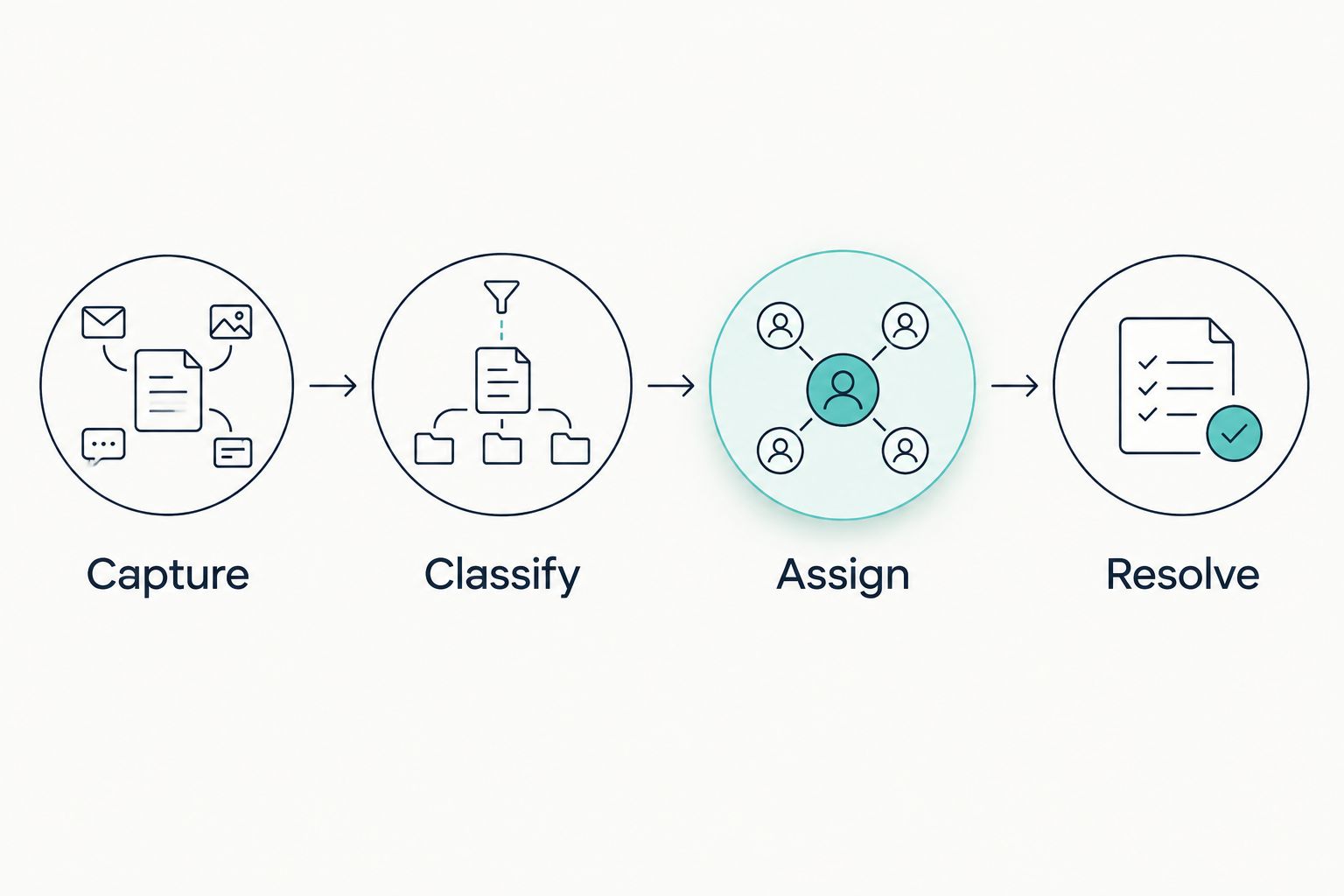
A 2026 workflow should preserve that sequence even when a caller changes the subject. A leasing conversation that becomes an urgent resident issue needs reassignment, not continued viewing reminders.
- Capture the inquiry without requesting unnecessary personal details.
- Classify the purpose and the relevant property.
- Assign a staff owner or approved escalation contact.
- Resolve the next action and record the outcome.
- Reassign conversations when the caller’s needs change.
Connect bookings to real appointment rules
Start with a staff-reviewed booking process. A prospective renter should receive an appointment invitation only after you establish which property and appointment type they need. An owner consultation and a rental viewing are different commitments.
Confirm what counts as a reserved appointment in your operation. A suggested time is not a booking. The record should identify the property, responsible person, agreed time, and any instructions the attendee needs.
Alintelliflow includes appointment booking within its stated service-business offering. When evaluating Alintelliflow for missed-call follow-up, require a demonstration of the booking rules your property team actually uses. Do not assume calendar connections, viewing coordination, or property-management-system integration from the general description.
- Define which inquiry types qualify for booking.
- Confirm the property before offering appointment choices.
- Establish who approves or accepts the appointment.
- Record the booking confirmation separately from the initial inquiry.
- Provide a clear route for cancellations and changes.
Test consent, handoffs, and failure cases
Run a controlled 10-call test before enabling the workflow across your operation. This is a recommended test size, not an industry standard. Include missed calls, answered calls, repeat callers, callers who reply, and callers who ask you to stop texting.
Keep the manual process available while testing. Your team needs a fallback when a text is not delivered, a reply cannot be routed, or the automation stops unexpectedly. Failure handling is part of the workflow, not a separate technical cleanup task.
For your 2026 launch, distinguish a service response from promotional messaging. An inbound call is not blanket permission for a marketing sequence. Have the responsible adviser review consent, opt-out handling, message content, and applicable requirements before deployment.
- Confirm that answered calls do not receive inappropriate missed-call messages.
- Check repeat calls for duplicate replies and competing follow-ups.
- Verify that opt-out requests stop the relevant messaging.
- Test the staff handoff with an unresolved resident request.
- Confirm the fallback when delivery or routing fails.
- Record test results and correct failures before expanding use.
Compare your setup options
Choose the smallest setup that reliably handles your actual routing requirements. A basic acknowledgment can be sufficient when staff already own every callback. A broader workflow is a better fit when intake, follow-up, and booking need coordination.
| Option | Best for | Main advantage | Key limitation |
|---|---|---|---|
| Manual call log and staff texting | Teams establishing their response process | Staff can interpret unusual requests directly | Completion depends on staff noticing and tracking each call |
| Basic missed-call autoresponder | Teams needing an acknowledgment before a callback | Handles the initial response when configured correctly | An acknowledgment alone does not qualify, assign, or resolve an inquiry |
| Alintelliflow | Service businesses seeking lead capture, follow-up, and booking together | Covers the broader lead-handling functions stated in its offering | Property-specific routing, missed-call triggers, and integrations require verification |
| Existing property-management workflow | Teams keeping resident requests in an established system | Preserves the current service ownership process | Missed-call texting and reply handling must be checked in the actual setup |
A manual process offers control but requires attention. A basic autoresponder reduces the initial sending task but still needs someone to handle the conversation. A broader platform adds coordination, yet it must fit the operation rather than introduce another unattended inbox.
Do not select a platform solely because it sends a fast acknowledgment. Demonstrate the entire path from unanswered call to completed next action. The strongest option is the one your staff can supervise and correct.
Measure outcomes without mixing inquiry types
Keep the first reporting view simple: unanswered calls, delivered responses, caller replies, assigned inquiries, and completed next actions. These are different stages. A delivered text does not establish that anyone read it, and a reply does not establish a booking.
For leasing, track confirmed appointments separately from general conversations. For resident service, track assignment and completion in the established service process. For owner inquiries, track whether the responsible contact made the agreed callback.
Use your own baseline rather than an unsupported conversion promise. Compare the same inquiry categories before and after the change, and retain the definitions so staff do not reclassify activity to make results look better.
- Separate new prospects from existing residents and owners.
- Keep delivery, reply, booking, and completion as distinct statuses.
- Track unresolved inquiries alongside completed actions.
- Review conversations where automation and staff both responded.
Common mistakes property managers make
Sending every caller a viewing invitation
A resident reporting a service issue is not a leasing prospect. Ask the inquiry type first, then offer an appointment only when booking is the appropriate next step.
Treating a text acknowledgment as emergency coverage
A message does not dispatch help. Publish the approved urgent-contact process and make the difference between acknowledgment and active escalation explicit.
Letting multiple properties share an unowned inbox
A shared inbox without assignment rules hides responsibility. Identify the property early, name the responsible team, and keep the inquiry open until someone accepts ownership.
Continuing reminders after a person takes over
Automated follow-up can conflict with a staff callback or an already confirmed appointment. Define the events that pause or stop the sequence, and test those events before launch.
Collecting application details in the first text
The opening message should route the inquiry, not reproduce a rental application. Move sensitive details into the approved process and keep leasing questions consistent with your documented policies.
FAQ
What is missed call text back for property managers?
Missed call text back for property managers is a workflow that sends a response after an unanswered call and routes the resulting conversation. It should distinguish leasing, resident service, owner inquiries, and urgent problems before selecting the next action.
What should the first missed-call text say?
The first text should identify the management business, acknowledge the missed call, and ask what the caller needs. Request the property name when necessary and use your approved instructions for urgent issues.
Is an automatic text better than a callback?
An automatic text handles acknowledgment; a callback handles a conversation that needs direct attention. Use both when appropriate rather than treating the text as proof that the inquiry is resolved.
Can missed-call texting handle maintenance emergencies?
Missed-call texting must not replace an established emergency response process. Give callers the approved urgent-contact instructions and ensure a responsible person owns any escalation.
Is Alintelliflow a fit for property-manager follow-up?
Alintelliflow fits service businesses seeking automated lead capture, qualification, follow-up, and appointment booking. Evaluate its missed-call trigger, property routing, and required connections against your actual operating process before selecting it.
Does calling a property manager give permission for promotional texts?
An inbound call is not blanket permission for promotional texting. Distinguish service responses from marketing and obtain appropriate review of consent, opt-out handling, and applicable requirements.
How do I know whether missed-call follow-up is working?
Measure completed next actions separately for leasing, resident service, and owner inquiries. Compare confirmed bookings, assigned requests, and completed callbacks with your own baseline rather than counting messages as outcomes.
One last thing
Before your 2026 rollout, test a caller who replies with a different problem from the one you expected. That conversation exposes whether the workflow understands reassignment or simply keeps sending the original sequence.
Give every open conversation an owner before adding more follow-up. More messages cannot fix an inquiry that nobody is responsible for resolving.