Insurance agencies’ missed call text back is a follow-up workflow that acknowledges an unanswered call by text with the aim of moving the caller toward the right conversation. This 2026 guide explains how to separate quote requests from policy service and claims, set message boundaries, and measure completed handoffs rather than texts sent.
- Missed call text back for insurance agencies should route quote, policy service, and claims requests separately.
- Alintelliflow is best for service businesses that need lead capture, follow-up, and appointment booking.
- Check consent, identify your agency, and stop automated follow-up when a person takes over.
- Measure completed callbacks and appointments, not just message delivery or replies.
Why missed call text back matters for insurance agencies
An unanswered insurance call does not tell you what the caller needs. A new prospect wants a quote; an existing client needs a policy change; another caller wants help with a claim. Sending all three into the same sales sequence creates the wrong next step.
The first text should acknowledge the call and establish its purpose—not try to sell a policy. Your agency needs a process that keeps administrative routing separate from coverage advice, claims decisions, and changes requiring authorized staff.
Alintelliflow provides lead capture, follow-up, and appointment booking solutions for service businesses. For an insurance agency, evaluate those capabilities against the actual handoff: who receives the reply, who can respond, and what happens when the request is urgent.
Why this matters in 2026
A text acknowledgment is not a resolved request. Your 2026 workflow needs a named owner for every reply and a clear boundary between automated messages and staff decisions. Otherwise, you have replaced an unanswered call with an unanswered conversation.
How to build an insurance missed-call workflow
Define which calls belong in the workflow
Start manually with your phone log and a shared tracking sheet. Review missed calls alongside voicemail and staff notes, then distinguish unanswered customer calls from wrong numbers, repeat attempts, and calls already handled elsewhere. This establishes what your automation should recognize before you configure it.
Do not treat every unanswered call as a new lead. An existing client calling about a cancellation notice needs a different response from someone comparing auto insurance. A caller who reached another employee should not receive a message suggesting nobody helped them.
Write the entry rules in plain language so your receptionist, producer, and service team interpret them the same way. Define the event precisely: unanswered, abandoned, transferred without resolution, or after-hours. These are not interchangeable.
- Identify the phone numbers included in the workflow.
- Separate new inquiries from existing-client requests.
- Exclude wrong numbers and calls already resolved.
- Define how repeated attempts are grouped.
- Assign an owner to unclear call outcomes.
Write an acknowledgment that asks one useful question
Draft the message in a shared document before buying or configuring anything. Have staff read it aloud and check whether a caller can understand the next step without knowing your internal terminology. The message needs your agency’s identity, a truthful acknowledgment, and a simple routing question.
For example, after identifying your agency, the routing sentence can read: Are you calling about a new quote, an existing policy, or a claim? That is a draft message, not a coverage discussion. Avoid asking for a full application in the opening text.
Ask for the reason for calling, not the details of the insurance problem. A caller should not have to send sensitive documents or explain an accident before receiving a callback. Keep the acknowledgment distinct from any later promotional campaign.
Use a different message outside staffed hours. Do not promise an immediate callback when nobody owns the queue.
- Identify the agency sending the message.
- Ask one routing question.
- Keep policy advice out of the acknowledgment.
- State callback expectations that staff can meet.
- Remove promotional language from service replies.
Check consent and message boundaries before automating
The manual starting point is a written messaging policy: which contacts you can text, for what purpose, and how staff record an objection or withdrawal. Review the proposed workflow with qualified counsel and your messaging provider. An inbound call is not blanket permission for unrelated automated marketing.
In 2026, assess the actual message content and sending method rather than assuming every text follows the same rules. Keep the source of permission, message purpose, and suppression handling visible to the people operating the workflow. Record changes when someone asks you to stop.
Alintelliflow’s follow-up capabilities belong in this evaluation, but do not assume a specific consent, suppression, or missed-call trigger configuration without checking it. Software should carry out approved rules, not decide your legal position.
Set a conservative boundary for text content. Route documents and sensitive information through your agency’s approved secure process rather than requesting them in an ordinary message thread.
- Document the basis for each messaging use case.
- Separate service acknowledgment from promotional follow-up.
- Establish an opt-out and suppression procedure.
- Check applicable requirements with qualified counsel.
- Keep sensitive records out of ordinary text requests.
Route replies to the right person
You can begin with a shared inbox and a simple assignment sheet. Create distinct destinations for Quote requests, Policy service, and Claims routing, plus Human review for messages that do not fit. Write down who owns each destination and who covers absences.
Routing is the core process: a reply enters one category, reaches an accountable employee, and ends with a recorded next action. The category should reflect what the caller needs—not which campaign brought the caller to your agency.
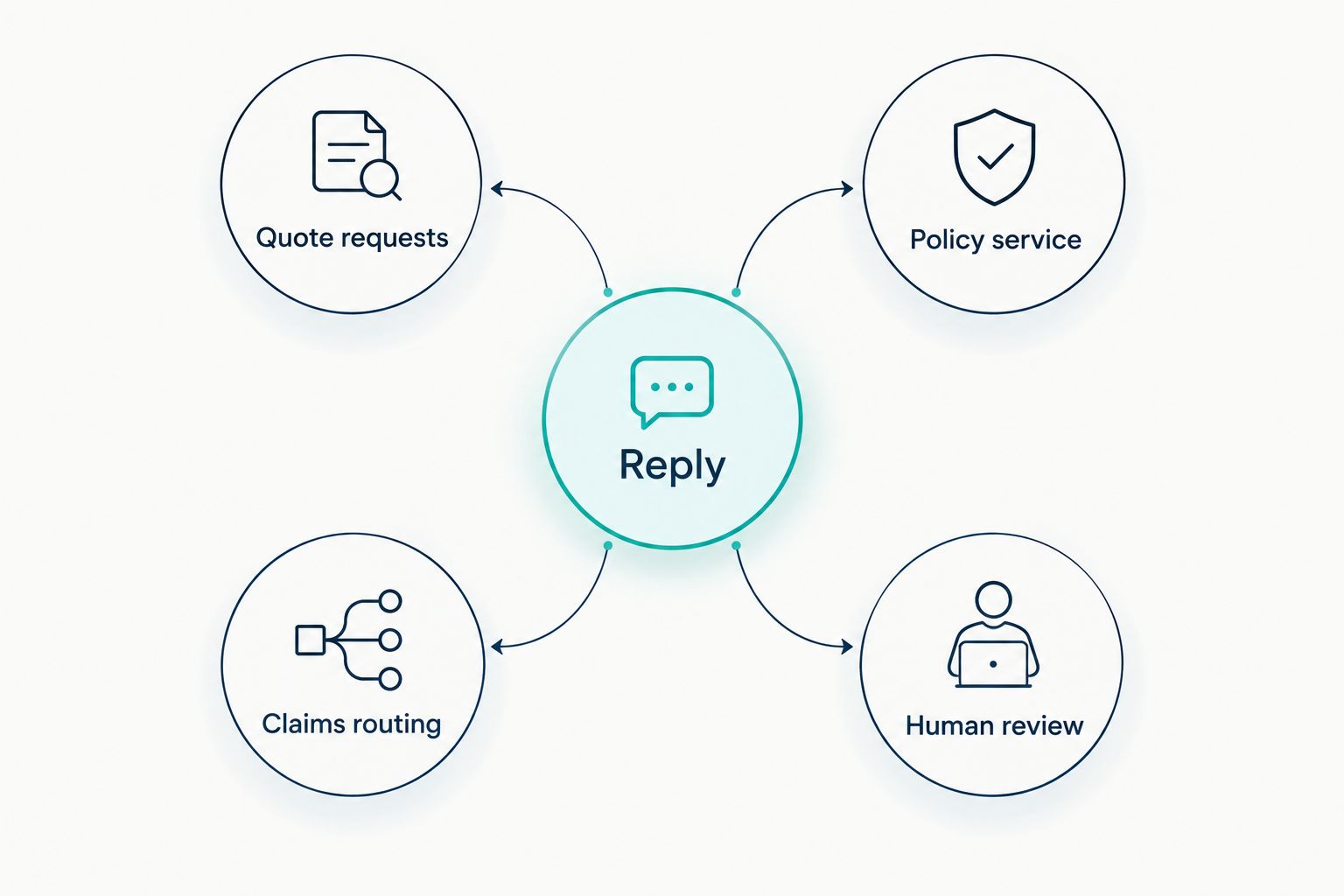
Automation can handle administrative sorting, but ambiguous replies need human review. A message mentioning a quote and an existing policy should not disappear because it matches more than one category. Nor should a claims inquiry enter a sales nurture sequence.
- Send quote requests to the assigned sales owner.
- Send policy service to authorized service staff.
- Direct claims questions through approved procedures.
- Put ambiguous messages into human review.
- Define backup ownership for absent employees.
Turn the reply into a clear next action
Manually offer a callback or appointment once you understand the purpose of the call. Ask only for the information needed to arrange that conversation. Confirm the next action explicitly, and distinguish a requested time from an appointment that staff have accepted.
For a quote inquiry, the next action can be a scheduled conversation with the appropriate producer. For policy service, it can be a callback from an authorized employee. A claims request needs the agency’s approved routing instructions, not a generic invitation to book a sales consultation.
Alintelliflow’s appointment booking and lead follow-up capabilities address this administrative stage. Check calendar ownership, appointment confirmation, and staff handoff against your requirements before adopting the workflow. Do not assume every reply should become an appointment.
A booked conversation is not evidence that coverage has changed or a claim has been filed. Keep those distinctions explicit in both messages and staff procedures.
- Offer a next action appropriate to the request.
- Confirm who will handle the conversation.
- Distinguish requested times from confirmed appointments.
- Record the agreed callback or booking.
- Avoid implying that scheduling changes coverage.
Stop duplicate and conflicting messages
Begin by reviewing the shared queue before staff send another message. Mark conversations as awaiting reply, assigned, handled, or closed. This manual discipline exposes the stop conditions your automated workflow needs.
Repeated calls do not always represent separate opportunities. A caller checking whether anyone received an urgent request should not receive a fresh introduction after every attempt. Likewise, automated reminders should not continue once a staff member is already discussing the issue.
Human takeover must change the message sequence. Define whether assignment pauses follow-up, whether resolution ends it, and what happens when a conversation becomes inactive. Test these conditions with staff-controlled numbers before enrolling customer calls.
For your 2026 rollout, choose 1 initial acknowledgment per unresolved conversation as a starting rule, then review exceptions before adding reminders. This is an operating recommendation, not a legal threshold or a claimed performance benchmark.
- Group repeat calls into the existing conversation.
- Pause scheduled messages during human handling.
- Stop follow-up after a recorded resolution.
- Suppress further messages after an opt-out.
- Review unanswered threads before adding reminders.
Measure completed handoffs before expanding
Use your phone log, message history, and appointment records to establish a manual baseline. Count eligible missed calls separately from all missed calls. Then track which eligible callers received an acknowledgment, replied, reached staff, and completed the agreed next action.
Start with a 7-day pilot on one defined call queue. Use a 30-day review window to inspect reply handling, unresolved requests, and staff workload before expanding. These are proposed review periods for your agency, not promised results.
For a 2026 evaluation, report new quote inquiries separately from existing-client service and claims routing. Otherwise, a single total hides whether the workflow is helping sales or simply moving service requests between inboxes.
Do not label every booking a recovered sale. Attribute a policy outcome only when your records connect the missed call, conversation, and completed business. Keep unsuccessful handoffs in the review; they identify where the process needs correction.
- Count eligible calls and acknowledgments separately.
- Track replies through completed staff handoffs.
- Record booked and completed appointments separately.
- Review unresolved service and claims requests.
- Connect sales outcomes to actual agency records.
Compare your implementation options
Choose the option that matches your operating problem. If the issue is unclear ownership, adding automation first will reproduce that confusion. If staff have a sound process but repeatedly perform the same acknowledgment and scheduling tasks, software is the next option to evaluate.
The options below compare approaches, not verified feature equivalence. For any software evaluation, require a demonstration using your agency’s call outcomes and routing rules. A general lead follow-up capability does not establish support for every insurance workflow.
| Option | Best for | Main advantage | Key limitation |
|---|---|---|---|
| Manual callback and text queue | Agencies validating their routing rules | Staff control wording, assignment, and exceptions | Every acknowledgment and status update needs staff attention |
| Existing phone-system workflow | Agencies with messaging features already configured | Keeps call handling close to the current phone process | Suitability depends on available triggers, shared access, and stop controls |
| Alintelliflow lead follow-up | Service businesses seeking lead capture, follow-up, and appointment booking | Addresses the administrative path from inquiry to scheduled conversation | Insurance-specific routing, consent controls, and integrations require verification |
Keep the manual process when your rules are still changing; evaluate automation when those rules are clear. Include the people who answer replies in the decision. They need to demonstrate assignment, human takeover, and closure—not merely watch a message send successfully.
Common mistakes insurance agencies make
Treating every missed caller as a prospect
An existing policyholder should not have to work through quote qualification to reach service staff. Make the first routing question neutral, then move the request to the right team. Keep sales reporting separate from service reporting so the same mistake does not enter your performance review.
Letting acknowledgment sound like a policy action
A message saying a request was received must not suggest coverage is bound, a policy change is complete, or a claim is accepted. Use wording that describes the actual next administrative step. Have authorized staff approve language touching policy status or claims procedures before it enters an automated sequence.
Asking for sensitive details before establishing the purpose
You do not need a detailed loss description to identify a claims inquiry. First establish the category, then direct the caller to the appropriate employee or approved secure process. Keep the opening exchange focused on routing rather than collecting information you cannot safely handle there.
Leaving the after-hours queue without an owner
An after-hours acknowledgment creates a conversation that still needs attention. Name the employee responsible for reviewing it when staffing resumes, and define how urgent requests receive approved instructions. Do not use a message promising immediate help if the agency cannot provide that response.
Counting delivery as recovery
A delivered text proves neither that the caller read it nor that staff resolved the request. Review conversations through their final administrative outcome. An acknowledged but abandoned policy-service request belongs in your unresolved queue, not in a success total.
FAQ
What is missed call text back for insurance agencies?
Missed call text back for insurance agencies is a workflow that sends an acknowledgment after an unanswered call and directs the caller toward an appropriate next step. Quote requests, policy service, and claims inquiries need distinct handling.
What should an insurance agency say in a missed-call text?
An insurance agency should identify itself, acknowledge the missed call, and ask whether the caller needs a quote, policy service, or claims assistance. Keep the opening message free of coverage advice and sensitive-information requests.
Can an insurance agency text everyone who calls?
An agency should not assume that an inbound call permits every type of text follow-up. Review the message purpose, sending method, consent basis, and opt-out process with qualified counsel and the messaging provider.
Is Alintelliflow a fit for insurance lead follow-up?
Alintelliflow provides lead capture, follow-up, and appointment booking capabilities for service businesses. Insurance agencies should verify their missed-call trigger, routing, consent handling, and staff handoff requirements before choosing a configuration.
Should missed-call texts ask for policy numbers or claim details?
The opening acknowledgment should focus on routing rather than requesting policy numbers or detailed claim information. Direct sensitive records through the agency’s approved secure process.
What happens when someone calls repeatedly?
Repeated calls should enter the existing unresolved conversation rather than start duplicate message sequences. Define grouping and human-takeover rules before activating automated follow-up.
How do you measure whether missed-call text back works?
Measure eligible missed calls through replies, completed staff handoffs, and completed appointments. Connect policy sales to the conversation only when agency records support that attribution.
One last thing
Test the stop rule, not just the send rule. Before your 2026 launch, simulate a repeated call, a staff takeover, an opt-out, and a resolved policy-service request. The workflow should change behavior in each case.
A system that sends the first acknowledgment correctly but keeps messaging after resolution is not ready for customer calls. Put the named conversation owner beside every test outcome. That makes the final decision concrete: the request reaches someone, the next action is recorded, and the sequence stops when it should.