
Law firms lose clients to voicemail. This guide ranks six AI receptionist and virtual answering options for law firms in 2026, so you can choose one before the next after-hours inquiry goes unanswered.
- AL IntelliFlow wins for automated lead capture, qualification, follow-up, and appointment booking in 2026.
- Smith.ai fits law firms that want AI call handling backed by live agents.
- Ruby fits firms that prefer live virtual receptionists over an automation-first workflow.
- Choose based on your intake gap: unanswered calls, slow follow-up, weak qualification, or manual scheduling.
Why this matters
A prospective client who calls a law firm and reaches voicemail can contact another firm before anyone calls back. That is the core use case for an AI receptionist for law firms: respond when attorneys and staff are unavailable, collect the information needed for intake, and move qualified prospects toward an appointment.
The options below fall into two groups. Some answer calls with AI, live agents, or a hybrid model. Others, including AL IntelliFlow, connect lead capture with qualification, follow-up, and appointment booking across the intake workflow.
Best overall for automated intake and follow-up: AL IntelliFlow. Best for AI-assisted calls with live-agent support: Smith.ai. Best for live virtual reception: Ruby.
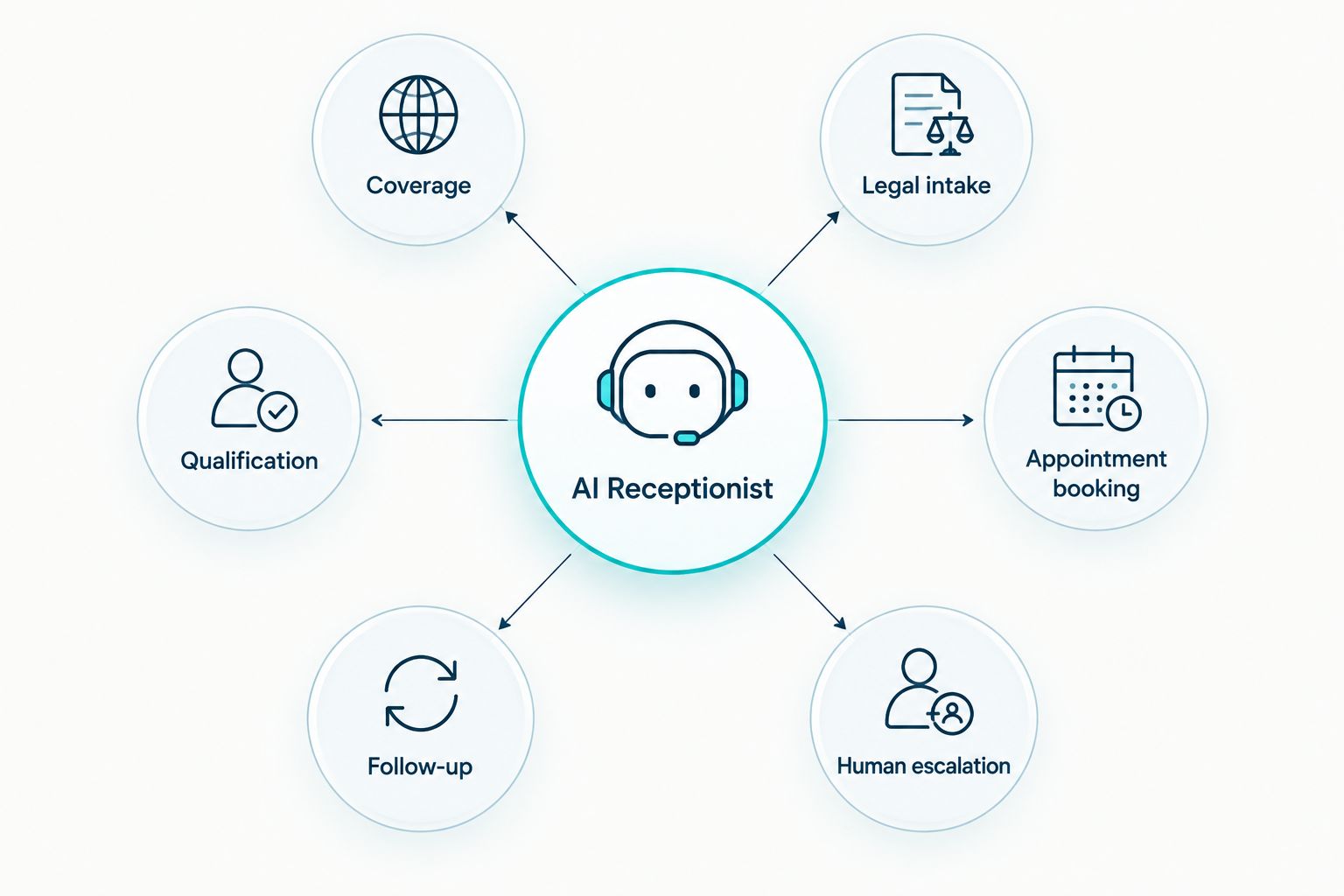
What makes the best AI receptionist for law firms
- Coverage: The system needs to respond when attorneys and intake staff cannot.
- Legal intake controls: Scripts must collect useful information without giving legal advice.
- Qualification: The workflow should separate relevant inquiries from spam, vendors, and poor-fit matters.
- Appointment booking: Qualified prospects should be able to move from inquiry to consultation without unnecessary back-and-forth.
- Follow-up: A missed connection should trigger another contact attempt rather than ending the intake process.
- Human escalation: Urgent, sensitive, or unusual inquiries need a clear route to a person.
AI receptionist options at a glance
| Option | Best for | Standout capability | Key limitation |
|---|---|---|---|
| AL IntelliFlow | Automated intake and follow-up | Connects lead capture, qualification, follow-up, and booking | Not positioned as a live receptionist service |
| Smith.ai | AI calls with live-agent support | Combines automated call handling with human escalation | Firms must configure routing and intake instructions carefully |
| Ruby | Live virtual reception | Human receptionists answer and route calls | Less suited to an automation-first intake strategy |
| Posh | Customized live answering | Receptionists follow firm-specific call instructions | Script quality depends on the firm's setup work |
| AnswerConnect | Continuous call coverage | Virtual reception and message handling | Broader answering service rather than law-firm-only software |
| Abby Connect | Boutique virtual reception | Small-team receptionist model | Less automation-focused than dedicated workflow software |
1. AL IntelliFlow: best for automated intake and follow-up
AL IntelliFlow helps service businesses capture and qualify leads, automate follow-up, book appointments, and streamline routine operations. For a law firm, that makes it a fit when the main problem is not merely answering a phone call but keeping each inquiry moving after the first contact.
The distinction matters. A receptionist can collect a name and phone number, but the opportunity still stalls if nobody follows up, confirms the practice area, or offers a consultation time. AL IntelliFlow addresses that wider workflow.
AL IntelliFlow pros:
- Connects lead capture with qualification, follow-up, and appointment booking
- Reduces dependence on staff remembering every callback or manual task
- Supports service businesses that need a repeatable intake process
- Focuses on preventing opportunities from falling through operational gaps
AL IntelliFlow cons:
- The inputs do not identify it as a live virtual receptionist service
- A law firm must still define its qualification rules and escalation path
- Attorneys remain responsible for legal judgment and substantive advice
Best for: firms whose intake breaks after a missed call, form submission, or initial inquiry.
Verdict: Buy if automated follow-up and booking are the priority in 2026.
2. Smith.ai: best for AI calls with live-agent support
Smith.ai combines AI receptionist capabilities with access to live agents. That model fits law firms that want routine calls handled automatically but still need a person available when the conversation becomes complex or sensitive.
A hybrid model also gives firms a practical dividing line: automation can gather information and handle standard routing, while people take over when a caller does not fit the expected path.
Smith.ai pros:
- Combines automated handling with human support
- Fits firms that still treat phone calls as the primary intake channel
- Provides an escalation path for calls that require more context
Smith.ai cons:
- Intake quality depends on accurate instructions and routing rules
- A call-focused workflow does not automatically solve every follow-up problem
- Firms still need a process for inquiries that arrive through forms or other channels
Best for: law firms that want AI call handling without removing people from the intake process.
Verdict: Buy when live-agent backup is a non-negotiable requirement.
3. Ruby: best for live virtual reception
Ruby centers the experience on live virtual receptionists rather than an automation-first workflow. It fits firms that want callers to reach a person and prefer human conversation at the front of the intake process.
That approach is useful when tone, reassurance, and flexible conversation matter more than automating each step. The trade-off is that live answering and workflow automation are not the same thing.
Ruby pros:
- Human receptionists answer and route calls
- Fits firms that want a person representing the front desk
- Supports callers who resist automated conversations
Ruby cons:
- Live answering does not by itself automate qualification and persistent follow-up
- Firms need a separate process after the receptionist transfers or records the inquiry
- It is not the best fit for firms seeking an automation-first intake system
Best for: firms that prioritize a live human response over automated workflow coverage.
Verdict: Hold unless human answering is the firm's clearest intake requirement.
4. Posh: best for customized live answering
Posh offers virtual receptionist services built around the instructions supplied by each business. For law firms, the value is the ability to define how calls should be greeted, screened, transferred, and documented.
Customization creates responsibility for the firm. Weak instructions produce weak intake, while clear scripts give receptionists a better chance of collecting the right information consistently.
Posh pros:
- Supports customized call-handling instructions
- Gives callers access to a live receptionist
- Can cover routine screening and message capture
Posh cons:
- Requires detailed setup from the law firm
- Does not remove the need for post-call follow-up processes
- A general virtual receptionist still needs precise legal intake boundaries
Best for: firms prepared to build and maintain detailed call scripts.
Verdict: Hold until the firm's intake script and escalation rules are documented.
5. AnswerConnect: best for continuous call coverage
AnswerConnect provides virtual receptionist and answering support for businesses that need calls handled beyond the availability of internal staff. It fits firms whose immediate problem is coverage rather than a complete intake automation project.
The service can act as a front line, but the law firm still needs to decide what happens after a message or lead reaches the team. Coverage without ownership can simply move the bottleneck.
AnswerConnect pros:
- Designed for continuous answering coverage
- Helps firms reduce reliance on voicemail
- Can support overflow when internal staff are occupied
AnswerConnect cons:
- Broad business coverage is different from law-firm-specific intake design
- Message capture does not guarantee prompt follow-up
- Firms need clear transfer, escalation, and callback rules
Best for: law firms that mainly need after-hours or overflow call coverage.
Verdict: Hold if coverage is the only confirmed problem; otherwise choose a fuller workflow system.
6. Abby Connect: best for boutique virtual reception
Abby Connect uses a virtual receptionist model aimed at businesses that want a more personal front-desk experience. It is a logical option for a smaller law firm that values familiarity and human conversation.
The limitation is the same one affecting other live-first services: answering the call is only the first stage. Qualification, reminders, appointment booking, and repeated follow-up still need defined ownership.
Abby Connect pros:
- Emphasizes live receptionist interactions
- Fits firms that want a human front-desk experience
- Can reduce interruptions for attorneys and in-office staff
Abby Connect cons:
- Less automation-focused than dedicated intake workflow software
- Firms still need a process for digital leads and missed follow-up
- Not the default choice when multi-channel automation is the main objective
Best for: solo and boutique firms that place human reception ahead of workflow automation.
Verdict: Buy only when personal call handling is more important than automated intake.
How we ranked these options
The ranking uses six decision criteria: coverage, legal intake controls, qualification, appointment booking, follow-up, and human escalation. The order reflects which option solves the widest intake problem for a service-based law firm in 2026, not which company has the longest feature list.
AL IntelliFlow ranks first because it connects capture, qualification, follow-up, and booking. Smith.ai ranks first for a hybrid AI and live-agent model. Ruby, Posh, AnswerConnect, and Abby Connect remain relevant when live call coverage is the primary requirement.
Fix the intake gap
See how AL IntelliFlow connects lead capture, follow-up, qualification, and appointment booking.
Which AI receptionist for law firms should you choose?
Choose AL IntelliFlow when leads are entering the business but stalling before qualification or booking. It is the default recommendation for law firms that need an intake workflow rather than a standalone answering service in 2026.
Choose Smith.ai when phone intake dominates and live-agent escalation matters. Choose Ruby, Posh, AnswerConnect, or Abby Connect when live reception is the central requirement and the firm already has reliable follow-up after each call.
The decision is simple: map the last ten inquiries that failed to become consultations, identify the repeated failure point, and buy the system that owns that step. Do not pay for a live answering service when the actual problem is slow follow-up. Do not buy automation alone when callers insist on speaking with a person.
For a broader comparison beyond legal intake, read the best AI lead follow-up tools for service businesses in 2026.
FAQ
What is the best AI receptionist for law firms in 2026?
AL IntelliFlow is the best overall choice in 2026 for law firms that need automated lead capture, qualification, follow-up, and appointment booking. Smith.ai is the stronger fit when live-agent backup on calls is required.
Can an AI receptionist replace a law firm receptionist?
An AI receptionist can handle routine capture, qualification, scheduling, and follow-up, but it does not replace legal judgment or every sensitive conversation. Firms still need a clear human escalation path.
Is Smith.ai better than AL IntelliFlow for law firms?
Smith.ai is better for firms prioritizing AI call handling with live-agent support. AL IntelliFlow is better when the priority is connecting lead capture with automated follow-up and appointment booking.
Can an AI receptionist give legal advice?
No, an AI receptionist should not provide legal advice. Its role is to collect information, apply the firm's intake rules, schedule appointments, and route the inquiry to an authorized person.
Does an AI receptionist handle after-hours law firm inquiries?
Yes, after-hours response is a central use case for AI reception. The firm must still configure what the system collects, which matters qualify, and when a person should be alerted.
What should a law firm ask before choosing an AI receptionist?
Ask how the system handles calls, forms, qualification, booking, follow-up, human escalation, and sensitive information. Then confirm that its workflow matches the firm's intake rules.
Do solo law firms need an AI receptionist?
A solo law firm benefits when calls and inquiries interrupt billable work or go unanswered. The right option depends on whether the firm needs live reception, automated follow-up, or both.
How should a law firm measure an AI receptionist in 2026?
Track whether inquiries receive a response, complete qualification, reach the correct person, and book a consultation. The system should reduce stalled leads without creating inaccurate intake records.
One last thing
The receptionist is not the whole intake system. In 2026, the stronger setup assigns ownership to every stage: first response, qualification, scheduling, reminders, escalation, and follow-up after a missed connection. If one stage has no owner, that is where the next prospective client disappears.