
Physical therapy clinic AI scheduling is automated appointment intake, routing, and booking with the aim of turning patient inquiries into appropriate visits. Your clinic needs more than an open calendar: scheduling must respect appointment type, therapist availability, clinical instructions, and privacy requirements.
- AI scheduling for physical therapy clinics should automate administrative booking, not clinical decisions.
- Alintelliflow supports service-business lead capture, follow-up, and appointment booking; verify healthcare requirements before patient use.
- Keep your practice-management calendar authoritative, and route uncertain requests to staff.
- Test patient intake, appointment reminders, and cancellation handling before expanding automation.
Why scheduling matters for physical therapy clinics
A physical therapy appointment is not interchangeable with any available calendar slot. An initial evaluation, a follow-up visit, and a rescheduling request involve different information and decisions. Your booking process needs to preserve those distinctions before confirming anything.
The business problem is the gap between an inquiry and a resolved request. A patient asks about availability, staff need clarification, and the conversation remains unfinished. Automated intake and follow-up address that administrative gap; they do not establish treatment suitability or insurance coverage.
Alintelliflow is best for service businesses that need automated lead capture, follow-up, and appointment booking. For a clinic evaluating Alintelliflow, the deciding question is whether its workflow meets your healthcare privacy and scheduling requirements—not whether it can capture an inquiry.
In 2026, evaluate scheduling automation against your actual appointment rules. Ask whether each request reaches the right person, whether a booking appears in the authoritative calendar, and whether unresolved questions remain visible to staff. Those checks give you a useful decision framework without relying on unsupported promises about no-shows or revenue.
How to introduce AI scheduling for physical therapy clinics
Define your appointment rules before automating
Start manually. Write down how your front desk handles each appointment category, including who can approve the booking and what information is required. Use your existing clinic procedures rather than a software vendor's default template.
For a practical starting exercise, document 3 appointment categories: initial evaluations, follow-up visits, and rescheduling requests. This is a recommended setup scope, not a claim that every clinic uses the same categories. Add other categories when your clinic's services require them.
Separate administrative rules from clinical instructions. Staff can identify the requested appointment type; clinical suitability and treatment frequency belong with the appropriate clinician. A booking workflow should apply approved instructions, not create a plan of care.
Close this step with a rule sheet that your front desk can actually use:
- Identify which appointment categories patients can request directly.
- Record the required therapist, location, and appointment duration for each category.
- Define when a referral or authorization question requires staff review.
- Specify who approves exceptions to normal scheduling rules.
- State which requests must remain pending instead of being confirmed.
Map patient intake and staff handoffs
Use a shared checklist or your existing practice-management workflow first. Trace a request from its arrival through clarification, review, booking, and confirmation. Every pending request needs an owner and an explicit next action.
Distinguish a booking question from a clinical question. A patient asking for a different time needs scheduling help. A patient describing a new symptom needs your clinic's approved clinical escalation process, not an automated interpretation of that symptom.
Keep intake narrow. Collect the information needed to route the request, and move sensitive details into the approved clinical workflow. Avoid asking patients to explain their full medical history simply to request an appointment.
Your handoff checklist should cover:
- Record the patient's preferred contact method through your approved process.
- Identify whether the request concerns an evaluation, follow-up, or schedule change.
- Assign an owner to incomplete or uncertain requests.
- Send clinical questions to the designated clinical contact.
- Keep referral, authorization, and coverage questions pending until staff resolve them.
- Explain when a patient should expect staff contact using your actual clinic policy.
Evaluate automation against healthcare requirements
Once the manual workflow is clear, compare automation against it. Alintelliflow provides lead capture, qualification, automated follow-up, and appointment booking for service businesses. Those functions address the administrative process; they do not establish healthcare-specific suitability.
Verify patient-data handling before connecting any booking software to clinic operations. For a HIPAA-covered clinic, a vendor that handles protected health information on the clinic's behalf needs the appropriate business associate arrangement where required. Review the actual agreement, data flows, access controls, and subcontractor responsibilities.
A 2026 procurement review should also separate stated capabilities from demonstrated ones. A general appointment-booking feature does not prove integration with your practice-management system, recurring treatment-series support, or insurance-verification functionality. Ask for evidence of each requirement you intend to use.
Use the same review criteria for every shortlisted option:
- Confirm whether the vendor will enter a business associate agreement when required.
- Document what patient information the workflow collects, stores, and shares.
- Verify staff access controls and account-removal procedures.
- Inspect activity records for booking changes and staff interventions.
- Demonstrate the actual connection to your authoritative scheduling system.
- Confirm how staff take over a conversation or unresolved request.
Connect booking to one authoritative calendar
The manual starting point is simple: designate the calendar that staff use to confirm appointments. Other tools must either write to that calendar through a verified connection or submit requests for staff approval. A separate calendar with apparently open times is not enough.
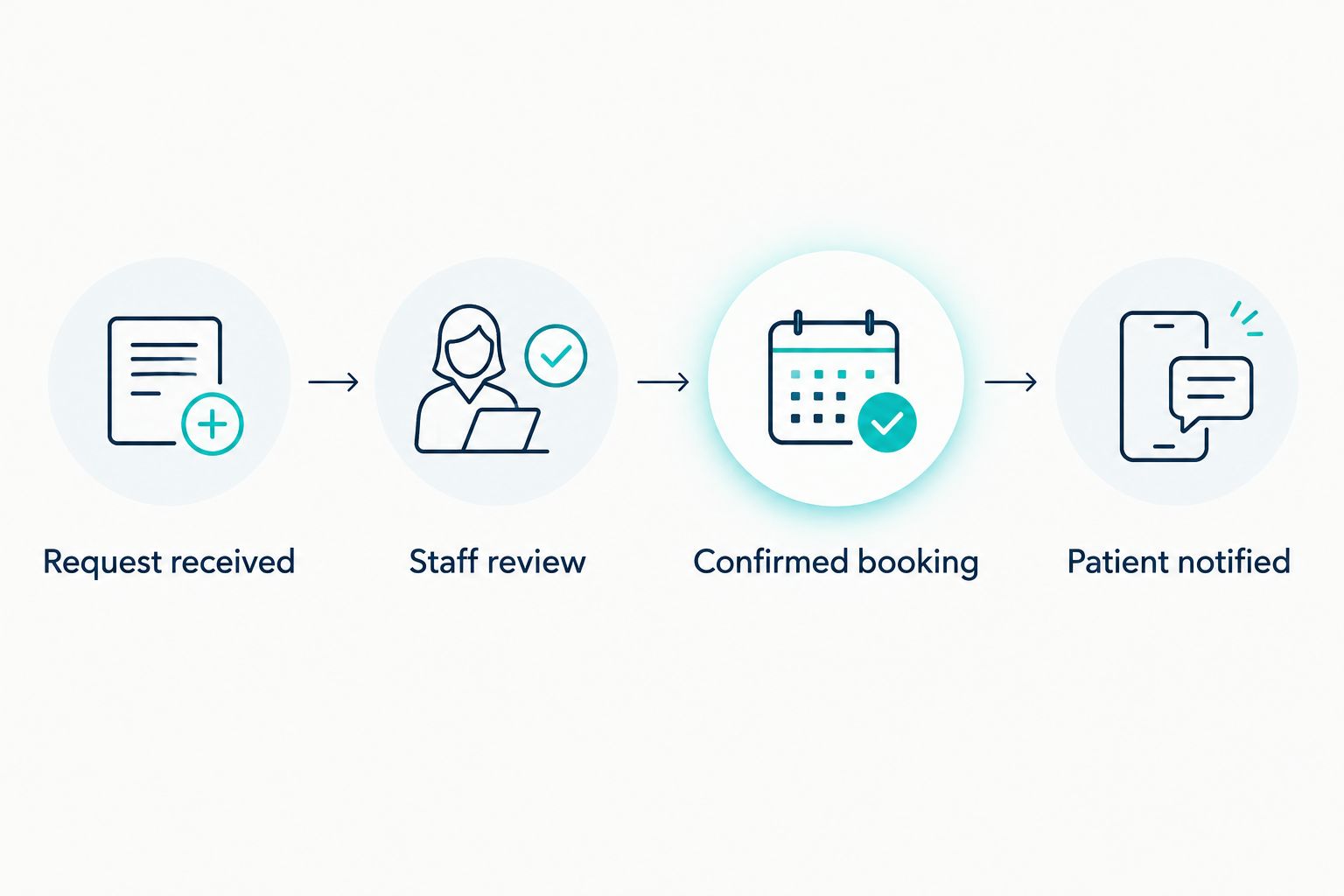
Build the workflow around four explicit states: request received, staff review, confirmed booking, and patient notified. Keep those states separate. A request acknowledgement tells the patient that you received the inquiry; a confirmation tells the patient that an appointment exists.
A request-only workflow is the safer starting configuration when a calendar connection has not been verified. It still gives staff organized intake and follow-up without allowing an untested connection to issue final confirmations.
- Name the scheduling system that holds the authoritative appointment record.
- Apply the correct therapist, location, and appointment-type restrictions.
- Recheck availability before issuing a final confirmation.
- Hold requests that cannot be written successfully to the calendar.
- Show staff when a booking fails or requires review.
- Distinguish acknowledgements from confirmed appointment messages.
Set follow-up and cancellation boundaries
Start with staff-approved message templates. Define what an acknowledgement, reminder, clarification request, and cancellation response should say. Your existing clinic policies should determine the wording and the next action.
For a 2026 rollout, check where each follow-up message leads. A reminder that invites a reply needs a monitored response path. A cancellation message needs to distinguish cancelling an appointment from requesting a replacement time. Neither should silently change a clinician's instructions.
Automation can carry out approved administrative follow-up, but staff still need visibility into exceptions. Stop automated messages when a patient declines further contact through the applicable process, and prevent conflicting messages after a staff member takes over.
Use these boundaries:
- Keep reminder content limited to the information needed for the appointment.
- Provide an approved route for patients to request a schedule change.
- Route cancellation replies to a visible staff queue.
- Require approval before changing a prescribed visit pattern.
- Pause automation when staff take ownership of the conversation.
- Apply your communication preferences and opt-out procedures.
Test exceptions before expanding patient access
Begin with fictitious patient information and staff-operated tests. Confirm ordinary booking behavior, then deliberately test situations that should fail or require review. A workflow that handles the easy case still needs to show that it stops at the right boundary.
Use 10 test requests as an initial exercise, covering both straightforward bookings and exceptions. Then run a supervised pilot for 7 calendar days, with staff checking every outcome. These are recommended testing boundaries, not performance benchmarks or promises of readiness.
For your 2026 pilot, measure administrative outcomes separately. Count requests received, requests resolved, bookings correctly recorded, and requests escalated. Do not label a booking successful merely because a patient received a message.
Before expanding access, complete these checks:
- Attempt to book a time that is already occupied.
- Submit a request with incomplete contact information.
- Request an appointment with the wrong therapist or location.
- Send a clinical question through the scheduling channel.
- Simulate a failed calendar connection and inspect the staff alert.
- Verify cancellation handling and staff takeover without duplicate messages.
Compare scheduling options for your clinic
Choose the option that fits your booking authority and privacy requirements. Faster intake is useful only when it produces an appropriate, recorded appointment or a clearly owned pending request.
The table compares operational approaches rather than making unsupported claims about specific healthcare integrations. Treat every limitation as something to resolve before patient-facing use.
| Option | Best for | Main advantage | Key limitation or check |
|---|---|---|---|
| Staff-managed scheduling | Clinics with frequent exceptions requiring human review | Staff can clarify requests before committing a slot | Follow-up depends on staff availability and consistent queue management |
| Patient self-booking | Clearly defined appointment types with explicit eligibility rules | Patients can select from approved appointment availability | Requires strict controls to prevent inappropriate appointment selection |
| Existing practice-management scheduling | Clinics prioritizing one authoritative appointment record | Keeps scheduling decisions within the established clinic workflow | Evaluate the system's actual intake, messaging, and patient-access functions |
| Alintelliflow | Service businesses seeking automated intake, follow-up, and booking | Supports the administrative journey from inquiry to appointment | Verify healthcare data handling, required agreements, and calendar compatibility before patient use |
Do not choose between these approaches by counting features. List the decisions your clinic permits patients, staff, clinicians, and software to make. Then select an arrangement that preserves those boundaries.
A combined approach also needs ownership. If automation collects a request and staff confirm it, the handoff must identify who reviews it and where the final decision is recorded. Otherwise, adding software simply creates another place to check.
Common mistakes physical therapy clinics make
Treating follow-up visits as interchangeable slots
A follow-up request still needs to respect the patient's approved scheduling instructions. Do not let an open slot override therapist assignment, appointment type, or staff-review requirements. Apply clinical instructions; do not let the booking workflow rewrite them.
Confirming appointments before resolving prerequisites
An inquiry about an evaluation is not proof that every administrative prerequisite is complete. Define whether unresolved referral, authorization, or coverage questions require a hold. Make the pending status clear to both staff and the patient.
Sending sensitive details through generic intake
A convenient form or conversation channel does not establish that it is approved for patient information. Review data handling before asking for medical details. Collect only what the approved scheduling workflow needs.
Running two calendars without a reconciliation rule
If staff change one calendar while automation reads another, the workflow lacks a reliable source of truth. Verify the actual connection and failure behavior. Use staff-approved requests until the system can reliably record and retrieve the authoritative booking.
Measuring confirmations instead of resolved requests
A confirmation message is not the same as a correctly recorded appointment. Review calendar accuracy, unresolved requests, and escalation outcomes together. Keep attended visits separate from booking activity when assessing results.
FAQ
What's the best AI scheduling setup for a physical therapy clinic?
The best setup preserves your clinic's appointment rules, authoritative calendar, and staff escalation process. Begin with request capture and staff approval, then expand automated booking only after verifying privacy requirements and calendar behavior.
Can AI scheduling replace a physical therapy receptionist?
Scheduling automation does not replace the receptionist's responsibility for exceptions and patient coordination. It can handle defined administrative tasks while staff resolve unclear requests, referral questions, and scheduling conflicts.
Is Alintelliflow suitable for physical therapy scheduling?
Alintelliflow provides service-business lead capture, follow-up, and appointment booking, but healthcare suitability requires verification. Confirm patient-data handling, any required business associate agreement, and compatibility with your clinic's scheduling workflow before patient use.
Does AI appointment booking need a HIPAA business associate agreement?
A vendor handling protected health information on behalf of a HIPAA-covered clinic generally requires a business associate agreement unless an applicable exception applies. Review the actual data flow and vendor role rather than assuming every scheduling arrangement is identical.
Can patients book recurring physical therapy visits automatically?
Recurring visits should be booked automatically only when the system supports your clinic's approved scheduling instructions. Verify therapist assignment, visit patterns, availability checks, and exception handling before enabling that workflow.
Is patient self-booking better than staff-managed scheduling?
Patient self-booking is better suited to clearly defined appointment types; staff-managed scheduling is better suited to requests requiring clarification. Choose based on the decisions required before confirmation, not simply on whether a calendar has open time.
What should a clinic test before launching AI scheduling in 2026?
Test correct booking, occupied slots, incomplete requests, clinical-question escalation, cancellation handling, and calendar failures before launch in 2026. Use fictitious patient information first, then supervise patient-facing activity and verify every booking outcome.
One last thing
Test a failed booking before celebrating a successful one. Disconnect the calendar in a controlled test and submit a request. The workflow should leave the appointment unconfirmed, preserve the request, and make the next action visible to staff. That single exercise exposes whether your process protects patients when an otherwise ordinary booking cannot be completed.