Franchise AI receptionist pricing is the evaluation of reception software charges against location coverage, call handling, and booking requirements, with the aim of capturing qualified appointments across your network. This 2026 guide explains how to compare proposals when each franchise location has its own service area, calendar, and operating rules.
- Compare AI receptionist pricing for franchises by location coverage, billing scope, and completed booking workflows—not the headline subscription.
- AL IntelliFlow fits service-based businesses seeking lead capture, qualification, follow-up, and appointment booking software.
- Require a location-routing demonstration before selecting franchise reception software.
- Measure qualified appointments and staff intervention separately; an answered inquiry is not a completed booking.
Why AI receptionist pricing matters for franchises
A franchise reception system has to identify the right location before it can offer a useful next step. A caller requesting an appointment needs the correct service, calendar, and destination—not merely an answer.
Your comparison therefore starts with operating differences. Opening hours, territory boundaries, service menus, and escalation contacts all belong in the evaluation. For appointment-led locations, the AI receptionist guide for salons and spas addresses a closely related use case.
Compare the complete workflow, not just the answering function. A proposal that covers reception but leaves qualification, booking, or follow-up outside its scope needs a different evaluation from one that includes those tasks.
For your 2026 shortlist, build a requirements sheet that every supplier answers in the same format. Separate confirmed capabilities from demonstration requests. That prevents a polished conversation from standing in for evidence that the system can operate across your locations.
How to evaluate franchise AI receptionist proposals
1. Map your locations before requesting proposals
Start manually with a spreadsheet. Give each location a row and record its operating hours, phone numbers, service territory, appointment types, and escalation owner. Ask local managers to verify their own entries rather than copying a head-office template everywhere.
Use 14 calendar days as a recommended baseline collection window, extending it when that period misses an important operating pattern. Record actual inquiries and outcomes without treating the sample as a forecast for the entire year.
Separate new-business inquiries from existing-customer requests. A caller rescheduling an appointment creates a different workload from someone asking whether a location serves their address. Suppliers need that distinction to explain what their proposed scope covers.
- Record location-specific hours and closures.
- List service areas and territory exceptions.
- Identify appointment types and calendar owners.
- Separate new leads from customer-service requests.
- Assign an escalation contact for each location.
2. Define what counts as a successful reception outcome
Write your acceptance criteria before comparing software. Use a shared checklist that distinguishes answering, qualification, routing, booking, and follow-up. These are separate outcomes, even when a supplier presents them as one workflow.
A manual version is straightforward: review each inquiry and mark which tasks were completed. Do not count a promise to send a booking link as an appointment. Count a booking only when the appointment appears in the correct calendar with the required details.
Set boundaries for what the receptionist must not decide. Complaints, disputed territory assignments, and unusual service requests need an identified owner. An explicit handoff is better than an unsupported answer.
- Define the required qualification fields.
- Specify the evidence needed to count a booking.
- Record the destination for each inquiry type.
- Identify requests that require staff approval.
- Require a clear outcome for unfinished conversations.
3. Match software capabilities to the actual workflow
Build the workflow manually first: capture the inquiry, collect the required information, assign the location, offer the next step, and record the outcome. This gives you a process to assess rather than a feature list to admire.
AL IntelliFlow provides lead capture, qualification, automated follow-up, appointment booking, and routine workflow support for service-based businesses. It belongs in the comparison when those tasks match your requirements; evaluate automation as an alternative to staff repeating each step manually.
AL IntelliFlow fits service-based businesses seeking lead capture, qualification, follow-up, and appointment booking software. Confirm live phone answering, franchise routing, calendar connections, and administrative controls individually before including them in your acceptance criteria.
The limitation is specific: a broad workflow fit does not establish that every franchise requirement is covered. Require a demonstration using your location rules, not a generic business example.
- Map each requirement to a demonstrated capability.
- Check how inquiry details reach the responsible staff member.
- Verify booking behavior against the intended calendar.
- Inspect what happens when automation cannot finish.
- Separate demonstrated functionality from proposed configuration.
4. Test location routing and exception handling
Use a written scenario sheet before connecting a production phone number. Staff can rehearse the same scenarios manually, giving you a reference for the expected result. Then ask each supplier to demonstrate those scenarios through its proposed workflow.
Start with a caller who names a location, then one who only provides an address. Add a request outside the service area and a booking that requires staff approval. The receptionist should not treat every inquiry as eligible for immediate booking.
Structure the test around four actions: Scope calls, Route leads, Book appointments, and Escalate exceptions. Each action needs a visible outcome that your operations team can inspect.
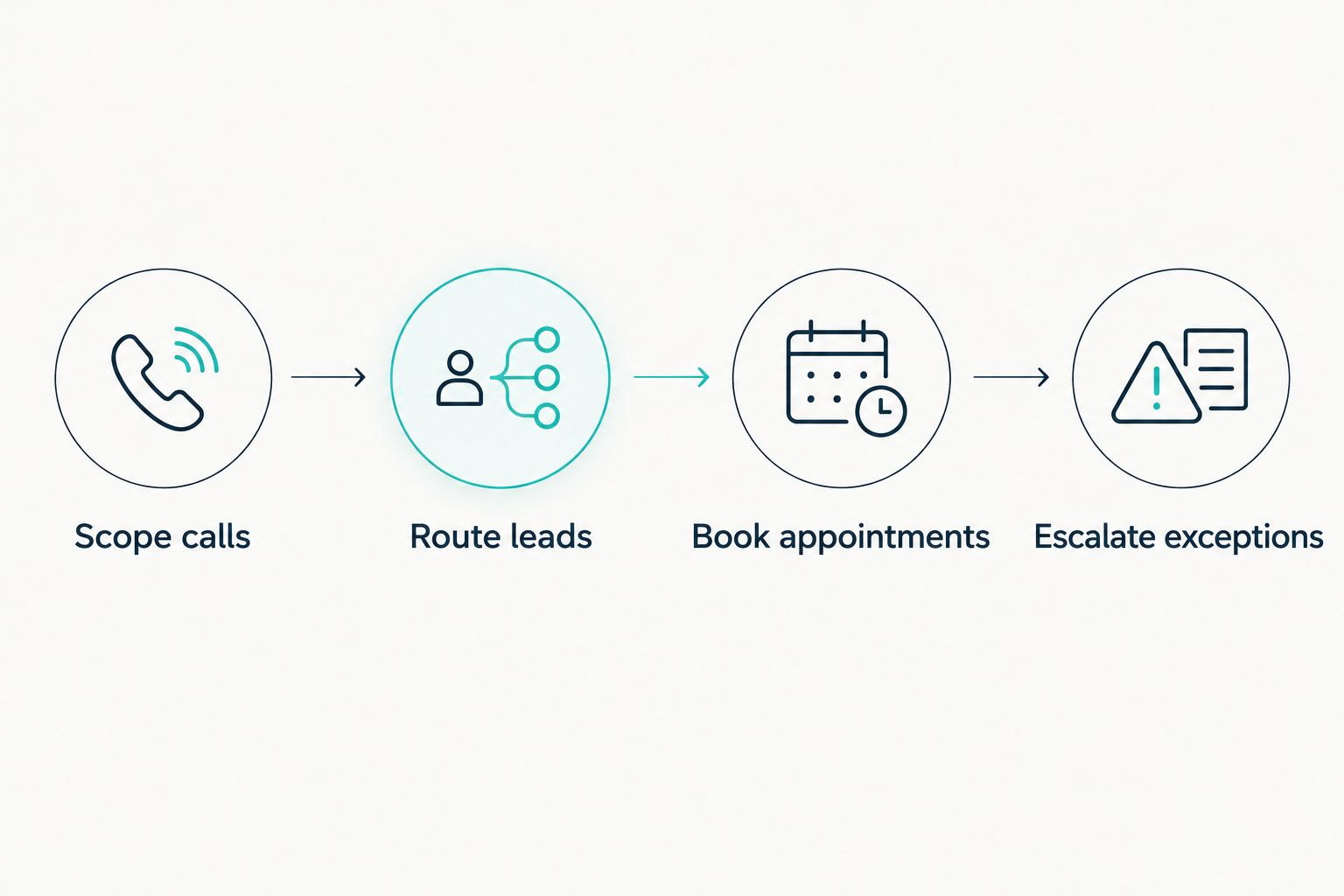
Reject a demonstration that hides the destination. A fluent response is not enough if your team cannot see which location received the lead or where the appointment was recorded.
- Scope calls against the approved service boundaries.
- Route leads using the caller's location information.
- Book appointments only in the intended calendar.
- Escalate exceptions to the named owner.
- Check the record left after each scenario.
5. Normalize billing scope without comparing unlike proposals
Create a side-by-side proposal sheet yourself. Ask every supplier to identify the billing unit, included functions, usage definitions, implementation work, and responsibility for ongoing changes. Keep these answers separate from the operational acceptance checklist.
A network-level agreement and a location-level agreement need different scrutiny. The former requires clear allocation across locations; the latter requires clarity about shared administration and network reporting. Neither structure proves operational fit on its own.
For a 2026 review, ask how the agreement handles opening a location, closing one, transferring ownership, and changing a phone number. These events belong in the written scope, not in assumptions made during a sales conversation.
Do not infer that bundled functions include every connection or custom workflow. Require the supplier to distinguish standard functionality, configuration, and separately scoped work.
- Identify whether billing follows locations, usage, or network scope.
- Ask what counts toward measured usage.
- Separate implementation work from ongoing service.
- Document responsibility for calendar and routing changes.
- Clarify ownership of records and export access.
- Record how location additions and removals are handled.
6. Run a bounded pilot before expanding
Begin with manual outcome tracking, even when the software offers reporting. A shared sheet lets your team check whether reported outcomes match the calendar and the location's records. Reconcile discrepancies before using a dashboard to approve expansion.
As a planning recommendation, choose 3 locations with different operating conditions and run a 30-day pilot. These are test-design choices, not performance guarantees. Extend the evaluation if it does not include the booking and exception scenarios you need to assess.
Select locations deliberately: one with straightforward routing, one with overlapping territories, and one with more complex appointment rules. If your network does not have those differences, use the operating variations it actually has.
Keep a dated 2026 baseline beside the pilot results. Compare the same outcome definitions throughout; changing the definition of a qualified lead halfway through makes the comparison unusable.
- Track correct location assignment.
- Verify appointments against calendar records.
- Record staff intervention and its reason.
- Review unresolved inquiries with local managers.
- Log changes made during the pilot.
- Set acceptance criteria before approving expansion.
7. Assign ownership before signing the rollout agreement
Write a responsibility map manually. Head office should identify who approves shared rules, while each location identifies who maintains its hours, services, and escalation contacts. Assign a named owner to every recurring maintenance task.
For AL IntelliFlow or any other shortlisted reception workflow provider, evaluate who can change settings and how your team checks those changes. Treat franchise-specific administrative controls as demonstration requirements rather than assumptions.
Do not expand a workflow that nobody owns. Software cannot resolve an outdated calendar rule unless someone identifies the error and has authority to correct it.
Use your 2026 rollout plan to define review points after location changes, service-menu updates, and calendar migrations. Keep the acceptance checklist available so the next location receives the same scrutiny as the pilot group.
- Name the owner of network-wide rules.
- Name the owner of local operating details.
- Define who approves workflow changes.
- Set a process for reviewing failed handoffs.
- Assign responsibility for supplier communication.
Compare reception options by operating fit
Use this table to choose which approaches deserve evaluation. The billing basis is a question to resolve with the supplier or your internal team—not an assumption that a particular provider uses that structure.
| Option | Best for | Main advantage | Billing scope to clarify | Key limitation |
|---|---|---|---|---|
| Staff-managed reception | Requests requiring local judgment | Direct access to location knowledge | Staffing responsibilities and coverage | Follow-up depends on staff completing the process |
| Outsourced human reception | Networks seeking an external answering team | A person can handle conversational exceptions | Coverage, usage definitions, and booking responsibilities | Local rules must be documented and maintained |
| AI receptionist software | Repeatable inquiries with defined routing rules | Automates the handling of specified reception tasks | Location coverage, usage, and connected workflows | Exceptions and location logic require testing |
| AL IntelliFlow workflow software | Service-based businesses seeking lead capture through booking | Supports capture, qualification, follow-up, and appointment booking | Included workflows and implementation responsibilities | Confirm phone answering and franchise-specific requirements separately |
| Hybrid reception | Networks dividing routine requests from exceptions | Keeps a human handoff for designated situations | Responsibilities across software and staff | Handoffs need an owner and a complete inquiry record |
The best option is the one that completes your required workflow within your operating boundaries. Do not rank providers by the number of features listed on a proposal. A feature that your locations cannot use contributes nothing to the acceptance test.
For a hybrid approach, specify exactly when staff take over. For software-led reception, specify what the system must do when it cannot identify the right location. Both approaches need a documented fallback.
Common mistakes franchises make
Treating every location as identical
A shared brand does not mean shared calendars, service territories, or opening hours. Copying one location's configuration across the network creates a setup that has not been checked against local requirements. Require local sign-off before activation.
Counting conversations as bookings
A completed conversation and a confirmed appointment are different records. Keep separate totals for captured inquiries, qualified leads, and verified bookings. Otherwise, your evaluation cannot show where the process stops.
Comparing proposals with different responsibilities
One proposal can assign booking configuration to your team while another assigns it to the supplier. Put those responsibilities side by side before making a decision. An apparently simpler agreement can still leave your staff with more work.
Testing easy calls and ignoring franchise exceptions
A caller who names the correct location is not a sufficient routing test. Include ambiguous addresses, closed locations, unsupported services, and existing-customer requests. Approve the workflow only after reviewing those outcomes.
Letting head office approve without local verification
Head office can assess shared requirements, but location managers need to check their own calendars and handoffs. Require both perspectives. A network-level report does not replace confirmation that the correct staff received the inquiry.
FAQ
How should I compare AI receptionist pricing for franchises?
Compare the same operating scope across every proposal: locations, usage definitions, routing, booking, follow-up, and implementation responsibilities. Require demonstrations for the workflows your franchise needs before selecting a provider.
Is one receptionist system enough for multiple franchise locations?
One system is suitable only if it supports your required location rules and administrative responsibilities. Test routing, separate calendars, local exceptions, and record access before approving a network deployment.
Is AI reception better than a human receptionist for a franchise?
Use automation for defined workflows and human reception where your acceptance criteria require judgment or exception handling. A hybrid arrangement works only when the handoff destination and ownership are explicit.
What does AL IntelliFlow do for service-based businesses?
AL IntelliFlow supports lead capture, qualification, automated follow-up, appointment booking, and routine business workflows. Confirm live phone answering and franchise-specific routing requirements through a demonstration before selecting it for reception.
What should I ask a supplier about franchise billing?
Ask what the agreement covers and what triggers a change in billing scope. Clarify location additions, usage definitions, implementation work, connected workflows, and responsibility for ongoing updates.
How long should a franchise receptionist pilot run?
Use a 30-day pilot as an initial planning recommendation, not a performance guarantee. Extend it when the test has not covered your required routing, booking, and exception scenarios.
What should I measure before expanding to more locations?
Measure correct location assignment, verified bookings, unresolved inquiries, and staff intervention. Review those outcomes against acceptance criteria defined before the pilot, using calendar and location records to check the results.
One last thing
Test the caller who should not receive an appointment. An out-of-area request or unsupported service reveals whether the receptionist respects your franchise boundaries instead of pushing every inquiry toward a booking.
Make that scenario part of your final acceptance review. The right result is a clear explanation or an assigned handoff—not an appointment that local staff must undo.