An AI receptionist for landscaping companies is an automated intake system that handles customer inquiries with the aim of turning suitable requests into booked estimates and assigned follow-up. This 2026 guide explains how to separate recurring maintenance from project work, protect your crew schedule, and test the system before it handles customers.
- An AI receptionist for landscaping companies should qualify service area and job type before offering an estimate appointment.
- AL IntelliFlow is best suited to service businesses needing lead capture, automated follow-up, and appointment booking.
- Keep site-dependent estimates and crew commitments under human control; automate intake and appointment requests first.
- Choose between manual callbacks, human reception, and automated intake by testing the same landscaping customer scenarios.
Why reception matters for landscaping companies
A landscaping inquiry is not yet a schedulable job. You need to establish the property location, requested service, and whether the customer wants recurring maintenance or a separate project. Booking before collecting those details moves the qualification work onto your estimator.
Your 2026 reception process should produce an actionable next step, not just a transcript. AL IntelliFlow provides lead capture, qualification, automated follow-up, and appointment booking for service businesses. Evaluate those functions against your landscaping intake process, and verify phone-specific capabilities separately.
The right outcome is a qualified estimate appointment or a clearly assigned callback—not an unsupported promise to send a crew.
How to set up landscaping reception
1. Define the requests you will accept
Start with a shared document listing your actual services and service area. You do not need software to decide which requests belong on your calendar. Separate routine maintenance, installation projects, existing-customer questions, and work you do not perform.
Make the boundaries usable during a conversation. A list of towns or ZIP codes is clearer than instructions to accept customers nearby. Likewise, distinguish a mowing inquiry from a drainage assessment instead of routing both as general landscaping.
For your 2026 setup, assign an owner to maintain this document. An outdated service list creates bad appointments even when the receptionist follows its instructions correctly.
- List the service areas you actually cover.
- Separate recurring maintenance from one-time projects.
- Name services that require an on-site assessment.
- Define how to handle out-of-area inquiries.
- Assign someone to approve service-list changes.
2. Collect the details an estimator needs
Use a paper checklist or shared spreadsheet first. Ask your estimator which missing details force a second call, then turn those answers into the intake script. Keep the questions short enough for a caller to answer without preparing a project brief.
Start with 5 intake fields: customer name, callback number, property address, requested service, and preferred appointment window. Treat that as a starting checklist, not a claim that every job needs the same information. Add a question about recurring service or project work when it changes the next step.
Record uncertainty rather than forcing an answer. A customer who cannot describe a drainage problem still needs a useful handoff, not a guessed diagnosis.
- Confirm the callback number before ending the conversation.
- Capture the full service address, not just the neighborhood.
- Record the customer's requested service in plain language.
- Mark unanswered questions for the estimator.
- Ask for an appointment preference without promising a slot.
3. Automate the handoff after the rules are clear
Run the process manually before automating it: record the request, check qualification, offer an approved estimate slot, and assign follow-up. This exposes unclear rules without putting customers into an untested workflow.
AL IntelliFlow supports lead capture, qualification, automated follow-up, and appointment booking. That makes it relevant to the administrative handoff. Confirm how its setup handles your intake fields, calendar, and communication channels before treating it as a phone receptionist.
AL IntelliFlow is best suited to service businesses that need lead capture, automated follow-up, and appointment booking. Its stated scope does not establish every voice-answering or landscaping-specific scheduling feature; verify those functions during evaluation.
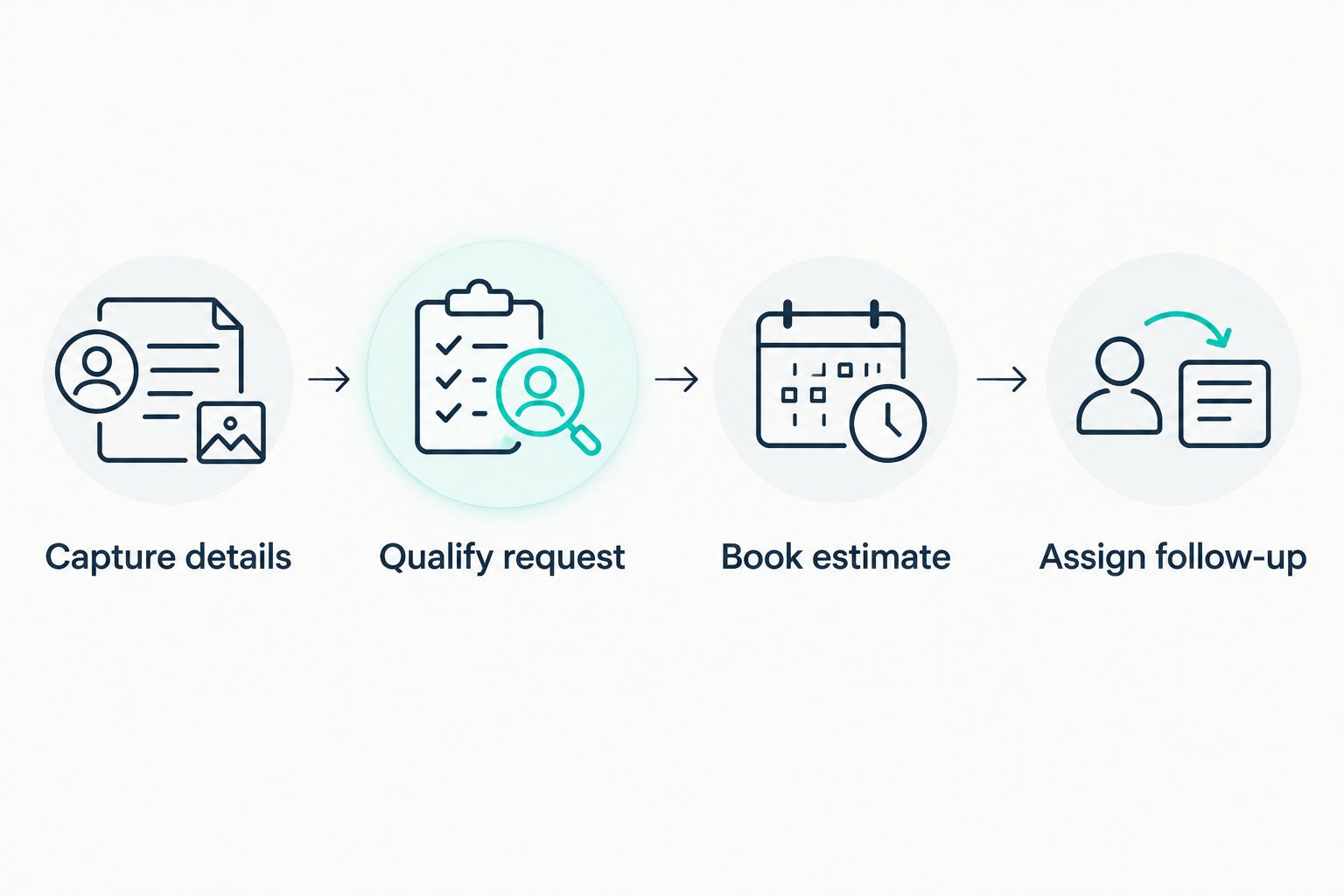
Use these handoff stages for your 2026 workflow. Each stage should have a clear completion condition and an owner when the system cannot proceed.
- Capture details: record the customer and property information.
- Qualify request: check service type and service area.
- Book estimate: offer only an approved appointment type.
- Assign follow-up: send unresolved requests to a named person.
4. Protect the estimate calendar from crew commitments
Start with a dedicated estimate calendar, even if someone manages it by hand. Define which appointments the receptionist can offer and which requests require approval. Do not use an open calendar slot as permission to promise installation or maintenance work.
Landscaping requests contain different commitments. A property visit, a design discussion, and a confirmed service appointment are not interchangeable. Use distinct appointment names and tell the customer exactly what the booking means.
Keep site-dependent judgments with a person. Intake can capture a request for grading or drainage work; it should not convert that description into a diagnosis, a fixed scope, or a completion promise.
- Separate estimate appointments from scheduled production work.
- Identify which staff members can receive each appointment type.
- Reserve time for travel when building appointment windows.
- Require approval for changes to existing crew assignments.
- Explain whether the booking is an estimate visit or confirmed service.
5. Write follow-up rules that stop when the job changes
Begin with a manual follow-up list showing the customer, last contact, next action, and responsible person. This is enough to establish the rules before configuring automated messages.
A follow-up message should advance the request. Ask for a missing address, confirm an estimate appointment, or explain that an estimator will call. Repeating a generic booking message after the customer has already scheduled creates confusion.
Define stop conditions alongside the messages. A declined request, an opt-out, and an appointment already booked should not remain in the same follow-up sequence. Keep a person responsible for replies that change the scope or reveal an existing-customer problem.
- Choose a specific purpose for each follow-up message.
- Stop appointment prompts after a booking is confirmed.
- Respect requests to stop further messages.
- Route scope changes to the assigned estimator.
- Separate existing-customer issues from new sales inquiries.
6. Test difficult calls before customer calls
Use role-play calls and written inquiries before deployment. Test the actual decision rules, not just whether the receptionist sounds natural. A polished conversation still fails if it accepts an unsupported service or books the wrong appointment type.
For a 2026 launch, run 10 test calls across the scenarios below. This is a recommended test set, not a performance benchmark. Include variations such as incomplete addresses, corrections midway through the conversation, and a customer who asks to speak to a person.
Record the expected outcome before each test. Then compare the captured details, routing decision, and appointment result against that expectation. Fix a failed rule and repeat the scenario before expanding the rollout.
- Request recurring mowing inside the service area.
- Ask for a project outside the service area.
- Describe a drainage issue without knowing the cause.
- Request a change to an existing appointment.
- Report a concern about completed work.
- Ask for a fixed estimate without a property assessment.
7. Measure the handoff, not just the answered inquiry
Start with a shared review sheet. Track whether each inquiry produced complete details, the correct routing decision, and a completed next action. A conversation count alone does not tell you whether reception helped the estimator.
Use a 7-day review window after launch as a practical checkpoint. Review captured requests alongside the resulting calendar entries and callbacks. Keep booked estimates separate from completed jobs; they represent different stages of the business.
For your 2026 review, prioritize errors that create customer expectations you cannot meet. An incorrect service commitment needs immediate correction. A minor wording issue can wait until the routing and booking rules work.
- Check whether required intake details were captured.
- Confirm that booked estimates fit your service area.
- Review requests left without an assigned owner.
- Identify appointments that required manual correction.
- Record completed callbacks separately from attempted callbacks.
- Update instructions when the same error repeats.
Compare reception options for landscaping companies
Choose reception by the work it completes, not by how convincing the opening greeting sounds. Use the same customer scenarios when comparing options. Ask each option to handle qualification, an appointment request, a correction, and a human handoff.
The table separates general approaches from the client's stated software functions. For any automated option, confirm the actual channels it supports and how it handles an unavailable calendar or an unanswered question.
| Option | Best for | Main advantage | Key limitation |
|---|---|---|---|
| Owner-managed callbacks | Owners who want direct control over qualification | The owner can assess unusual requests personally | Every callback requires the owner's attention |
| In-house receptionist | Businesses wanting a staff member to coordinate customer requests | A person can discuss exceptions and consult the team | Coverage depends on staffing and working hours |
| Human answering service | Businesses seeking outsourced inquiry handling | Agents can collect details from an approved script | Crew decisions and unusual scopes still need your team |
| Automated voice receptionist | Businesses testing automated phone intake | Can apply configured intake and routing rules | Voice handling, transfers, and calendar behavior require testing |
| AL IntelliFlow | Service businesses needing lead capture, follow-up, and booking | Its stated functions address the lead-to-appointment workflow | Confirm phone reception and required scheduling connections before selection |
A manual process is a useful baseline because it shows what successful qualification looks like. Automation is the next step when the rules are clear and repeatable. Human handling remains appropriate for exceptions that require judgment rather than another scripted question.
Before selecting an option, ask to inspect the resulting customer record and appointment entry. The handoff matters as much as the conversation. Your estimator should not have to reconstruct the request from a long exchange.
Common mistakes landscaping companies make
Booking work when the customer requested an estimate
A customer asking about a patio installation has not necessarily approved a project. Label the appointment as an assessment or estimate when that is its purpose. Do not let reception promise production work before your team approves the scope.
Treating every property as a qualified lead
A complete name and phone number do not establish service-area fit. Check the property address before offering an appointment. Otherwise, the estimator inherits the task of declining a request that should have been screened during intake.
Putting seasonal instructions into permanent rules
Temporary schedule changes need an owner and a review date. Keep weather-related notices, seasonal service restrictions, and routine intake instructions separate. Remove an expired instruction rather than relying on staff to remember that it no longer applies.
Sending customer complaints into sales follow-up
A concern about completed work needs a different route from a new estimate request. Identify existing customers early and assign the issue to the person responsible for resolving it. Appointment reminders are not a substitute for that response.
Letting reception diagnose site conditions
A customer's description is useful intake information, not a verified site assessment. Capture the symptoms and requested help without declaring the cause. Give the estimator the customer's words and leave technical conclusions to the appropriate person.
FAQ
What's the best AI receptionist for landscaping companies?
The best fit is the option that correctly qualifies your services, property locations, and estimate appointments in testing. AL IntelliFlow addresses lead capture, qualification, follow-up, and booking; verify its phone-specific functions against your requirements.
Can an AI receptionist book landscaping estimates?
An automated receptionist can book estimates when its supported scheduling setup and your rules permit it. Separate estimate visits from confirmed service work, and test what happens when no approved slot is available.
Can an AI receptionist give landscaping quotes?
Do not authorize a receptionist to give site-dependent quotes without an approved estimating process. Let it collect the project description and arrange the assessment rather than inventing scope or making a fixed commitment.
Is an AI receptionist better than a human answering service?
Automated reception suits repeatable intake rules; human handling suits requests that need judgment. Compare both using the same service-area, appointment, correction, and escalation scenarios.
What information should landscaping reception collect?
Start with the customer's name, callback number, property address, requested service, and preferred appointment window. Add questions only when the answers change qualification or the next action.
Should landscaping reception handle existing customers differently?
Yes, existing-customer requests need routes distinct from new estimate inquiries. Schedule changes, concerns about completed work, and billing questions should reach the person responsible for that issue.
How do I test a landscaping receptionist before launch?
Run scripted inquiries with expected outcomes before using the system for customer intake. Check captured details, qualification decisions, appointment labels, and human handoffs—not just conversation quality.
One last thing
Test a correction, not just a clean request. Have a caller change the property address after discussing an appointment. The receptionist should reassess service-area eligibility rather than carry the original assumption into the booking.
That single exercise tests whether intake information actually controls the next step. Repeat it whenever you change your service-area rules or booking instructions.