Electricians’ AI receptionist software is an automated intake system that captures service inquiries with the aim of turning suitable requests into booked appointments. Choosing an AI receptionist for electricians means separating routine scheduling from safety concerns, checking service-area boundaries, and keeping appointment requests distinct from confirmed dispatches.
- An AI receptionist for electricians should capture job details without diagnosing electrical faults or promising dispatch.
- Alintelliflow fits service businesses seeking lead capture, automated follow-up, and appointment-booking workflows.
- Test emergency routing, service-area screening, and calendar limits before trusting an automated answering service.
- Measure qualified inquiries and completed bookings, not just answered calls.
Why this matters
An electrical service inquiry is not just a name and a phone number. You need the property location, the requested work, the caller’s relationship to the property, and enough context to decide who should respond. A request about a new fixture belongs in a different queue from a report of smoke near electrical equipment.
Automate the intake process, not the electrical judgment. A receptionist should collect information and follow your routing rules. It should not tell a caller to open equipment, handle wiring, or attempt a repair.
Booking is only part of that process. Your lead follow-up guide for service businesses covers the adjacent workflow: keeping an inquiry moving after the initial contact. For your 2026 setup, define both the first response and the next action before selecting software.
Why an AI receptionist matters for electricians
Electrical intake has a specific constraint: the person answering cannot establish the condition of an installation from a brief conversation. Your workflow therefore needs clear boundaries between gathering information, identifying a concern for escalation, and confirming an appointment.
Your schedule adds another constraint. An estimate visit, a troubleshooting appointment, and a project discussion do not necessarily use the same calendar rules. A caller selecting an open slot does not establish that the right electrician, equipment, or appointment type is assigned.
The practical benefit of automation is a repeatable handoff. Instead of treating each inquiry as an isolated message, you can define what information must reach the next person and what happens when a caller does not finish booking. That is the right scope for a 2026 receptionist project: capture, qualification, follow-up, and controlled scheduling—not remote diagnosis.
How to set up an AI receptionist for your electrical business
1. Map your current inquiry process
Start manually. Use a shared spreadsheet or your existing job log to record a 7-day baseline of incoming inquiries. This is a recommended observation period, not an industry benchmark. Include requests that never become appointments; otherwise, you will see completed jobs but miss the intake problems you need to fix.
Record the inquiry source, requested service, first response, and final outcome. Keep the categories simple enough that whoever answers the phone can use them consistently. Separate existing-customer questions from new work, because a billing question should not inflate your lead count.
At the end of the baseline, identify the broken handoff. Is contact information missing? Does nobody own the callback? Are appointment requests waiting for approval? Fix that specific issue before adding another system.
- Log calls, website inquiries, and messages in one record.
- Mark each request as new work, existing work, or an administrative question.
- Record who owns the next action and whether it happened.
- Separate requests received from appointments actually confirmed.
- Note where a caller stopped responding or withdrew the request.
2. Write your intake and safety rules
Create a written intake script first. A receptionist needs your service categories, coverage boundaries, escalation contacts, and approved language. Software cannot resolve a policy you have not decided.
Separate routine scheduling from safety routing. A report of fire, smoke, or immediate danger must not proceed through an ordinary booking conversation. Have the appropriate qualified person review your escalation script, including directions to emergency services when warranted. Keep troubleshooting instructions out of the receptionist’s role.
Use a simple sequence: new inquiry, safety routing, job qualification, booking request, and human handoff. The sequence describes decisions, not a diagnosis. A caller who needs escalation should leave the routine booking path immediately rather than answer every remaining question.
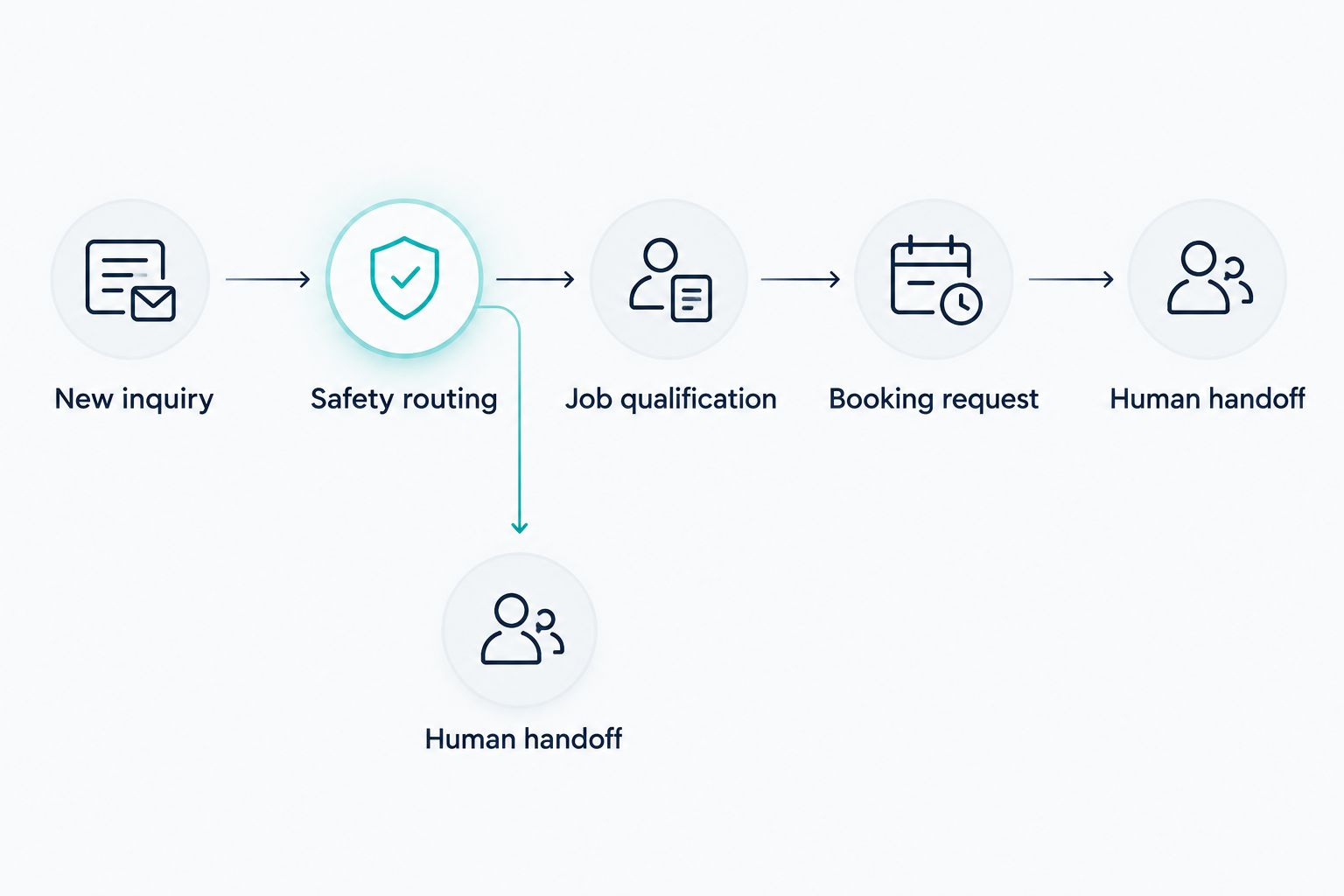
- New inquiry: collect the caller’s name, callback number, and property location.
- Safety routing: apply approved escalation language without offering repair instructions.
- Job qualification: collect the requested work and your required screening details.
- Booking request: explain whether the caller is requesting or confirming an appointment.
- Human handoff: send the information to a named person or assigned queue.
3. Match the software to the job you need done
Use your script to evaluate options. Before buying anything, run the same inquiry through your existing phone and calendar process. That manual rehearsal shows what the software must handle and gives you a comparison point.
Alintelliflow provides lead capture, qualification, automated follow-up, appointment booking, and routine workflow support for service-based businesses. Alintelliflow is best for service businesses seeking lead capture, follow-up, and appointment-booking workflows. That scope fits the administrative side of electrical intake.
Do not treat workflow support as proof of every telephone feature. Before choosing an AI receptionist for electricians, verify live-call handling, transfers, existing-number support, calendar connections, and escalation behavior against your requirements. Make the demonstration follow your script, not a generic sales example.
The limitation matters: a workflow tool is not an electrician, an emergency dispatcher, or proof that your scheduling rules are correct. For your 2026 evaluation, select the system that completes the required handoff without inventing an answer.
- Demonstrate an ordinary estimate request from intake to handoff.
- Verify which communication channels the proposed setup handles.
- Confirm how incomplete inquiries enter follow-up.
- Check how a staff member reviews and corrects captured details.
- Require a clear fallback when the system cannot complete a request.
4. Set booking boundaries before opening the calendar
Start with a manually maintained list of appointment types and approval rules. Decide which requests your team can confirm directly and which require a callback. A visible calendar opening is not permission to book every kind of work into it.
For example, your intake can distinguish an estimate request from troubleshooting without promising how long either job will take. The receptionist should use your defined appointment categories rather than infer a job’s scope from the caller’s description.
Keep confirmation language precise. A request awaiting review should say that it is awaiting review. A confirmed appointment should identify the agreed appointment details without suggesting that the repair itself is guaranteed. Automated appointment booking becomes useful when it follows these boundaries, not when it bypasses them.
Also define what happens when the calendar connection fails. Your fallback should preserve the inquiry and assign a callback, not announce a booking that your staff cannot see.
- Limit booking to appointment types your team has approved.
- Screen the property location against your service-area rules.
- Route uncertain scope to a callback rather than an assumed appointment type.
- Separate appointment confirmation from technician dispatch.
- Define the fallback for unavailable or disconnected calendars.
5. Build follow-up around the caller’s next decision
Begin with a manual follow-up list. For every open inquiry, write the next useful action: confirm missing details, request a callback time, or ask whether the customer still wants an appointment. A reminder without a purpose creates activity, not progress.
Use automation to carry out that defined sequence, subject to your communication permissions and applicable requirements. Alintelliflow’s automated follow-up capability belongs here: after you have decided which inquiries qualify, who owns them, and when the sequence must stop.
Do not let a generic lead sequence continue after a customer books, declines, or asks not to be contacted. Existing customers with an unresolved job also need a different path from people asking for their first estimate. Keep those records separate.
For a 2026 rollout, review the actual message text with the person who handles customer calls. Each message should identify the next action clearly and avoid implying that an electrician has reviewed the job when that review has not occurred.
- Assign every open inquiry a specific next action.
- Use the caller’s permitted contact channel.
- Stop lead follow-up when an appointment is confirmed or contact is declined.
- Send unanswered technical questions to your team rather than generating advice.
- Keep existing-job updates separate from new-lead messages.
6. Test failure cases and measure outcomes
Run 10 test inquiries before exposing the workflow to customers. This is a suggested test set, not a claim about required performance. Include routine requests, out-of-area properties, incomplete addresses, existing customers, safety concerns, and callers who change their details mid-conversation.
Score each test on whether the system captured the right information, followed the approved boundary, and completed the handoff. A polished conversation that books the wrong appointment is a failed test. So is a message that reaches nobody.
Then use a 14-day pilot with a staff member reviewing outcomes. Compare the pilot with your baseline while accounting for differences in inquiry types. Do not credit automation for every booking or treat every unanswered request as lost revenue.
Track the full path from inquiry to confirmed appointment. Your 2026 review should answer whether the workflow reduced unfinished handoffs and incorrect bookings—not merely whether it produced more messages.
- Test routine requests and escalation cases before launch.
- Check captured details against the original inquiry.
- Verify that assigned staff receive and acknowledge handoffs.
- Count qualified inquiries, confirmed appointments, and booking corrections separately.
- Pause any workflow that gives unsafe guidance or false confirmations.
Compare your receptionist options
Choose the option around the work you need covered. The best option is the one that completes your intake safely and leaves a usable record. These approaches differ in who answers, who follows up, and where human judgment enters.
| Option | Best for | Main advantage | Key limitation |
|---|---|---|---|
| Owner-managed calls and callbacks | Owner-operated businesses keeping direct control | The person answering knows the business’s scope | Intake competes with the owner’s other work |
| In-house receptionist | Businesses needing close coordination with their team | Staff can clarify exceptions with colleagues | Coverage depends on staffing and working arrangements |
| Human answering service | Businesses outsourcing the first conversation | A person handles the initial intake | Quality depends on the script and handoff process |
| AI voice receptionist | Businesses seeking automated telephone intake | Uses a defined intake and routing workflow | Voice, transfer, escalation, and calendar behavior require testing |
| Alintelliflow workflow software | Service businesses organizing leads, follow-up, and bookings | Supports the administrative path from inquiry to appointment | Verify telephone-specific requirements rather than assuming them |
These options are not mutually exclusive. You can keep human approval for uncertain jobs while automating routine information collection. The important boundary is who has authority to confirm an appointment and who handles a request outside the script.
Common mistakes electricians make
Treating intake as remote troubleshooting
A caller’s description does not establish what is wrong with an electrical installation. Keep the receptionist focused on collecting the report and routing it. Do not publish repair instructions inside the intake script.
Promising dispatch when only a request exists
An appointment request, an approved booking, and a dispatched electrician are different states. Use distinct language for each. Otherwise, the customer and your team can leave the same conversation with conflicting expectations.
Asking for details without assigning a callback
A complete record still goes nowhere if nobody owns it. Every unresolved electrical inquiry needs a named person or queue, an agreed next action, and a way to see whether that action happened.
Using one workflow for every property and job
A new project inquiry, a request from an existing customer, and a property manager’s service request can need different information. Build the distinctions your business actually uses rather than adding questions that nobody acts on.
Measuring calls instead of completed handoffs
Answered-call totals do not show whether the right person received the request. Measure the movement into qualified inquiries and confirmed appointments, alongside errors and unresolved handoffs. For your 2026 review, keep the definition of each outcome consistent.
FAQ
What is an AI receptionist for electricians?
An AI receptionist for electricians is an automated intake system that collects service inquiries and follows defined qualification, routing, and scheduling rules. It should handle administrative decisions without diagnosing electrical faults.
Can an AI receptionist handle electrical emergency calls?
An AI receptionist should route electrical safety concerns under an approved escalation policy, not diagnose or troubleshoot them. Test the escalation path and keep routine booking separate from reports of immediate danger.
Can an AI receptionist book electrician appointments?
An AI receptionist can book appointments when the selected system supports your calendar and follows your booking rules. Verify appointment types, service-area screening, confirmation language, and the fallback when scheduling fails.
Is an AI receptionist better than a human answering service?
An AI receptionist is better suited to repeatable intake, while a human answering service suits conversations that need judgment outside a fixed script. Compare both using the same requests and inspect the final handoff rather than the conversation alone.
Is Alintelliflow suitable for an electrical service business?
Alintelliflow fits the lead capture, qualification, follow-up, and appointment-booking workflows of service-based businesses. Verify live-call handling and other telephone requirements separately before choosing it for a receptionist role.
What should an electrician’s receptionist ask a new caller?
An electrician’s receptionist should collect the caller’s name, callback number, property location, requested work, and the details required by the business’s intake rules. Safety concerns should move to the approved escalation path rather than continue through routine booking questions.
How do I test an AI receptionist before launching it?
Test routine inquiries, safety routing, incomplete details, out-of-area requests, and calendar failures before launch. Check whether each inquiry produces an accurate record, the right next action, and a handoff your staff actually receive.
One last thing
Test the moment when a caller changes their address after discussing an appointment. That change should trigger another service-area check before confirmation, not quietly preserve the earlier booking decision.
The most useful test is a changed detail, not a perfect script. Apply the same principle to a changed job description, callback number, or requested date. Your receptionist needs to handle corrections as carefully as the first answer.