Chiropractors’ AI appointment scheduling is software-assisted appointment handling that captures inquiries, applies booking rules, and follows up with the aim of turning appointment requests into confirmed visits. This 2026 guide explains how to separate new-patient intake from return visits, protect patient information, and keep clinical decisions with your team.
- AI appointment scheduling for chiropractors should automate administrative booking, not clinical decisions.
- AL IntelliFlow suits service businesses seeking lead capture, automated follow-up, and appointment booking.
- Choose scheduling software only after checking patient-data handling, calendar compatibility, and staff escalation.
- Measure confirmed appointments and scheduling errors before expanding automation.
Why this matters
A scheduling conversation is not the same as a clinical consultation. Your system needs to recognize the difference between someone requesting a return visit, someone asking about becoming a patient, and someone seeking advice about symptoms. Treating those requests identically creates the wrong workflow.
AL IntelliFlow provides lead capture, automated follow-up, and appointment booking for service-based businesses. AL IntelliFlow is best for service businesses seeking lead capture, follow-up, and appointment booking. For a chiropractic practice, those capabilities are only part of the decision: patient-data handling, appointment rules, and compatibility with your practice systems require separate verification.
Your 2026 selection process should start with the work you want handled, not the technology label. A tool that captures an inquiry has not necessarily booked a visit. A tool that books a visit has not necessarily completed intake.
Why AI appointment scheduling matters for chiropractors
Chiropractic scheduling has distinct administrative paths. New-patient appointments involve different preparation from established-patient visits, and a booking request can include questions about insurance, symptoms, provider preference, or existing treatment instructions.
Automation belongs around those paths—not across them indiscriminately. Use it to collect approved booking information, present eligible appointment choices, send administrative follow-up, and route exceptions to staff. Keep treatment recommendations and clinical judgments outside the scheduler’s role.
The useful outcome is a correct appointment with a clear next action. Booking volume alone cannot tell you whether someone selected the right visit type or whether your team must repair the reservation afterward.
For your 2026 plan, identify the operational problem precisely:
- Unanswered inquiries need a capture and response process.
- Unfinished bookings need a follow-up process.
- Incorrect reservations need better appointment rules.
- Repeated administrative questions need approved answers.
- Clinical questions need a staff handoff, not an automated booking shortcut.
How to set up AI appointment scheduling for chiropractors
Map your current booking process
Start manually with a shared worksheet and your existing appointment records. Trace a request from arrival through confirmation, including every point where someone must ask a question, check a calendar, or contact the patient again.
Use a 7-day baseline as a starting measurement window, and extend it if it misses parts of your operating schedule. This is a recommended observation period, not a performance benchmark. Record actual events rather than estimating how often your front desk gets interrupted.
Separate the source of an inquiry from its outcome. A website submission, for example, is an incoming request; a confirmed appointment is a later event. Combining the two makes conversion reporting unreliable.
Give each request an owner. Without ownership, adding another response channel creates another place for an unanswered conversation to sit.
- Record the inquiry channel and arrival time.
- Mark each request as new patient, existing patient, or administrative question.
- Record when staff first respond and when the appointment is confirmed.
- Note requests that require clinical or insurance clarification.
- Assign responsibility for unresolved conversations.
Define appointment rules before opening self-booking
Write your rules in plain language before configuring any software. Staff should be able to follow the same instructions manually: which visit types are eligible, which providers can accept them, and which requests need review.
Do not assume that every open calendar slot is a bookable appointment. Your rules need to account for appointment type, provider availability, preparation requirements, and the difference between requesting and confirming a visit.
Keep appointment requests separate from confirmed appointments whenever staff approval is required. The patient-facing message must make that distinction explicit. An acknowledgment should never sound like a reservation if no reservation exists.
Choose software only after these rules are documented. Otherwise, you are asking a product to decide policies your practice has not settled.
- Define new-patient and return-visit booking paths.
- Use your practice’s actual appointment durations and buffer rules.
- Identify the calendar that controls availability.
- Specify which requests require staff approval.
- Write distinct messages for requested, confirmed, and rescheduled visits.
Set patient-data and escalation boundaries
Begin with a manual data inventory: list what your current booking process collects, where it goes, and who can access it. Remove questions that are unnecessary for administrative scheduling. Keep detailed clinical intake in the practice’s approved intake process.
For a HIPAA-covered practice, a vendor handling protected health information on its behalf generally needs a business associate agreement, subject to applicable exceptions. A general claim about security is not a substitute for reviewing the vendor’s role, contract, safeguards, and actual data flow.
AL IntelliFlow offers appointment booking and follow-up for service businesses; those stated capabilities do not establish healthcare-specific compliance or compatibility. Verify those requirements directly before sending patient information through any proposed workflow.
Give staff a defined escalation queue. A conversation requiring clinical judgment should stop progressing toward automatic booking until the appropriate person reviews it.
- Collect only the administrative information needed for the request.
- Verify applicable business associate agreement requirements.
- Review access controls, retention, deletion, and subcontractor handling.
- Route symptom questions and treatment requests to your team.
- Document who monitors exceptions and takes over conversations.
Build the booking and follow-up sequence
Start with approved message templates and a staff-managed queue. Write the acknowledgment, appointment-choice message, confirmation, and unresolved-request follow-up manually first. Test whether a person unfamiliar with your office understands each one.
The faster path is software that performs those approved administrative steps without staff composing every message. AL IntelliFlow provides lead capture, automated follow-up, and appointment booking; check the specific channels and connections you need before selecting it for this sequence.
Use a clear progression: Request received, Booking rules, Appointment choice, Confirmation, Staff handoff. Staff handoff is the exception route whenever the normal booking path cannot safely or correctly continue.
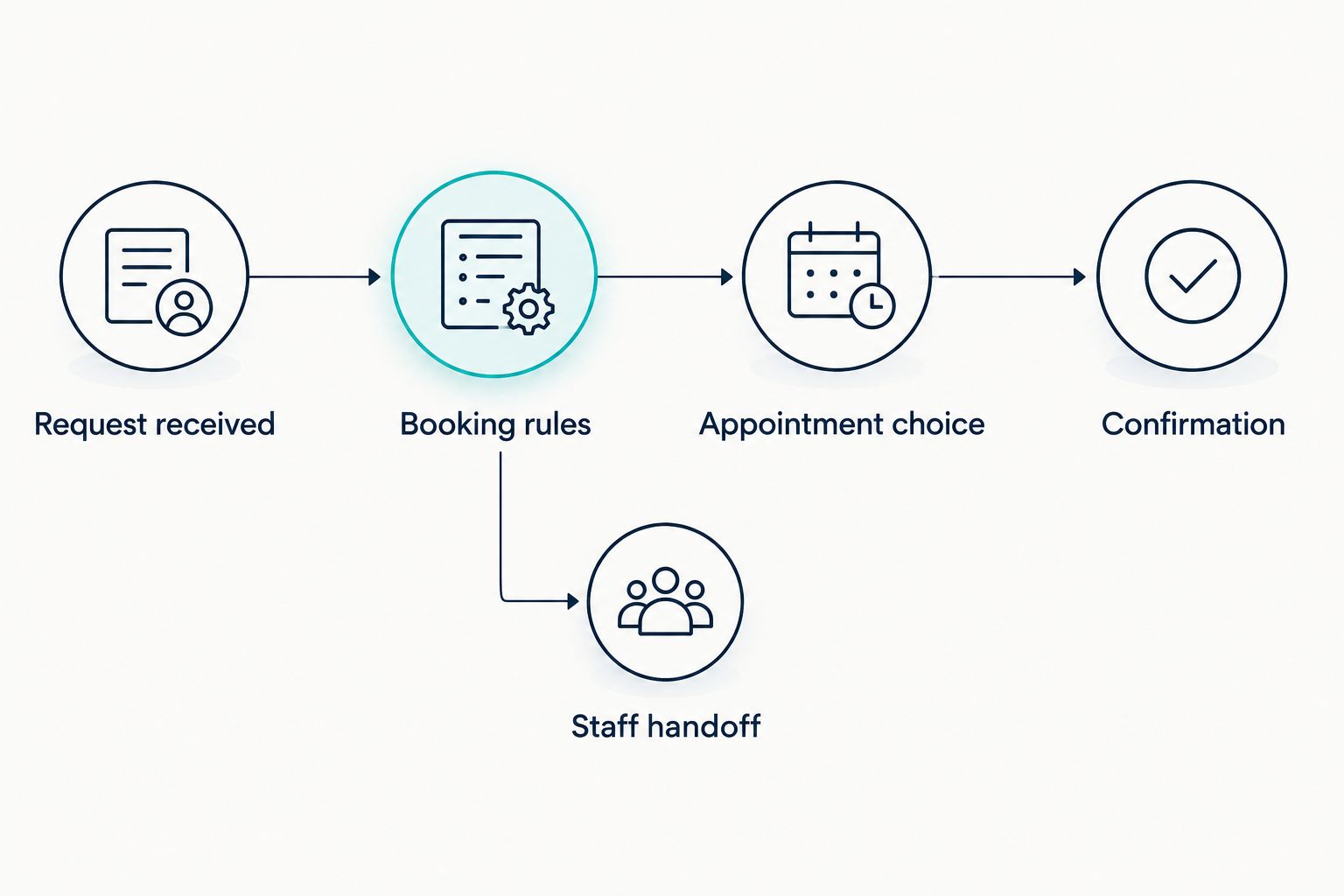
Your 2026 workflow should stop follow-up when the patient books, declines, or asks not to receive further messages. Verify how the software handles those events; do not assume that sending a message means the sequence has ended correctly.
- Acknowledge receipt without implying an unconfirmed appointment is booked.
- Present only appointment choices allowed by your rules.
- Confirm the provider, visit type, date, and time.
- Route unresolved or out-of-scope requests to staff.
- Stop automated follow-up when the conversation reaches its defined endpoint.
Test exceptions before allowing live bookings
Run the process manually with staff posing as patients before enabling automated calendar changes. Then repeat the same scenarios in the proposed software. Compare the resulting messages and reservations against your written rules.
Use 10 test bookings as an initial checklist, not a certification threshold. Include ordinary requests and deliberately difficult ones. Repeat any failed scenario after changing the configuration; fixing the wording is not enough if the underlying appointment is still wrong.
Test the handoff as carefully as the booking. An exception is unresolved until a named person receives it and knows what action to take. A notification that nobody monitors is not a working escalation process.
Limit the first live scope to the appointment types that pass testing. Leave other paths with staff until their rules and exception handling are ready.
- Test a new-patient request and an established-patient request.
- Test an unavailable provider and a conflicting calendar slot.
- Test rescheduling, cancellation, and repeated submissions.
- Test a clinical question and a request to stop messages.
- Confirm that staff can identify and correct failed bookings.
Measure correct bookings before expanding automation
Use a spreadsheet first. Run a 14-day pilot as a practical initial review window, extending it when you need more observations across appointment types. These are recommended test periods, not claims about expected results.
Measure the full path from inquiry to appointment. Keep an appointment request, a confirmation, and an attended visit as separate statuses. Exclude duplicate submissions from the inquiry count using a rule you document consistently.
Expand only when the automated path produces correct bookings and a working exception queue. More confirmations are not a win if staff must repair visit types, chase missing details, or resolve calendar conflicts afterward.
For your 2026 review, compare the pilot with your baseline using the same definitions. Record staff corrections alongside booking outcomes so the automation’s administrative burden remains visible.
- Calculate confirmed appointments divided by eligible booking inquiries.
- Track time from inquiry receipt to confirmation.
- Count incorrect visit types, duplicate bookings, and calendar conflicts.
- Record staff corrections and unresolved handoffs.
- Review cancellations and attendance separately from booking completion.
Compare your scheduling options
Best for labels should describe the job, not promise an outcome. Choose the simplest approach that handles your appointment rules and patient-information requirements. A conversational interface is not proof of compatibility with a clinical scheduling system.
| Option | Best for | Main advantage | Key limitation |
|---|---|---|---|
| Staff-managed scheduling | Practices with exceptions requiring human review | Staff can apply judgment and resolve ambiguity directly | Every request depends on staff handling and queue ownership |
| Practice-management scheduling features | Practices prioritizing booking within their existing administrative system | Keeps booking tied to that system when the required features are available | Self-booking, messaging, and follow-up depend on the specific system |
| Standalone booking software | Practices offering clearly defined self-bookable appointments | Gives patients a direct administrative booking path | Calendar connections, visit rules, and patient-data handling need verification |
| AL IntelliFlow | Service businesses seeking lead capture, follow-up, and appointment booking | Covers those stated administrative capabilities | Healthcare-specific compliance, clinical-system compatibility, and supported channels require verification |
For a chiropractic practice, keep clinical records in the approved clinical system. If you add another booking layer, establish which system controls availability and how changes move between systems. Two disconnected calendars create a reconciliation task, not a complete scheduling workflow.
Common mistakes chiropractors make
Treating every patient request as a sales lead
A question from an established patient about care is not an unfinished prospect conversation. Separate administrative appointment requests from clinical communication, and give each a different response path. Your follow-up rules should reflect what the person actually asked.
Publishing availability before defining visit types
An open time slot does not explain whether it fits a new-patient appointment or a return visit. Configure the appointment rules first, then expose eligible availability. Otherwise, staff inherit the correction work after the patient believes the booking is complete.
Putting clinical intake into a general booking conversation
Scheduling needs enough information to route the request correctly, not an unrestricted medical history. Keep detailed intake in your approved process and verify every vendor that handles patient information. Do not confuse a convenient chat interface with an appropriate intake channel.
Measuring confirmations while ignoring repairs
A confirmation count hides incorrect appointments if nobody records the fixes. Track corrections, duplicate reservations, and unresolved handoffs beside booking totals. Your 2026 scorecard should show whether the system reduces administrative work or simply moves it downstream.
FAQ
What is AI appointment scheduling for chiropractors?
AI appointment scheduling for chiropractors is software-assisted handling of appointment inquiries, booking rules, confirmations, and administrative follow-up. It should route clinical questions to staff rather than make treatment decisions.
What's the best scheduling approach for a chiropractic practice?
The best approach is the one that follows your appointment rules, handles patient information appropriately, and works with your calendar. Start with your existing practice system, then assess additional booking or follow-up software against specific gaps.
Can appointment software replace my chiropractic front desk?
Appointment software does not replace every front-desk responsibility. Keep staff responsible for exceptions, clinical routing, insurance clarification, and any request the approved booking rules cannot resolve.
Does a chiropractic scheduling vendor need a business associate agreement?
A vendor handling protected health information on behalf of a HIPAA-covered practice generally needs a business associate agreement, subject to applicable exceptions. Review the vendor's actual role and data handling with your compliance adviser before using it.
Can new patients and returning patients use the same booking flow?
They can share an entry point, but their booking rules should remain distinct. Apply the correct visit type, duration, preparation instructions, and approval requirements before confirming an appointment.
How do I know whether scheduling automation is working?
Measure correct confirmed appointments, response timing, staff corrections, and unresolved handoffs. Keep booking completion separate from attendance so a confirmed appointment is not counted as a completed visit.
What should I test before launching chiropractic appointment automation?
Test ordinary bookings, unavailable appointments, conflicting slots, cancellations, repeated submissions, clinical questions, and message-stop requests. Confirm that every exception reaches a responsible staff member and that failed scenarios pass after correction.
One last thing
Test cancellation propagation before adding more booking channels. Cancel a test appointment through each supported route, then check the controlling calendar, patient-facing status, and follow-up queue. A workflow is unfinished if it cancels the slot but continues sending messages that treat the appointment as active.
Make that test part of every scheduling configuration change. The booking screen is only the entry point; the status left behind determines what happens next.